# Anchorpoint Actions - Complete Code Reference
# This file contains all Python and YAML code from the ap-actions repository
# Generated for LLM context
================================================================================
================================================================================
FOLDER: batch_rename
================================================================================
--- batch_rename\batch_rename.py ---
```python
import anchorpoint as ap
import os
import apsync as aps
# Set the option that will be shown in the dropdown and map it to the number of digits
# 0 means variable, so no leading zeros
DIGIT_OPTIONS_MAP = {
1: ("1 Digit (1, 2, 3)", 1),
2: ("2 Digits (01, 02, 03)", 2),
3: ("3 Digits (001, 002, 003)", 3),
4: ("4 Digits (0001, 0002, 0003)", 4),
0: ("Variable (no leading zeros)", 0)
}
# The default base name that will be shown in the input field
DEFAULT_BASENAME = "File_"
# Limit the options that can be chosen based on the number of selected files. E.g. if you have 15 files selected, you cannot pick 1 digit
def get_digit_options(file_count):
options = []
if file_count <= 9:
options.append(DIGIT_OPTIONS_MAP[1])
if file_count <= 99:
options.append(DIGIT_OPTIONS_MAP[2])
if file_count <= 999:
options.append(DIGIT_OPTIONS_MAP[3])
if file_count <= 9999:
options.append(DIGIT_OPTIONS_MAP[4])
options.append(DIGIT_OPTIONS_MAP[0])
return options
# Generate a preview string based on the current settings
def get_preview_names(base_name, ext, count, digit_count, variable, selected_files):
preview = ""
for i in range(min(3, count)):
if variable:
num = str(i+1)
else:
num = str(i+1).zfill(digit_count)
preview += (f"{base_name}{num}{ext},")
return preview+"..."
# Update the preview text in the dialog when user changes input
def update_preview(dialog, value):
ctx = ap.get_context()
selected_files = ctx.selected_files
file_count = len(selected_files)
# Get extension from first file
first_ext = os.path.splitext(selected_files[0])[1]
base_name = dialog.get_value("base_name_var")
digits_label = dialog.get_value("digits_var")
# Map the selected label back to the digit value
digits = get_digits(digits_label)
variable = digits == 0
preview = get_preview_names(
base_name, first_ext, file_count, digits, variable, selected_files)
dialog.set_value("preview_var", preview)
# get the number of digits (int) based on that the user chose in the dropdown
def get_digits(digits_label):
for label, value in DIGIT_OPTIONS_MAP.values():
if label == digits_label:
return value
return 0
# prepare the rename options and start the async process
def init_rename(dialog):
ctx = ap.get_context()
selected_files = ctx.selected_files
base_name = dialog.get_value("base_name_var")
digits_label = dialog.get_value("digits_var")
digits = get_digits(digits_label)
variable = digits == 0
# Start the async rename process to not block the UI
ctx.run_async(rename, selected_files, variable, digits, base_name)
dialog.close()
def rename(files, variable, digits, base_name):
# Set the progress that will be displayed in the top right corner of the desktop application
progress = ap.Progress("Renaming Files", infinite=False)
progress.set_cancelable(True) # allow the user to cancel the progress
for file in files:
if progress.canceled: # Check if the user canceled the operation
break
idx = files.index(file)
# Report progress to the desktop application
progress.report_progress(idx / len(files))
ext = os.path.splitext(file)[1]
if variable: # no leading zeros because no digits have been picked in the dropdown
num = str(idx + 1)
else:
num = str(idx + 1).zfill(digits)
new_name = f"{base_name}{num}{ext}"
dir_path = os.path.dirname(file)
new_path = os.path.join(dir_path, new_name)
if file != new_path:
# Use Anchorpoint rename instead of Pythons native rename to keep Attributes
aps.rename_file(file, new_path)
pass
progress.finish()
ap.UI().show_success("Batch Rename", "Files have been renamed.")
def main():
# Get the current context from the desktop application
ctx = ap.get_context()
selected_files = ctx.selected_files
file_count = len(selected_files)
# Calculate the available digit options, that will be options ins the dropdown based on the number of selected files
digit_options = get_digit_options(file_count)
digit_labels = [opt[0] for opt in digit_options]
# Build the dialog with all it's interface building blocks
dlg = ap.Dialog()
dlg.title = "Batch Rename Files"
if ctx.icon:
dlg.icon = ctx.icon # take the icon from the YAML file
# add the input field for the base name and add the dropdown for the number of digits
dlg.add_input(placeholder="Base name",
default=DEFAULT_BASENAME, callback=update_preview, var="base_name_var").add_dropdown(digit_labels[0], digit_labels, var="digits_var",
callback=update_preview)
# add a static text
dlg.add_text("Preview")
# add a smaller info text field that will be updated with the preview content such as File_01.ext, File_02.ext, File_03.ext...
dlg.add_info("", var="preview_var")
# add the main button to start the rename process
dlg.add_button("Rename", callback=init_rename)
# set the preview based on the default values
update_preview(dlg, None)
dlg.show()
if __name__ == "__main__":
main()
```
--- batch_rename\batch_rename.yaml ---
```yaml
# Anchorpoint Markup Language
# Predefined Variables: e.g. ${path}
# Environment Variables: e.g. ${MY_VARIABLE}
# Full documentation: https://docs.anchorpoint.app/api/intro
version: 1.0
action:
name: Batch Rename
version: 1
id: ap::rename
category: user
type: python
author: Anchorpoint Software GmbH
description: Renames a set of selected files
icon:
path: :/icons/design-tools-photo-editing/pencil.svg
script: batch_rename.py
register:
file:
enable: true
```
--- batch_rename\batch_rename_package.yaml ---
```yaml
#Anchorpoint Markup Language
#Predefined Variables: e.g. ${path}
#Environment Variables: e.g. ${MY_VARIABLE}
#Full documentation: https://docs.anchorpoint.app/api/intro
version: "1.0"
action:
#Must Have Properties
name: Batch Rename
#Optional Properties
version: 1
id: ap::package::rename
category: user
type: package
enable: false
description: A simple batch rename tool, that can be customized to your needs
author: Anchorpoint Software GmbH
icon:
path: batch_rename.svg
actions:
- ap::rename
```
================================================================================
FOLDER: blender
================================================================================
--- README.md ---
# Blender Actions
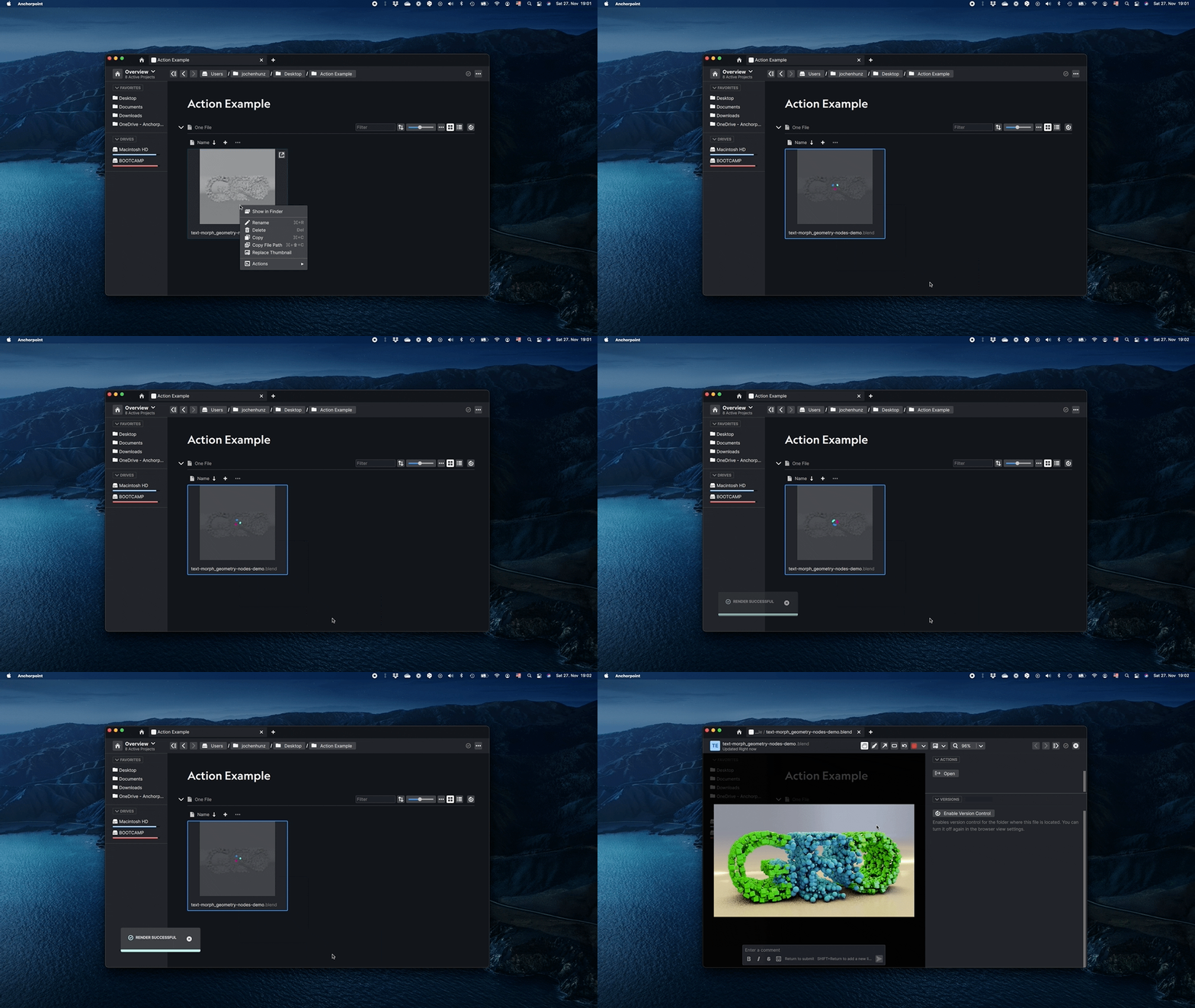
With the [blender](https://www.blender.org) action you can render a thumbnail for Anchorpoint using Eevee. Make sure to provide the correct path to your blender installation in the YAML file.
--- blender\blender_eevee_settings.py ---
```python
import bpy # pyright: ignore[reportMissingImports]
bpy.context.scene.render.resolution_x = 1280
bpy.context.scene.render.resolution_y = 720
bpy.context.scene.eevee.taa_render_samples = 1
```
--- blender\blender_thumbnail.py ---
```python
import anchorpoint as ap
import apsync as aps
import subprocess
import random
import string
import os
ui = ap.UI()
ctx = ap.get_context()
def create_random_text():
ran = "".join(random.choices(string.ascii_uppercase + string.digits, k=10))
return str(ran)
def render_blender(blender_path, selected_files, yaml_dir):
# Use a random output path within the Anchorpoint temporary directory
# so that we do not conflict with any other file
output = f"{ap.temp_dir()}/blender/{create_random_text()}"
# Show Progress
progress = ap.Progress(
"Blender Thumbnail",
"Rendering Images",
infinite=True,
cancelable=len(selected_files) > 1,
)
for file in selected_files:
if progress.canceled:
for file in ctx.selected_files:
ui.finish_busy(file)
return
subprocess.run(
[
blender_path,
"-b",
file,
"-E",
"BLENDER_EEVEE",
"-F",
"PNG",
"-P",
f"{yaml_dir}/blender_eevee_settings.py",
"-o",
f"{output}#",
"-f",
"0",
]
)
ui.replace_thumbnail(file, f"{output}0.png")
ui.show_success("Render Successful")
# First, check if the tool can be found on the machine
if "blender" in ctx.inputs:
blender_path = ctx.inputs["blender"]
if blender_path.lower().endswith("blender.app"):
blender_path = os.path.join(blender_path, "Contents/MacOS/Blender")
if ap.check_application(
blender_path, "Path to Blender is not correct, please try again", "blender"
):
# Tell the UI that these files are being processed
for file in ctx.selected_files:
ui.show_busy(file)
# Render the thumbnail
# We don't want to block the Anchorpoint UI, hence we run on a background thread
ctx.run_async(render_blender, blender_path, ctx.selected_files, ctx.yaml_dir)
else:
# Remove the path to blender from the action settings so that the user must provide it again
settings = aps.Settings()
if settings:
settings.remove("blender")
settings.store()
```
--- blender\blender_package.yaml ---
```yaml
#Anchorpoint Markup Language
#Predefined Variables: e.g. ${path}
#Environment Variables: e.g. ${MY_VARIABLE}
#Full documentation: https://docs.anchorpoint.app/api/intro
version: "1.0"
action:
#Must Have Properties
name: "Blender"
#Optional Properties
version: 1
id: "ap::package::blender"
category: "dcc/blender"
type: package
enable: false
description: Render a thumbnail for Anchorpoint using Eevee
author: "Anchorpoint Software GmbH"
icon:
path: "blender.svg"
actions:
- ap::blender::thumbnail
```
--- blender\blender_thumbnail.yaml ---
```yaml
#Anchorpoint Markup Language
#Predefined Variables: e.g. ${path}
#Environment Variables: e.g. ${MY_VARIABLE}
#Full documentation: https://docs.anchorpoint.app/api/intro
version: "1.0"
action:
#Must Have Properties
name: "Blender / Render Thumbnail"
#Optional Properties
version: 1
id: "ap::blender::thumbnail"
category: "dcc/blender/thumbnail"
enable: false
type: python
author: "Anchorpoint Software GmbH"
icon:
path: "blender.svg"
script: "blender_thumbnail.py"
inputs:
blender:
message: Path to Blender # The message that is displayed to the user
browse: file # Show a browse button so that the user can browse to the executable
store: user # Only ask once, store in user settings
dependencies:
- blender_eevee_settings.py
#Where to register this action
register:
file:
filter: "*.blend" #Wildcard matching
```
================================================================================
FOLDER: csv_import
================================================================================
--- csv_import\objects_from_csv.py ---
```python
"""
CHAT GPT PROMPT (Use it only for guidance. It will not create you a perfect working Action)
Create an action, that imports a CSV file and creates either a task list or a set of folders based on a dedicated column from the CSV file.
It should read all the columns in the CSV, list then out and the user can pick a dedicated Attribute in Anchorpoint, that will display the content of the column.
Include also an Option to either overwrite existing Attributes in Anchorpoint or ignore them.
The info whether to create folders or tasks, will come from the YAML file via the input parameter. You can read this input parameter in python via anchorpoint.get_context().inputs["INPUTNAME_IN_YAML"]
Anchorpoint has the following Attribute types: "Single Choice Tag", "Multiple Choice Tag", "Textfield", "Rating", "Link", "Members", "Date", "Checkbox"
The first thing the action should do, is to create a dialog, named "Task/Folder from CSV". There, add a input field, with a browse button where the user can browse to the csv file on the hard drive.
Remember the latest browse path, so if the user presses the browse button again, the browser dialog starts at the same folder where it was closed before.
After the user has added a csv file, create a new dialog, which will overwrite the first one. This dialog should also store the input settings.
In the new dialog, use the name of the csv file as the dialog name. Check all the columns in the csv, because you will need them for matching the folder/task name and the attributes.
Add a dropdown with a label "Match Names". In the dropdown, list all possible columns from the csv. Take the first one as a default.
Below that, add an info description named "Which column to display the task/folder name"
Then, add a set of dropdowns with labels, based on the columns in the csv file. Each label should be the exact same name like the column. In the attributes,
list all anchorpoint attributes and add a "No Attribute" entry on top. This should be also the default.
Below that, add a description named "Pick for which column an Attribute should be created. Leave it to
No Attribute if you want to skip it.")
Below that, add a checkbox, named "Overwrite existing Attribute Values".
Finally, add a button named "Create Tasks/Folders"
When the user presses the button, start an asynchronous process with a process indicator that creates the tasks/folders with the attributes.
For tasks, put them in a task list. This task list should have the same name as the csv file. If the task lists with this name exists, add all the tasks there, if not create a new one.
Folders and the task list should be created in the folder, where the action is executed. You can access the current folder path via anchorpoint.get_context().path
If the taskname/foldername does not exist, create a new task/folder. If the attributes of that task/folder already exist, check if the checkbox "Overwrite existing Attribute Values" is checked.
If it's enabled, overwrite the attribute value from the csv, if it's not enabled, skip the attribute.
Only create the attributes, that the user has chosen in the dialog.
Show a success message when the operation is complete.
"""
from typing import cast
import anchorpoint as ap
import apsync as aps
import csv
import os
import dateutil.parser
ctx = ap.get_context()
ui = ap.UI()
settings = aps.Settings()
api = ap.get_api()
csv_headers = []
object_type = ctx.inputs["type"]
# Define attribute types with beautified labels
ATTRIBUTE_TYPES = ["No Attribute", "Single Choice Tag", "Multiple Choice Tag",
"Textfield", "Rating", "Link", "Members", "Date", "Checkbox"]
def create_attribute(attribute_type, name):
attribute = api.attributes.get_attribute(name)
if attribute:
return attribute
if attribute_type == "Single Choice Tag":
attribute = api.attributes.create_attribute(
name, aps.AttributeType.single_choice_tag)
if attribute_type == "Multiple Choice Tag":
attribute = api.attributes.create_attribute(
name, aps.AttributeType.multiple_choice_tag)
if attribute_type == "Textfield":
attribute = api.attributes.create_attribute(
name, aps.AttributeType.text)
if attribute_type == "Rating":
attribute = api.attributes.create_attribute(
name, aps.AttributeType.rating)
if attribute_type == "Link":
attribute = api.attributes.create_attribute(
name, aps.AttributeType.hyperlink)
if attribute_type == "Members":
attribute = api.attributes.create_attribute(
name, aps.AttributeType.user)
if attribute_type == "Date":
attribute = api.attributes.create_attribute(
name, aps.AttributeType.date)
if attribute_type == "Checkbox":
attribute = api.attributes.create_attribute(
name, aps.AttributeType.checkbox)
return attribute
def get_csv_delimiter(csv_path):
try:
with open(csv_path, 'r', encoding='utf-8-sig') as csvfile:
first_line = csvfile.readline()
delimiter = ';' if ';' in first_line else ','
return delimiter
except UnicodeDecodeError:
# Try alternative encodings
try:
with open(csv_path, 'r', encoding='latin-1') as csvfile:
first_line = csvfile.readline()
delimiter = ';' if ';' in first_line else ','
return delimiter
except Exception:
ui.show_error("Encoding Error", "Cannot read the CSV file. Please save it with UTF-8 encoding and try again.")
return None
def remove_empty_entries(array):
return [entry for entry in array if entry]
def convert_attribute_value(attribute_type, value):
if attribute_type == "Date":
if (not value):
return ""
# Parsing the date string to a datetime object
date_obj = dateutil.parser.parse(value)
return date_obj
if attribute_type == "Members":
user = ""
if "[" in value and "]" in value:
user = value.replace("[", "").replace("]", "")
else:
user = value
if (not user):
return ""
if "@" not in user:
project = aps.get_project_by_id(ctx.project_id, ctx.workspace_id)
users = aps.get_users(ctx.workspace_id, project)
for u in users:
if u.name.strip() == user.strip():
return u.email
return ""
else:
return user
return value
def show_dialog():
last_csv_file = cast(str, settings.get("last_csv_file", ""))
dialog = ap.Dialog()
dialog.title = f"{object_type.capitalize()}s from CSV"
dialog.icon = ctx.icon
dialog.add_text("CSV File").add_input(browse=ap.BrowseType.File,
browse_path=os.path.dirname(last_csv_file), var="csv_path", callback=on_file_selected, placeholder="todos.csv")
dialog.show()
def on_file_selected(dialog, value):
dialog = ap.Dialog()
dialog.title = os.path.basename(value)
dialog.icon = ctx.icon
csv_path = value
if not csv_path or not os.path.isfile(csv_path) or not csv_path.lower().endswith('.csv'):
ui.show_error("Not a CSV File", "Please select a valid CSV file.")
return
if settings.get("last_csv_file", "") != csv_path:
settings.clear()
settings.set("last_csv_file", csv_path)
settings.store()
delimiter = get_csv_delimiter(csv_path)
if delimiter is None: # Handle encoding error
return
try:
with open(csv_path, newline='', encoding='utf-8-sig') as csvfile:
reader = csv.reader(csvfile, delimiter=delimiter)
csv_headers = next(reader)
csv_headers = remove_empty_entries(csv_headers)
except UnicodeDecodeError as e:
ui.show_error("Issue with the CSV file", "This file cannot be opened. Re-export it and open it again.")
return
dialog.add_text("Match Names")
dialog.add_dropdown(
csv_headers[0], csv_headers, var="object_name", width=160).add_text("⮕").add_text(f"{object_type.capitalize()} Name", width=224)
dialog.add_info(f"Which column should display the {object_type} name")
dialog.add_text("Match Attributes")
for header in csv_headers:
default_value = settings.get(f"{header}_dropdown", "No Attribute")
dialog.add_text(header, width=160).add_text("⮕").add_dropdown(
default_value, ATTRIBUTE_TYPES, var=f"{header}_dropdown", width=224)
dialog.add_info("Pick for which column an Attribute should be created. Leave it to
No Attribute if you want to skip it.")
dialog.add_checkbox(
text="Overwrite existing Attribute Values", var="overwrite")
dialog.add_info(f"Existing {object_type}s will be merged with new ones. If you override existing
Attributes, it will use the Attribute values from the csv file. Learn more")
dialog.add_button(f"Create {object_type.capitalize()}s", callback=lambda dialog: create_objects_async(dialog, csv_path),
var="create_objects_btn", enabled=True)
dialog.show(settings)
def create_objects_async(dialog, csv_path):
dialog.close()
ctx.run_async(create_objects, dialog, csv_path)
def create_objects(dialog, csv_path):
name_column = dialog.get_value("object_name")
if not csv_path or not os.path.isfile(csv_path):
ui.show_error("Invalid File", "Please select a valid CSV file.")
return
if not name_column:
ui.show_error("No Task Name", "Please select a task name column.")
return
if (object_type == "task"):
task_list_name = os.path.basename(csv_path)
block_id = ctx.block_id
if block_id:
task_list = api.tasks.get_task_list_by_id(ctx.block_id)
else:
task_list = api.tasks.get_task_list(ctx.path, task_list_name)
if not task_list:
task_list = api.tasks.create_task_list(
ctx.path, task_list_name)
progress = ap.Progress(
f"Creating {object_type.capitalize()}s", infinite=False)
progress.set_cancelable(True)
progress.report_progress(0.0)
created_object_count = 0
delimiter = get_csv_delimiter(csv_path)
with open(csv_path, newline='', encoding='utf-8-sig') as csvfile:
reader = csv.DictReader(csvfile,delimiter=delimiter)
rows = list(reader)
total_rows = len(rows)
for index, row in enumerate(rows):
if progress.canceled:
break
object_name = row[name_column]
if (object_type == "task"):
object_item = api.tasks.get_task(task_list, object_name)
if not object_item:
object_item = api.tasks.create_task(task_list, object_name)
if (object_type == "folder"):
object_item = os.path.join(ctx.path, str(object_name))
if not os.path.exists(object_item):
os.makedirs(object_item)
created_object_count += 1
for header in row.keys():
attribute_type = dialog.get_value(f"{header}_dropdown")
if attribute_type != "No Attribute":
if (row[header]):
attribute = api.attributes.get_attribute_value(
object_item, header)
if not attribute or dialog.get_value("overwrite"):
api.attributes.set_attribute_value(object_item, create_attribute(
attribute_type, header), convert_attribute_value(attribute_type, row[header]))
progress.report_progress((index + 1) / total_rows)
progress.finish()
ui.show_success(f"{object_type}s created",
f"{created_object_count} {object_type}s created using column '{name_column}'.")
def main():
show_dialog()
if __name__ == "__main__":
main()
```
--- csv_import\csv_package.yaml ---
```yaml
#Anchorpoint Markup Language
#Predefined Variables: e.g. ${path}
#Environment Variables: e.g. ${MY_VARIABLE}
#Full documentation: https://docs.anchorpoint.app/api/intro
version: "1.0"
action:
#Must Have Properties
name: "CSV Import"
#Optional Properties
version: 1
id: "ap::package::csv"
category: "csv"
type: package
enable: true
description: Creates folders or tasks from a CSV file including Attributes.
author: "Anchorpoint Software GmbH"
icon:
path: "csv_package.svg"
actions:
- ap::tasksfromcsv
- ap::folderfromcsv
```
--- csv_import\folder_from_csv.yaml ---
```yaml
# Anchorpoint Markup Language
# Predefined Variables: e.g. ${path}
# Environment Variables: e.g. ${MY_VARIABLE}
# Full documentation: https://docs.anchorpoint.app/Actions/Reference
version: 1.0
action:
name: Folder from CSV
version: 1
id: ap::folderfromcsv
category: csv
type: python
author: Anchorpoint Software GmbH
description: ""
icon:
path: addFolderCSV.svg
enable: true
inputs:
type: "folder"
script: objects_from_csv.py
register:
new_folder:
enable: true
```
--- csv_import\tasks_from_csv.yaml ---
```yaml
# Anchorpoint Markup Language
# Predefined Variables: e.g. ${path}
# Environment Variables: e.g. ${MY_VARIABLE}
# Full documentation: https://docs.anchorpoint.app/Actions/Reference
version: 1.0
action:
name: Tasks from CSV
version: 1
id: ap::tasksfromcsv
category: csv
type: python
author: Anchorpoint Software GmbH
description: ""
icon:
path: addCardCSV.svg
enable: true
inputs:
type: "task"
script: objects_from_csv.py
register:
new_task:
enable: true
```
================================================================================
FOLDER: dcc_pipeline_tools
================================================================================
--- README.md ---
# Publish from DCCs workflow
This action contains tools and scripts to streamline the workflow for creating and publishing new assets using DCCs like Cinema 4D. It's used for product visualization or asset creation workflows and allows to perform versioning on a shared drive such as a NAS, Dropbox or Google Drive.
## How it works
When enabling the Action in the Action Settings, it will:
- Add a new project type to the list
- Add the DCC integrations, so that users can install the Anchorpoint plugin to their DCC (e.g. Cinema 4D)
When creating a new project, the new project type has to be chosen. It can only be used if files are on a shared drive and is not compatible with Git. The project type, has also an option to use a folder template. The template has to be configured in the Action Settings.
### Templates
Folder structures from Templates can be created when the Anchorpoint project is created. Templates have to be placed on a folder, that is accessible for all team members. The file path to macOS and Windows have to be set in the Action Settings. Furthermore, tokens can be also specified. A token is a placeholder, that can replace a name on a file or folder.
For example, a file that is stored as `[customer]_model_v001.psd` can be automatically renamed to `ACME_model_v001.psd` if a token `customer` has been set in the Action Settings. Then, the user will get an input field where the actual name of the customer has to be entered.
### The publish process
Publishing means to mark a file as "ready" for the next step. In most cases publishes follow a review process by another team member. Publishing can be either done from a context menu entry, that will show a popup where the user can enter a message or via DCC plugins. Currently, publishing allows also to create a "master" file, which is basically a copy of the working file version without the increment appendix (v_001).
You can also trigger a webhook at the end of the publish process to e.g. connect to web based project management applications.
## Adjusting this workflow for your own pipeline
This workflow can be completely customized for your own needs. The recommended way is to copy and paste this code to a new Git repository, that you then import in Anchorpoint in the Action Settings. Before you start, make sure that you understand the [development of Actions](https://docs.anchorpoint.app/api/intro/) in Anchorpoint.
1. Create a new public Git repository on GitHub
2. Copy and paste the content from this folder to your new repository and push it to GitHub
3. In Anchorpoint, go to Workspace Settings / Actions and import your new created repository
4. Disable the default "DCC Pipeline Tools" Action that comes with Anchorpoint
5. Restart Anchorpoint
6. To use the DCC plugin (e.g. Cinema 4D) you have to go to Workspace Settings / Integrations to see where your plugin will be located as it's part of the code that you can modify. It's recommended to point (add a new plugin folder) Cinema 4D or other DCCs to the plugin rather than copying it to your plugins directory. This should be also done by every member in your team. Once you make plugin updates, they are automatically read by the DCC and don't need to be manually copied over again.
Then you can start developing.
## Action content and structure
Metadata (the version history) is stored using the shared_settings module. The timeline content is stored as a JSON representation. The publish class (publish.py) is adding new entries, while the inc_timeline class is reading and displaying these entries in the Anchorpoint timeline UI.
**publish_from_ui**
Allows to create a timeline entry by opening a dialog in the Anchorpoint context menu. This is a fallback if other DCC files are published than the ones that have plugins.
### inc_project
This folder contains the code to display the new project entry and the timeline entries in that project. The project settings and the timeline entries are only read if the timeline channel (a way to manage project types) is set to `inc-vc-basic`. The project settings entry are also only displayed it the project has that timeline channel, to prevent them displaying on Git projects.
**inc_project**
- Creates a new Anchorpoint project type
- Handles the folder structure from template creation part
**inc_timeline**
Creates timeline entries from the metadata database manages in settings
**project_settings**
Controls whether a master file should be created
### cinema_4d
Includes the display of the Cinema 4D integration in Anchorpoint and the plugin that connects to the Anchorpoint CLI to send commands.
**c4d_to_ap**
Converts the data from the plugin and triggers `publish.py` which creates a new timeline entry. The Cinema 4D plugin triggers the Anchorpoint CLI (ap.exe) with arguments. One of the argument is to pass the `c4d_to_ap.py` script with other arguments. This script can then use the Anchorpoint python modules to e.g. access the Anchorpoint metadata. This would not be possible to write in the Cinema 4D python plugin on it's own.
**cinema_4d_integration**
This covers only the display of the Cinema 4D plugin in the Workspace Settings / Integration section.
**plugin/Anchorpoint**
This folder is the actual Cinema 4D plugin that has to be added to Cinema 4D if you develop your own integration. When you are using the default Action, that comes with Anchorpoint, copy and paste the plugin folder to your Cinema 4D plugin directory. It will then always point to the Anchorpoint installation path, including the default Actions.
--- dcc_pipeline_tools\blender\blender_integration.py ---
```python
import anchorpoint as ap
import apsync as aps
import os
import subprocess
import platform
plugin_action_id = "open_plugin_directory"
# Hook, triggered by Anchorpoint
def on_load_integrations(integrations, ctx: ap.Context):
integration = Cinema4DIntegration(ctx)
integrations.add(integration)
class Cinema4DIntegration(ap.ApIntegration):
def __init__(self, ctx: ap.Context):
super().__init__()
self.ctx = ctx
self.name = "Blender"
self.description = "Publish incremental file versions from Blender and automate pipeline steps. Useful for product visualization and asset creation workflows. Requires Blender 4.5 or newer."
self.priority = 100
self.dashboard_icon = os.path.join(ctx.yaml_dir, "blender.svg")
self.preferences_icon = os.path.join(ctx.yaml_dir, "blender.svg")
plugin_folder = ap.IntegrationAction()
plugin_folder.name = "Open Plugin"
plugin_folder.enabled = True
plugin_folder.icon = aps.Icon(
os.path.join(os.path.dirname(ctx.yaml_dir), "folder_grey.svg")
)
plugin_folder.identifier = plugin_action_id
plugin_folder.tooltip = (
"Copy and paste the plugin to your Blender plugin directory"
)
self.add_preferences_action(plugin_folder)
def execute_preferences_action(self, action_id: str):
if action_id == plugin_action_id:
system = platform.system()
path = os.path.join(
self.ctx.app_dir,
"scripts",
"ap-actions",
"dcc_pipeline_tools",
"blender",
"plugin",
)
# fallback e.g. for macOS
if not os.path.exists(path):
path = os.path.join(self.ctx.yaml_dir, "plugin")
if system == "Windows":
# Open folder or select a file
if os.path.isfile(path):
subprocess.run(["explorer", "/select,", os.path.normpath(path)])
else:
subprocess.run(["explorer", os.path.normpath(path)])
elif system == "Darwin": # macOS
if os.path.isfile(path):
subprocess.run(["open", "-R", path])
else:
subprocess.run(["open", path])
else: # Linux, fallback
subprocess.run(["xdg-open", path])
```
--- dcc_pipeline_tools\blender\plugin\anchorpoint.py ---
```python
import glob
import threading
import platform
import json
import os
import subprocess
from bpy.props import StringProperty # pyright: ignore[reportMissingImports]
from bpy.types import Operator # pyright: ignore[reportMissingImports]
import bpy # pyright: ignore[reportMissingImports]
bl_info = {
"name": "Anchorpoint Integration",
"author": "Anchorpoint",
"version": (1, 0, 0),
"blender": (3, 0, 0),
"location": "View3D > Header > Anchorpoint Menu",
"description": "Anchorpoint integration for Blender - Publish versions and open Anchorpoint",
"category": "System",
}
# Global variables for UI message display
_pending_message = None
_pending_title = "Anchorpoint"
_message_type = 'INFO'
def show_message_delayed(message, title="Anchorpoint", icon='INFO'):
# Store message to be shown by timer callback
global _pending_message, _message_type, _pending_title
_pending_message = message
_pending_title = title
_message_type = icon
# Register timer to show message in main thread
bpy.app.timers.register(show_pending_message, first_interval=0.1)
def show_pending_message():
# Timer callback to show pending message
global _pending_message, _message_type, _pending_title
if _pending_message:
# Use the dialog operator with OK button
bpy.ops.anchorpoint.show_message('INVOKE_DEFAULT',
message=_pending_message,
dialog_title=_pending_title)
_pending_message = None
return None # Don't repeat timer
# Check if the file is in an Anchorpoint project
def is_in_anchorpoint_project(file_path: str) -> bool:
if not file_path:
return False
# Start at the folder containing the file (or the folder itself if it's a directory)
if os.path.isfile(file_path):
current_dir = os.path.dirname(os.path.abspath(file_path))
else:
current_dir = os.path.abspath(file_path)
while True:
# Look for any .approj file in this folder
if glob.glob(os.path.join(current_dir, "*.approj")):
return True
# Move one level up
parent_dir = os.path.dirname(current_dir)
# Stop if we've reached the root (no higher dir exists)
if parent_dir == current_dir:
break
current_dir = parent_dir
return False
def get_executable_path():
if platform.system() == "Windows":
cli_path = os.path.join(
os.getenv("APPDATA"), "Anchorpoint Software", "Anchorpoint", "app", "ap.exe"
) # pyright: ignore[reportCallIssue]
elif platform.system() == "Darwin": # macOS
cli_path = "/Applications/Anchorpoint.app/Contents/Frameworks/ap"
if os.path.exists(cli_path):
return cli_path
else:
raise FileNotFoundError("CLI Not Installed!")
def run_executable(msg, path):
def execute_command():
try:
executable_path = get_executable_path()
# Ensure all values are serializable (strings)
json_object = {
"msg": str(msg),
"doc-path": str(path)
}
payload = json.dumps(json_object, ensure_ascii=False)
# Try to get the script path if the plugin is relative to the Anchorpoint installation folder
script_path = os.path.join(os.path.dirname(os.path.dirname(os.path.dirname(
__file__))), "cmd_to_ap.py")
# Use the file path relative to the ap.exe if the other one does not exist
if not os.path.exists(script_path):
script_path = os.path.join(os.path.dirname(
executable_path), "scripts", "ap-actions", "dcc_pipeline_tools", "cmd_to_ap.py")
# Prepare the command
command = [
executable_path,
'--cwd', os.path.dirname(path),
'python',
'-s',
script_path,
'--args',
payload,
]
startupinfo = None
if platform.system() == "Windows":
startupinfo = subprocess.STARTUPINFO() # pyright: ignore[reportAttributeAccessIssue]
startupinfo.dwFlags |= subprocess.STARTF_USESHOWWINDOW # pyright: ignore[reportAttributeAccessIssue]
startupinfo.wShowWindow = subprocess.SW_HIDE # pyright: ignore[reportAttributeAccessIssue]
result = subprocess.run(
command, capture_output=True, text=True, check=True, startupinfo=startupinfo)
if result.stderr:
print(f"Anchorpoint Error: {result.stderr}")
show_message_delayed(
"An issue has occurred", "Anchorpoint Error", 'ERROR')
else:
output_msg = result.stdout.strip()
print(f"Anchorpoint Message: {output_msg}")
show_message_delayed(output_msg, "Anchorpoint Success", 'INFO')
except subprocess.CalledProcessError as e:
print(
f"Anchorpoint Error: An error occurred during execution: {e}")
show_message_delayed(
"An error occurred during execution", "Anchorpoint Error", 'ERROR')
except Exception as e:
print(f"Anchorpoint Error: Unexpected error: {str(e)}")
show_message_delayed(
f"Unexpected error: {str(e)}", "Anchorpoint Error", 'ERROR')
threading.Thread(target=execute_command).start()
class ANCHORPOINT_OT_show_message(Operator):
"""Show a message dialog"""
bl_idname = "anchorpoint.show_message"
bl_label = "File published"
message: StringProperty(
name="Message", description="Message to display", default=""
) # pyright: ignore[reportInvalidTypeForm]
dialog_title: StringProperty(
name="Dialog Title", description="Title for the dialog", default="Anchorpoint"
) # pyright: ignore[reportInvalidTypeForm]
def execute(self, context):
return {'FINISHED'}
def invoke(self, context, event):
# restore cursor to default
context.window.cursor_modal_restore()
# show success dialog
return context.window_manager.invoke_props_dialog(self, width=400)
def draw(self, context):
layout = self.layout
# Split message into lines for better display
lines = self.message.split('\n')
for line in lines:
if line.strip():
layout.label(text=line)
class ANCHORPOINT_OT_open_anchorpoint(Operator):
"""Open Anchorpoint application with the current file"""
bl_idname = "anchorpoint.open_anchorpoint"
bl_label = "Open Anchorpoint"
bl_description = "Opens Anchorpoint application"
def execute(self, context):
if not bpy.data.is_saved:
self.report(
{'ERROR'}, "Document must be saved before opening Anchorpoint.")
return {'CANCELLED'}
file_path = bpy.data.filepath
try:
if platform.system() == "Windows":
# Use the user's home directory for AppData
appdata = os.getenv('LOCALAPPDATA')
anchorpoint_exe = os.path.join(
appdata, "Anchorpoint", "anchorpoint.exe"
) # pyright: ignore[reportCallIssue]
if not os.path.exists(anchorpoint_exe):
self.report({'ERROR'}, "Anchorpoint executable not found!")
return {'CANCELLED'}
subprocess.Popen([anchorpoint_exe, file_path], shell=False)
elif platform.system() == "Darwin":
# On Mac, use the same directory as the CLI
anchorpoint_app = "/Applications/Anchorpoint.app/Contents/MacOS/Anchorpoint"
if not os.path.exists(anchorpoint_app):
self.report({'ERROR'}, "Anchorpoint app not found!")
return {'CANCELLED'}
subprocess.Popen([anchorpoint_app, file_path])
else:
self.report({'ERROR'}, "Unsupported OS")
return {'CANCELLED'}
except Exception as e:
self.report({'ERROR'}, f"Failed to open Anchorpoint: {e}")
return {'CANCELLED'}
return {'FINISHED'}
class ANCHORPOINT_OT_publish_version(Operator):
"""Publish current version to Anchorpoint"""
bl_idname = "anchorpoint.publish_version"
bl_label = "Publish"
bl_description = "Sets your current file as latest version"
comment: StringProperty(
name="Comment", description="Comment for this version", default=""
) # pyright: ignore[reportInvalidTypeForm]
def execute(self, context):
if not self.comment.strip():
self.report({'ERROR'}, "Please enter a comment")
return {'CANCELLED'}
if not bpy.data.is_saved:
self.report({'ERROR'}, "Document must be saved before publishing.")
return {'CANCELLED'}
file_path = bpy.data.filepath
if not is_in_anchorpoint_project(file_path):
self.report(
{'ERROR'}, "This file is not part of an Anchorpoint project")
return {'CANCELLED'}
# Set cursor to waiting/hourglass
context.window.cursor_modal_set('WAIT')
# Start the publish process
run_executable(self.comment, file_path)
return {'FINISHED'}
def invoke(self, context, event):
if not bpy.data.is_saved:
self.report({'ERROR'}, "You have to save your file first")
return {'CANCELLED'}
file_path = bpy.data.filepath
if not is_in_anchorpoint_project(os.path.dirname(file_path)):
self.report(
{'ERROR'}, "This file is not part of an Anchorpoint project")
return {'CANCELLED'}
return context.window_manager.invoke_props_dialog(self, width=400, confirm_text="Publish")
def draw(self, context):
layout = self.layout
layout.label(
text="Publishing will create a new version in Anchorpoint")
layout.prop(self, "comment", text="Comment")
class ANCHORPOINT_MT_menu(bpy.types.Menu):
"""Anchorpoint menu"""
bl_label = "Anchorpoint"
bl_idname = "ANCHORPOINT_MT_menu"
def draw(self, context):
layout = self.layout
layout.operator("anchorpoint.open_anchorpoint", icon='FILE_FOLDER')
layout.operator("anchorpoint.publish_version", icon='EXPORT')
def draw_anchorpoint_menu(self, context):
"""Draw Anchorpoint menu in the header"""
self.layout.menu("ANCHORPOINT_MT_menu")
classes = [
ANCHORPOINT_OT_show_message,
ANCHORPOINT_OT_open_anchorpoint,
ANCHORPOINT_OT_publish_version,
ANCHORPOINT_MT_menu,
]
def register():
for cls in classes:
bpy.utils.register_class(cls)
# Add menu to the header
bpy.types.TOPBAR_MT_editor_menus.append(draw_anchorpoint_menu)
def unregister():
# Remove menu from the header
bpy.types.TOPBAR_MT_editor_menus.remove(draw_anchorpoint_menu)
for cls in reversed(classes):
bpy.utils.unregister_class(cls)
if __name__ == "__main__":
register()
```
--- dcc_pipeline_tools\cinema_4d\cinema_4d_integration.py ---
```python
import anchorpoint as ap
import apsync as aps
import os
import subprocess
import platform
plugin_action_id = "open_plugin_directory"
# Hook, triggered by Anchorpoint
def load_integration(integrations, callback, ctx: ap.Context):
integration = Cinema4DIntegration(ctx)
integrations.add(integration)
callback(None)
def on_load_integrations_async(integrations, callback, ctx: ap.Context):
ctx.run_async(load_integration, integrations, callback, ctx)
class Cinema4DIntegration(ap.ApIntegration):
def __init__(self, ctx: ap.Context):
super().__init__()
self.ctx = ctx
self.name = "Cinema 4D"
self.description = "Publish incremental file versions from Cinema 4D and automate pipeline steps. Useful for product visualization and asset creation workflows."
self.priority = 100
self.dashboard_icon = os.path.join(ctx.yaml_dir, "cinema_4d.svg")
self.preferences_icon = os.path.join(ctx.yaml_dir, "cinema_4d.svg")
plugin_folder = ap.IntegrationAction()
plugin_folder.name = "Open Plugin"
plugin_folder.enabled = True
plugin_folder.icon = aps.Icon(
os.path.join(os.path.dirname(ctx.yaml_dir), "folder_grey.svg")
)
plugin_folder.identifier = plugin_action_id
plugin_folder.tooltip = (
"Copy and paste the plugin to your Cinema 4D plugin directory"
)
self.add_preferences_action(plugin_folder)
def execute_preferences_action(self, action_id: str):
if action_id == plugin_action_id:
system = platform.system()
path = os.path.join(
self.ctx.app_dir,
"scripts",
"ap-actions",
"dcc_pipeline_tools",
"cinema_4d",
"plugin",
)
# fallback e.g. for macOS
if not os.path.exists(path):
path = os.path.join(self.ctx.yaml_dir, "plugin")
if system == "Windows":
# Open folder or select a file
if os.path.isfile(path):
subprocess.run(["explorer", "/select,", os.path.normpath(path)])
else:
subprocess.run(["explorer", os.path.normpath(path)])
elif system == "Darwin": # macOS
if os.path.isfile(path):
subprocess.run(["open", "-R", path])
else:
subprocess.run(["open", path])
else: # Linux, fallback
subprocess.run(["xdg-open", path])
```
--- dcc_pipeline_tools\cmd_to_ap.py ---
```python
import sys
import json
import apsync as aps
import anchorpoint as ap
import publish
# Summary
# This script is called by the Anchorpoint plugin for Cinema 4D to publish a file.
# It takes a look at the file path and the message provided by the the cinema 4D plugin and initiates the publish process.
# This function is called form the C4D plugin
def main():
# add the parent directory to the sys.path to be able to import inc_publish_utils
arguments = sys.argv[1]
msg = ""
doc_path = ""
additional_file_objects = []
thumbnail_path = ""
# Parse the JSON string
try:
parsed_arguments = json.loads(arguments)
# Access and print the "msg" object
if "msg" in parsed_arguments:
msg = parsed_arguments["msg"]
if "doc-path" in parsed_arguments:
doc_path = parsed_arguments["doc-path"]
if "screenshot" in parsed_arguments:
thumbnail_path = parsed_arguments["screenshot"]
except json.JSONDecodeError:
raise Exception("Cannot decode JSON.")
# check if post processing needs to be done
ctx = ap.get_context()
project_settings = aps.SharedSettings(
ctx.project_id, ctx.workspace_id, "inc_settings"
)
data_object = {
"create_master": project_settings.get("create_master_file", True),
"attached_doc_thumbnail": thumbnail_path,
"additional_file_objects": additional_file_objects,
}
# Trigger the publish process
try:
publish_successful = publish.publish_file(
msg, doc_path, data_object=data_object)
# Print a success to stdout so the C4D plugin can read it
if publish_successful:
sys.__stdout__.write("The file has been published")
ap.log_success("DCC publish successful")
except Exception as e:
sys.__stdout__.write("An issue has occurred: " + str(e))
ap.log_error("DCC publish failed")
if __name__ == "__main__":
main()
```
--- dcc_pipeline_tools\dcc_action_settings.py ---
```python
import anchorpoint as ap
import apsync as aps
import os
# Summary
# These are settings for the action. They cover templates and the webhook that is triggered on the publish process
ctx = ap.get_context()
ui = ap.UI()
settings = aps.SharedSettings(ctx.workspace_id, "inc_workspace_settings")
# save the settings
def apply_callback(dialog, value):
template_dir_win = dialog.get_value("template_dir_win")
template_dir_mac = dialog.get_value("template_dir_mac")
tokens = dialog.get_value("tokens_var")
webhook_url = dialog.get_value("webhook_url")
# Check if the directories are valid or empty
if (template_dir_win and not os.path.isdir(template_dir_win)) or (
template_dir_mac and not os.path.isdir(template_dir_mac)
):
ui.show_error(
"One of the folders does not exist",
"Add an existing folder or leave it empty",
)
return # Exit the function if the paths are invalid
# Set and store the settings
settings.set("template_dir_win", template_dir_win)
settings.set("template_dir_mac", template_dir_mac)
settings.set("tokens", tokens)
settings.set("webhook_url", webhook_url)
settings.store()
def main():
# Create a dialog container
dialog = ap.Dialog()
dialog.title = "Template Settings"
template_dir_win = settings.get("template_dir")
template_dir_mac = settings.get("template_dir_mac")
tokens = settings.get("tokens", [])
webhook_url = settings.get("webhook_url", "")
dialog.add_text("Workspace Templates Location")
dialog.add_text("Windows", width=70).add_input(
template_dir_win,
browse=ap.BrowseType.Folder,
var="template_dir_win",
width=400,
placeholder="C:/Projects/Templates",
callback=apply_callback,
)
dialog.add_text("macOS", width=70).add_input(
template_dir_mac,
browse=ap.BrowseType.Folder,
var="template_dir_mac",
width=400,
placeholder="/Users/John/Templates",
callback=apply_callback,
)
dialog.add_info(
"Set a location that your team can access and that is the same for all Windows and macOS users"
)
dialog.add_text("Tokens", width=70).add_tag_input(
tokens,
placeholder="client, project_id",
width=400,
var="tokens_var",
callback=apply_callback,
)
dialog.add_info(
"Tokens are placeholders marked with square brackets e.g. [placeholder] on files and folders that
can be replaced with user input during the creation from a template."
)
dialog.add_text("Webhook")
dialog.add_text("Url", width=70).add_input(
webhook_url,
var="webhook_url",
width=400,
placeholder="https://yourdomain.com/webhook",
callback=apply_callback,
)
dialog.add_info(
"Optional: Set a webhook URL to trigger an automation when a new version is published"
)
# Present the dialog to the user
dialog.show(settings, store_settings_on_close=False)
main()
```
--- dcc_pipeline_tools\inc_project\inc_project.py ---
```python
import anchorpoint as ap
import apsync as aps
import platform
import os
import sys
def validate_path(dialog: ap.Dialog, value):
if not value or len(value) == 0:
return False, "Please add a folder for your project files"
if not os.path.exists(value):
return False, "Please add a real folder"
else:
return True, None
def get_workspace_template_dir():
ctx = ap.get_context()
settings = aps.SharedSettings(ctx.workspace_id, "inc_workspace_settings")
template_dir_win = settings.get("template_dir_win")
template_dir_mac = settings.get("template_dir_mac")
if platform.system() == "Darwin":
return template_dir_mac
else:
return template_dir_win
class IncProjectType(ap.ProjectType):
def __init__(self, path: str, remote: str, tags, ctx: ap.Context):
super().__init__()
self.context = ctx
self.path = path
self.icon = os.path.join(os.path.dirname(__file__), "dcc_project.svg")
self.pre_selected = True
self.dialog = ap.Dialog("CreateIncProjectDialog")
self.local_settings = aps.Settings("inc_local_settings")
self.shared_settings = aps.SharedSettings(
ctx.workspace_id, "inc_workspace_settings")
self.tokens = self.shared_settings.get("tokens", [])
template_empty = self.shared_settings.get(
"template_dir_win") == "" and self.shared_settings.get("template_dir_mac") == ""
self.dialog.add_input(
var="project_path",
browse_path=self.local_settings.get("prev_project_path", ""),
placeholder="Z:\\Projects\\ACME_Corp_AB434",
width=420,
browse=ap.BrowseType.Folder,
validate_callback=validate_path,
)
if not template_empty:
self.dialog.add_checkbox(False,
text="Use Folder Structure Template", var="use_template")
self.dialog.add_info(
"Populates a folder structure from a template. The selected project folder has to be empty
in this case.")
if self.tokens != []:
self.dialog.add_text("Tokens")
for token in self.tokens:
self.dialog.add_text(token, width=70).add_input(
var=f"{token}_token_var", width=200, placeholder="Enter something")
self.dialog.add_info(
"Tokens are used to manage additional project information and for naming conventions")
def get_dialog(self):
return self.dialog
def get_project_name_candidate(self):
return os.path.basename(self.dialog.get_value("project_path")) # pyright: ignore[reportCallIssue]
def get_project_path(self):
return self.dialog.get_value("project_path")
def project_created(self):
pass
def setup_project(self, project_id: str, progress):
# store project parent path for next time
project_path = self.dialog.get_value("project_path")
parent_path = os.path.dirname(project_path.rstrip("\\/")) # pyright: ignore[reportAttributeAccessIssue]
# If parent_path is empty or same as project_path, it's a root drive
if parent_path and parent_path != project_path:
self.local_settings.set("prev_project_path", parent_path)
else:
self.local_settings.set("prev_project_path", project_path)
self.local_settings.store()
# Make the project folder
project_path = self.get_project_path()
os.makedirs(project_path, exist_ok=True)
# Access the project settings for storing the tokens
project_settings = aps.SharedSettings(
project_id, self.context.workspace_id, "inc_settings")
# Copy from template and resolve token placeholders
project_name = aps.get_project_by_id(
project_id, self.context.workspace_id).name.replace(" ", "_")
variables = {"project_name": project_name}
# variable structure example: {"client_name": "some_client","country_code":"de"}
for token in self.tokens:
value = self.dialog.get_value(f"{token}_token_var").strip() # pyright: ignore[reportAttributeAccessIssue]
if value != "":
variables[token] = value
# Store the tokens so that they can be used later
project_settings.set("tokens", variables)
project_settings.store()
# Apply the template if the checkbox is checked
if self.dialog.get_value("use_template"):
template_dir = get_workspace_template_dir()
if not template_dir or not os.path.exists(template_dir):
ap.UI().show_error("Template directory is not set or does not exist.")
sys.exit(0)
progress.set_text("Creating from template...")
try:
aps.copy_from_template(template_dir, project_path, variables)
except Exception as e:
ap.UI().show_error("Error copying template", e)
return
self.project = aps.get_project_by_id(
project_id, self.context.workspace_id)
self.path = project_path
channel = aps.TimelineChannel()
channel.id = "inc-vc-basic"
channel.name = "Published incremental saves"
channel.features.commit_details = True
aps.add_timeline_channel(self.project, channel)
def on_show_create_project(project_types, integrations, path: str, remote: str, tags, ctx: ap.Context):
inc_project_type = IncProjectType(path, remote, tags, ctx)
inc_project_type.name = "Shared Folder with Publish Workflow"
inc_project_type.description = "Store files on a shared folder with incremental file versioning and publish versions to the timeline via DCC plugins."
inc_project_type.priority = 200
inc_project_type.pre_selected = True
project_types.add(inc_project_type)
```
--- dcc_pipeline_tools\inc_project\inc_timeline.py ---
```python
from dataclasses import dataclass
from datetime import datetime
from typing import Optional, cast
import anchorpoint as ap
import apsync as aps
import json
# A cache object so that we can re-use the history data
# without having to read it from shared settings every time
@dataclass
class IncCache:
history_data: Optional[list] = None
# Use the string version of the enum from c++
def get_vc_file_status_from_string(status_str: str):
mapping = {
"Unknown": ap.VCFileStatus.Unknown,
"New": ap.VCFileStatus.New,
"Deleted": ap.VCFileStatus.Deleted,
"Modified": ap.VCFileStatus.Modified,
"Renamed": ap.VCFileStatus.Renamed,
"Conflicted": ap.VCFileStatus.Conflicted,
}
return mapping.get(status_str, ap.VCFileStatus.Unknown)
# Retrieve the history from shared settings
def get_history_data(ctx):
# This is how the stored data is formatted
# [
# {
# "user_email": "m.niedoba@anchorpoint.app",
# "message": "Added splinter for review.",
# "time": "2025-08-21T11:20:00",
# "id": "e5f6g7h8",
# "type": "version",
# "files": [
# {"path": "C:/Users/USERNAME/Desktop/Projects/AB123/3_Scenes/1_Cinema4D/AB123_v001.c4d",
# "status": "Modified"}
# ]
# }
# ]
# Retrieve the history from shared settings
settings = aps.SharedSettings(ctx.project_id, ctx.workspace_id, "inc_settings")
# Get the array of strings and parse them as JSON objects
history_array = cast(list, settings.get("inc_versions", []))
history = []
for entry in history_array:
try:
history.append(json.loads(entry))
except:
pass
return history
# Map the history data to timeline entries
def get_history(ctx):
cache: IncCache = ap.get_cache("inc_cache" + ctx.project_id, default=IncCache()) # pyright: ignore[reportAssignmentType]
cache.history_data = get_history_data(ctx)
# Build the timeline entries from the JSON history that comes from get_history()
history = []
for history_item in cache.history_data:
entry = ap.TimelineChannelEntry()
entry.id = history_item["id"]
entry.time = int(datetime.fromisoformat(history_item["time"]).timestamp())
entry.message = history_item["message"]
entry.user_email = history_item["user_email"]
entry.has_details = True
if history_item["type"] == "cinema4d":
entry.icon = aps.Icon(
":/icons/organizations-and-products/c4d.svg", "#F3D582"
)
entry.tooltip = "Published from Cinema 4D"
elif history_item["type"] == "maya":
entry.icon = aps.Icon(
":/icons/organizations-and-products/maya.svg", "#F3D582"
)
entry.tooltip = "Published from Maya"
elif history_item["type"] == "blender":
entry.icon = aps.Icon(
":/icons/organizations-and-products/blender.svg", "#F3D582"
)
entry.tooltip = "Published from Blender"
else:
entry.icon = aps.Icon(":/icons/user-interface/information.svg", "#70717A")
entry.tooltip = "Created a new file"
history.append(entry)
return history
# Initial load of the entire timeline
def on_load_timeline_channel(channel_id: str, page_size: int, ctx):
if channel_id != "inc-vc-basic":
return None
info = ap.TimelineChannelInfo(ctx.project_id)
history = get_history(ctx)
has_more = False
changes = None
return info, changes, history, has_more
# Only load the timeline channel entries
def on_load_timeline_channel_entries(channel_id: str, page_size: int, page: int, ctx):
if channel_id != "inc-vc-basic":
return None, False
history = get_history(ctx)
return history, False
# Load the files when the user clicks on a timeline entry
def on_load_timeline_channel_entry_details(channel_id: str, entry_id: str, ctx):
if channel_id != "inc-vc-basic":
return None
history_data: Optional[list] = None
cache: Optional[IncCache] = ap.get_cache("inc_cache" + ctx.project_id, default=None) # pyright: ignore[reportAssignmentType]
if not cache:
history_data = get_history_data(ctx)
else:
history_data = cache.history_data
if not history_data:
return None
# Find the history item matching the entry_id
history_item = next((item for item in history_data if item["id"] == entry_id), None)
if not history_item:
return None
# List all the changed files. In most cases it should just be one file
changes = []
for file_obj in history_item["files"]:
change = ap.VCPendingChange()
change.path = file_obj["path"].replace("\\\\", "/")
change.status = get_vc_file_status_from_string(file_obj["status"])
changes.append(change)
details = ap.TimelineChannelEntryVCDetails()
details.changes = ap.VCChangeList(changes)
return details
# Only load channel info object
def on_load_timeline_channel_info(channel_id: str, ctx):
if channel_id != "inc-vc-basic":
return None
info = ap.TimelineChannelInfo(ctx.project_id)
return info
# listen to changes to refresh the timeline.
def on_settings_changed(workspace_id, project_id, settings_id, ctx):
if settings_id != "inc_settings" or project_id != ctx.project_id:
return
history = get_history(ctx)
ap.update_timeline_entries(
"inc-vc-basic",
ctx.project_id,
history,
has_more=False,
update=True,
)
```
--- dcc_pipeline_tools\inc_project\project_settings.py ---
```python
import anchorpoint as ap
import apsync as aps
# Register the Project Settings type, so that it can be accessed from the Project Settings in Anchorpoint
class IncProjectSettings(ap.AnchorpointSettings):
def __init__(self, ctx: ap.Context):
super().__init__()
if ctx.project_id is None or ctx.project_id == "":
raise Exception(
"Inc project settings can only be used inside a project"
)
self.project_id = ctx.project_id
self.workspace_id = ctx.workspace_id
self.shared_settings = aps.SharedSettings(
self.project_id, self.workspace_id, "inc_settings")
self.dialog = ap.Dialog()
# Display local settings for all users
self.dialog.add_text("Publishing Settings")
self.dialog.add_checkbox(
text="Create Master File per default",
var="create_master_file",
default=self.shared_settings.get("create_master_file", True),
callback=self.store_shared_settings
)
self.dialog.add_text("File Appendix").add_input(
placeholder="MyDocument_master.c4d",
var="master_file_appendix",
default=self.shared_settings.get("master_file_appendix", "master"),
width=344,
callback=self.store_shared_settings,
enabled=self.dialog.get_value("create_master_file")
)
self.dialog.add_info(
"Creates a copy of the latest incremental file version that can be referenced in other files")
# Show tokens if they have been created during project creation
tokens = self.shared_settings.get("tokens")
if tokens:
self.dialog.add_text("Project Tokens")
for name, value in tokens.items():
self.dialog.add_text(
name, width=100).add_text(value)
self.dialog.add_info(
"Tokens can replace [placeholders] in file names when creating from templates")
def get_dialog(self):
return self.dialog
# Store settings on interface value changes
def store_shared_settings(self, dialog, value):
create_master_file = dialog.get_value("create_master_file")
self.dialog.set_enabled("master_file_appendix", create_master_file)
self.shared_settings.set("create_master_file", create_master_file)
self.shared_settings.set("master_file_appendix",
dialog.get_value("master_file_appendix"))
self.shared_settings.store()
return
def on_show_project_preferences(settings_list, ctx: ap.Context):
project = aps.get_project_by_id(ctx.project_id, ctx.workspace_id)
if not project:
return
# Do not show the settings if it's not a inc versioning project, defined in inc_project.py
channel = aps.get_timeline_channel(project, "inc-vc-basic")
if not channel:
return
inc_project_settings = IncProjectSettings(ctx)
inc_project_settings.name = "Workflow"
inc_project_settings.priority = 90
inc_project_settings.icon = ":/icons/Misc/single Version.svg"
settings_list.add(inc_project_settings)
```
--- dcc_pipeline_tools\maya\maya_integration.py ---
```python
import anchorpoint as ap
import apsync as aps
import os
import subprocess
import platform
plugin_action_id = "open_plugin_directory"
# Hook, triggered by Anchorpoint
def load_integration(integrations, callback, ctx: ap.Context):
integration = MayaIntegration(ctx)
integrations.add(integration)
callback(None)
def on_load_integrations_async(integrations, callback, ctx: ap.Context):
ctx.run_async(load_integration, integrations, callback, ctx)
class MayaIntegration(ap.ApIntegration):
def __init__(self, ctx: ap.Context):
super().__init__()
self.ctx = ctx
self.name = "Maya"
self.description = "Publish incremental file versions from Maya and automate pipeline steps. Useful for product visualization and asset creation workflows."
self.priority = 100
self.dashboard_icon = os.path.join(ctx.yaml_dir, "maya.svg")
self.preferences_icon = os.path.join(ctx.yaml_dir, "maya.svg")
plugin_folder = ap.IntegrationAction()
plugin_folder.name = "Open Plugin"
plugin_folder.enabled = True
plugin_folder.icon = aps.Icon(
os.path.join(os.path.dirname(ctx.yaml_dir), "folder_grey.svg")
)
plugin_folder.identifier = plugin_action_id
plugin_folder.tooltip = (
"Copy and paste the plugin to your default Maya plugin directory"
)
self.add_preferences_action(plugin_folder)
def execute_preferences_action(self, action_id: str):
if action_id == plugin_action_id:
system = platform.system()
path = os.path.join(
self.ctx.app_dir,
"scripts",
"ap-actions",
"dcc_pipeline_tools",
"maya",
"plugin",
)
# fallback e.g. for macOS
if not os.path.exists(path):
path = os.path.join(self.ctx.yaml_dir, "plugin")
if system == "Windows":
# Open folder or select a file
if os.path.isfile(path):
subprocess.run(["explorer", "/select,", os.path.normpath(path)])
else:
subprocess.run(["explorer", os.path.normpath(path)])
elif system == "Darwin": # macOS
if os.path.isfile(path):
subprocess.run(["open", "-R", path])
else:
subprocess.run(["open", path])
else: # Linux, fallback
subprocess.run(["xdg-open", path])
```
--- dcc_pipeline_tools\maya\plugin\anchorpoint_plugin.py ---
```python
import maya.cmds as cmds # pyright: ignore[reportMissingImports]
import maya.api.OpenMaya as om # pyright: ignore[reportMissingImports]
import maya.utils # pyright: ignore[reportMissingImports]
import subprocess
import os
import json
import platform
import threading
import glob
import tempfile
def maya_useNewAPI():
pass
# Check if the file is in an Anchorpoint project
# Check if the file is in an Anchorpoint project
def is_in_anchorpoint_project(file_path: str) -> bool:
if not file_path:
return False
# Start at the folder containing the file (or the folder itself if it's a directory)
if os.path.isfile(file_path):
current_dir = os.path.dirname(os.path.abspath(file_path))
else:
current_dir = os.path.abspath(file_path)
while True:
# Look for any .approj file in this folder
if glob.glob(os.path.join(current_dir, "*.approj")):
return True
# Move one level up
parent_dir = os.path.dirname(current_dir)
# Stop if we've reached the root (no higher dir exists)
if parent_dir == current_dir:
break
current_dir = parent_dir
return False
def get_executable_path():
if platform.system() == "Windows":
cli_path = os.path.join(
os.getenv("APPDATA"), "Anchorpoint Software", "Anchorpoint", "app", "ap.exe"
) # pyright: ignore[reportCallIssue]
elif platform.system() == "Darwin": # macOS
cli_path = "/Applications/Anchorpoint.app/Contents/Frameworks/ap"
if os.path.exists(cli_path):
return cli_path
else:
raise FileNotFoundError("CLI Not Installed!")
def capture_viewport_screenshot():
try:
# Use the system temp directory
temp_dir = tempfile.gettempdir()
output_path = os.path.join(temp_dir, "ap_maya_screenshot.png")
# Get the active model panel (viewport)
panel = cmds.getPanel(withFocus=True)
if not panel or not cmds.getPanel(typeOf=panel) == "modelPanel":
# Fallback: first available modelPanel
model_panels = cmds.getPanel(type="modelPanel")
panel = model_panels[0] if model_panels else None
if not panel:
raise RuntimeError("No active model panel found for screenshot")
# Capture viewport as an image (png)
cmds.playblast(
completeFilename=output_path,
forceOverwrite=True,
format="image",
compression="png",
width=960,
height=540,
quality=100,
showOrnaments=False,
viewer=False,
frame=cmds.currentTime(q=True),
offScreen=True,
percent=100,
clearCache=True
)
return output_path
except Exception as e:
print(f"Failed to capture viewport screenshot: {e}")
return None
def run_executable(msg, path):
def execute_command():
try:
maya.utils.executeInMainThreadWithResult(
lambda: cmds.headsUpMessage("Talking to Anchorpoint")
)
executable_path = get_executable_path()
screenshot_path = maya.utils.executeInMainThreadWithResult(
lambda: capture_viewport_screenshot()
)
json_object = {
"msg": str(msg),
"doc-path": str(path),
"screenshot": str(screenshot_path)
}
payload = json.dumps(json_object, ensure_ascii=False)
plugin_path = cmds.pluginInfo(
"anchorpoint_plugin", q=True, path=True)
plugin_dir = os.path.dirname(plugin_path)
script_path = os.path.join(
os.path.dirname(os.path.dirname(plugin_dir)),
"cmd_to_ap.py"
)
if not os.path.exists(script_path):
script_path = os.path.join(
os.path.dirname(executable_path),
"scripts", "ap-actions", "dcc_pipeline_tools", "cmd_to_ap.py"
)
command = [
executable_path,
'--cwd', os.path.dirname(path),
'python',
'-s',
script_path,
'--args',
payload,
]
startupinfo = None
if platform.system() == "Windows":
startupinfo = subprocess.STARTUPINFO() # pyright: ignore[reportAttributeAccessIssue]
startupinfo.dwFlags |= subprocess.STARTF_USESHOWWINDOW # pyright: ignore[reportAttributeAccessIssue]
startupinfo.wShowWindow = subprocess.SW_HIDE # pyright: ignore[reportAttributeAccessIssue]
result = subprocess.run(
command,
capture_output=True,
text=True,
check=True,
startupinfo=startupinfo
)
if result.stderr:
print(result.stderr)
maya.utils.executeInMainThreadWithResult(
lambda: cmds.confirmDialog(
title="Error", message="An issue has occurred")
)
else:
maya.utils.executeInMainThreadWithResult(
lambda: cmds.confirmDialog(
title="Success", message=result.stdout)
)
except subprocess.CalledProcessError as e:
print(f"An error occurred: {e}")
finally:
maya.utils.executeInMainThreadWithResult(
lambda: cmds.headsUpMessage("")
)
threading.Thread(target=execute_command).start()
def _env_for_clean_qt():
env = os.environ.copy()
# Apply neutral High-DPI settings for the child Qt app
env["QT_ENABLE_HIGHDPI_SCALING"] = "1"
return env
def open_anchorpoint_with_file():
current_file = cmds.file(query=True, sceneName=True)
if not current_file:
cmds.confirmDialog(
title="Error",
message="Document must be saved before opening Anchorpoint."
)
return
try:
env = _env_for_clean_qt()
if platform.system() == "Windows":
appdata = os.getenv('LOCALAPPDATA')
anchorpoint_exe = os.path.join(appdata, "Anchorpoint", "anchorpoint.exe") # pyright: ignore[reportCallIssue]
if not os.path.exists(anchorpoint_exe):
cmds.confirmDialog(
title="Error", message="Anchorpoint executable not found!")
return
# Detach + no console to keep things clean and fully separate from Maya
creationflags = 0
try:
creationflags = (
subprocess.CREATE_NEW_PROCESS_GROUP # pyright: ignore[reportAttributeAccessIssue]
| subprocess.DETACHED_PROCESS # pyright: ignore[reportAttributeAccessIssue]
| subprocess.CREATE_NO_WINDOW # pyright: ignore[reportAttributeAccessIssue]
)
except AttributeError:
# On some Python builds these flags may not exist; it's fine to skip.
creationflags = 0
subprocess.Popen(
[anchorpoint_exe, current_file],
shell=False,
env=env,
creationflags=creationflags,
startupinfo=None # or a hidden STARTUPINFO if you prefer
)
elif platform.system() == "Darwin":
anchorpoint_app = "/Applications/Anchorpoint.app/Contents/MacOS/Anchorpoint"
if not os.path.exists(anchorpoint_app):
cmds.confirmDialog(
title="Error", message="Anchorpoint app not found!")
return
# Use the sanitized env (replaces your previous hard-coded QT_SCALE_FACTOR=1)
subprocess.Popen([anchorpoint_app, current_file], env=env)
else:
cmds.confirmDialog(title="Error", message="Unsupported OS")
except Exception as e:
cmds.confirmDialog(
title="Error", message=f"Failed to open Anchorpoint: {e}")
def show_publish_dialog():
current_file = cmds.file(query=True, sceneName=True)
if not current_file:
cmds.confirmDialog(
title="Error", message="Document must be saved before publishing.")
return
if not is_in_anchorpoint_project(current_file):
cmds.confirmDialog(
title="Error",
message="This file is not inside an Anchorpoint project."
)
return
result = cmds.promptDialog(
title="Publish Current Version",
message="Enter a comment for this version:",
button=["Publish", "Cancel"],
defaultButton="Publish",
cancelButton="Cancel",
dismissString="Cancel"
)
if result == "Publish":
user_message = cmds.promptDialog(query=True, text=True)
if not user_message.strip():
cmds.confirmDialog(title="Error", message="Please enter a comment")
return
run_executable(user_message, current_file)
def create_anchorpoint_menu():
menu_name = "Anchorpoint"
if cmds.menu(menu_name, exists=True):
cmds.deleteUI(menu_name)
cmds.menu(menu_name, label=menu_name, parent="MayaWindow")
cmds.menuItem(
label="Open in Anchorpoint",
command=lambda *args: open_anchorpoint_with_file()
)
cmds.menuItem(
label="Publish",
command=lambda *args: show_publish_dialog()
)
def initializePlugin(mobject):
plugin = om.MFnPlugin(
mobject,
"Anchorpoint Software GmbH", # vendor
"1.0.0", # version string
"Any" # API version
)
create_anchorpoint_menu()
def uninitializePlugin(mobject):
plugin = om.MFnPlugin(mobject)
menu_name = "Anchorpoint"
if cmds.menu(menu_name, exists=True):
cmds.deleteUI(menu_name)
```
--- dcc_pipeline_tools\publish.py ---
```python
from typing import cast
import apsync as aps
import uuid
from datetime import datetime
import os
import json
import anchorpoint as ap
from PIL import Image
def get_master_filename(path, appendix):
"""
Given a file path and an appendix, return the master filename by removing initials and increments.
Examples:
C4324-EN_Autum_Toolkit_mn_v002.c4d -> C4324-EN_Autum_Toolkit_master.c4d
bla_v001.c4d -> bla_master.c4d
bla.001.c4d -> bla_master.c4d
object_mn_0002.c4d -> object_mn_master.c4d
"""
filename = os.path.basename(path)
name, ext = os.path.splitext(filename)
new_name = name
sepparator = ""
# Case 1: filenames like bla_v001 or bla_mn_v002
if "_v" in name:
parts = name.split("_")
cleaned_parts = []
for part in parts:
if part.startswith("v") and part[1:].isdigit(): # v001, v23, etc.
break # stop here, remove this and everything after
cleaned_parts.append(part)
new_name = "_".join(cleaned_parts)
sepparator = "_"
# Case 2: filenames like bla.001 (only checks the LAST dot)
elif "." in name:
base, last = name.rsplit(".", 1) # split only once, from the right
if last.isdigit(): # last part is just numbers like 001
new_name = base
else:
new_name = name
sepparator = "."
# Case 3: filenames like object_mn_0002
elif "_" in name:
parts = name.split("_")
if parts[-1].isdigit(): # last part is just digits
parts = parts[:-1] # drop the number
new_name = "_".join(parts)
sepparator = "_"
master_name = f"{new_name}{sepparator}{appendix}{ext}"
return master_name
def scale_png_by_half(input_path):
"""
Scale a PNG image down by 2x and save it as '_low.png'
next to the original file.
"""
if not os.path.exists(input_path):
raise FileNotFoundError(f"File not found: {input_path}")
base, ext = os.path.splitext(input_path)
output_path = f"{base}_low.png"
with Image.open(input_path) as img:
new_size = (max(1, img.width // 2), max(1, img.height // 2))
resized = img.resize(new_size, Image.Resampling.LANCZOS)
resized.save(output_path, format="PNG")
return output_path
def publish_file(msg, path, data_object=None):
ctx = ap.get_context()
# load the existing history from shared settings
project_settings = aps.SharedSettings(
ctx.project_id, ctx.workspace_id, "inc_settings"
)
workspace_settings = aps.SharedSettings(
ctx.workspace_id, "inc_workspace_settings")
history_array = cast(list, project_settings.get("inc_versions", []))
# Check if we need to create a master file
create_master = isinstance(data_object, dict) and data_object.get(
"create_master", False
)
# Check if we need to attach a thumbnail
thumbnail = isinstance(data_object, dict) and data_object.get(
"attached_doc_thumbnail", False
)
low_res_thumbnail = ""
# Set the file status to Modified
file_status = "Modified"
# Create a random id
version_id = uuid.uuid4().hex[:8]
files = [{"path": path, "status": file_status}]
# Set the application type based on the file extension
type = ""
ext = os.path.splitext(path)[1].lower() # get file extension
match ext:
case ".c4d":
type = "cinema4d"
case ".mb" | ".ma":
type = "maya"
case ".blend":
type = "blender"
case _:
type = ""
# Build the json object that will be stored in the shared settings
json_object = {
"user_email": ctx.email,
"message": msg,
"time": str(datetime.now()),
"id": version_id,
"type": type,
"files": files,
}
# Add the new entry to the history and store it
json_object_str = json.dumps(json_object)
history_array.append(json_object_str)
project_settings.set("inc_versions", history_array)
project_settings.store()
# Attach a thumbnail to the increment
if thumbnail:
low_res_thumbnail = scale_png_by_half(thumbnail)
aps.attach_thumbnails(path, low_res_thumbnail, thumbnail)
if create_master:
# Set some attributes on the master file
database = ap.get_api()
appendix = project_settings.get("master_file_appendix", "master")
# Update the master file
master_filename = get_master_filename(path, appendix)
master_path = os.path.join(os.path.dirname(path), master_filename)
aps.copy_file(path, master_path, True)
# Attach a thumbnail to the master
if thumbnail:
aps.attach_thumbnails(master_path, low_res_thumbnail, thumbnail)
file_base_name = os.path.splitext(os.path.basename(path))[0]
# Set the source file name (the one with the increment)
database.attributes.set_attribute_value(
master_path, "Source File", file_base_name
)
# Mark it as a master with a tag for better visibility
tag = aps.AttributeTag("master", "yellow")
database.attributes.set_attribute_value(master_path, "Type", tag)
# Trigger webhook if set -> needs a fix
webhook_url = workspace_settings.get("webhook_url", "")
if webhook_url:
try:
import requests
project = aps.get_project(path)
payload = {
"project_name": project.name,
# an app link to the anchorpoint timeline
"project_app_link": f"https://anchorpoint.app/link?p=projects%2F{project.id}%2F%3FswTime%3D",
"user_email": ctx.email,
"message": msg,
"time": str(datetime.now()),
"id": version_id,
"type": "cinema4d",
"files": [
{"path": path, "status": file_status},
],
}
requests.post(webhook_url, json=payload)
except Exception as e:
raise Exception(f"Failed to send webhook: {e}")
return True
```
--- dcc_pipeline_tools\publish_from_ui.py ---
```python
import anchorpoint as ap
import apsync as aps
# Import the publish class, that is also triggered from the DCC plugins
import publish
# Summary
# This action is triggered from the right click context menu on a file.
# The purpose is to allow to publish files that don't have a plugin yet
ctx = ap.get_context()
project_id = ctx.project_id
workspace_id = ctx.workspace_id
shared_settings = aps.SharedSettings(project_id, workspace_id, "inc_settings")
create_master = shared_settings.get("create_master_file", False)
# send the data to the publish class that creates the timeline entry
def trigger_publish(msg, path, data_object):
progress = ap.Progress("Publishing File", "Please wait...")
ui = ap.UI()
try:
publish_successful = publish.publish_file(msg, path, data_object)
if publish_successful:
ap.log_success("DCC publish successful")
ui.show_success(
"Publish Successful",
"The file has been added to the timeline",
)
else:
ui.show_error(
"Cannot publish the file",
"Check the console for more information",
)
ap.log_error("DCC publish failed")
except Exception as e:
print(e)
ui.show_error("Cannot publish the file",
"Check the console for more informatio")
ap.log_error("DCC publish failed")
progress.finish()
# The function that is triggered when the user clicks on the button
def button_callback(dialog):
data_object = {"create_master": dialog.get_value("create_master")}
comment = dialog.get_value("comment")
# Run the publish process async because it could take a while
ctx.run_async(trigger_publish, comment, ctx.path, data_object)
dialog.close()
# Make the button only clickable when the textfield is not empty
def text_callback(dialog, value):
dialog.set_enabled("publish_button_var", value != "")
def main():
# Create the dialog
dialog = ap.Dialog()
dialog.title = "Publish to Timeline"
if ctx.icon:
dialog.icon = ctx.icon
dialog.add_input(
var="comment",
placeholder="Add a comment to this version",
width=400,
callback=text_callback,
)
dialog.add_info("Creates a timeline entry for this file")
dialog.add_checkbox(
create_master, text="Create Master File", var="create_master")
dialog.add_info(
"This will create a file without increments in the file name")
dialog.add_button(
"Publish", var="publish_button_var", callback=button_callback, enabled=False
)
dialog.show()
main()
```
--- dcc_pipeline_tools\blender\blender_integration.yaml ---
```yaml
# Anchorpoint Markup Language
# Predefined Variables: e.g. ${path}
# Environment Variables: e.g. ${MY_VARIABLE}
# Full documentation: https://docs.anchorpoint.app/api/intro
version: 1.0
action:
name: Blender Integration
version: 1
id: ap::integrations::blender
category: integrations
type: python
enable: true
author: Anchorpoint Software GmbH
description: Integration for Blender
script: blender_integration.py
```
--- dcc_pipeline_tools\cinema_4d\cinema_4d_integration.yaml ---
```yaml
# Anchorpoint Markup Language
# Predefined Variables: e.g. ${path}
# Environment Variables: e.g. ${MY_VARIABLE}
# Full documentation: https://docs.anchorpoint.app/api/intro
version: 1.0
action:
name: Cinema 4D Integration
version: 1
id: ap::integrations::cinema-4d
category: integrations
type: python
enable: true
author: Anchorpoint Software GmbH
description: Integration for Cinema 4D
script: cinema_4d_integration.py
```
--- dcc_pipeline_tools\dcc_package.yaml ---
```yaml
#Anchorpoint Markup Language
#Predefined Variables: e.g. ${path}
#Environment Variables: e.g. ${MY_VARIABLE}
#Full documentation: https://docs.anchorpoint.app/api/intro
version: "1.0"
action:
#Must Have Properties
name: DCC Pipeline Tools
#Optional Properties
version: 1
id: ap::package::dcc
category: vc
type: package
enable: false
description: Publish file versions based on incremental file versioning for digital content creation tools. Adds a new project type for shared folders and DCC integrations.
icon:
path: dccs.svg
settings: "dcc_action_settings.py"
author: "Anchorpoint Software GmbH"
actions:
- ap::inc::timeline
- ap::inc::project
- ap::inc::project-settings
- ap::inc::publish
- ap::integrations::cinema-4d
- ap::integrations::maya
```
--- dcc_pipeline_tools\inc_project\inc_project.yaml ---
```yaml
# Anchorpoint Markup Language
# Predefined Variables: e.g. ${path}
# Environment Variables: e.g. ${MY_VARIABLE}
# Full documentation: https://docs.anchorpoint.app/api/intro
version: 1.0
action:
name: Incremental Saves Project
version: 1
id: ap::inc::project
type: python
author: Anchorpoint Software GmbH
script: inc_project.py
```
--- dcc_pipeline_tools\inc_project\inc_timeline.yaml ---
```yaml
# Anchorpoint Markup Language
# Predefined Variables: e.g. ${path}
# Environment Variables: e.g. ${MY_VARIABLE}
# Full documentation: https://docs.anchorpoint.app/api/intro
version: 1.0
action:
name: Incremental Saves Timeline
version: 1
id: ap::inc::timeline
type: python
author: Anchorpoint Software GmbH
script: inc_timeline.py
```
--- dcc_pipeline_tools\inc_project\project_settings.yaml ---
```yaml
# Anchorpoint Markup Language
# Predefined Variables: e.g. ${path}
# Environment Variables: e.g. ${MY_VARIABLE}
# Full documentation: https://docs.anchorpoint.app/api/intro
version: 1.0
action:
name: Unreal
version: 1
id: ap::inc::project-settings
category: user
type: python
author: Anchorpoint Software GmbH
description: ""
script: project_settings.py
```
--- dcc_pipeline_tools\maya\maya_integration.yaml ---
```yaml
# Anchorpoint Markup Language
# Predefined Variables: e.g. ${path}
# Environment Variables: e.g. ${MY_VARIABLE}
# Full documentation: https://docs.anchorpoint.app/api/intro
version: 1.0
action:
name: Maya Integration
version: 1
id: ap::integrations::maya
category: integrations
type: python
enable: true
author: Anchorpoint Software GmbH
description: Integration for Autodesk Maya
script: maya_integration.py
```
--- dcc_pipeline_tools\publish_from_ui.yaml ---
```yaml
# Anchorpoint Markup Language
# Predefined Variables: e.g. ${path}
# Environment Variables: e.g. ${MY_VARIABLE}
# Full documentation: https://docs.anchorpoint.app/api/intro
version: 1.0
action:
name: Publish to Timeline
version: 1
id: ap::inc::publish
category: vc
type: python
enable: false
author: Anchorpoint Software GmbH
description: Publishes any file using a context menu
icon:
path: :/icons/Misc/single Version.svg
script: publish_from_ui.py
register:
file:
enable: true
```
================================================================================
FOLDER: drives
================================================================================
--- README.md ---
# Drive Actions
---
**NOTE**
These actions are only supported on Windows
---
## Map Folder as Drive
With this action you can map any given folder to a drive (e.g. X:). This is super useful when dealing with broken absolute paths of scene files.
Example:
A folder like **C:/Dropbox/Assets** can be mapped so that a file C:/Dropbox/Assets/car.c4d can be accessed as **X:/Assets/car.c4d**
## Unmap drive
Allows you to unmount a previously mounted drive
--- drives\map_drive.py ---
```python
import anchorpoint as ap
import platform
import subprocess
import os
ctx = ap.get_context()
ui = ap.UI()
drive_var = "drive"
def get_unused_drives():
import string
from ctypes import windll # pyright: ignore[reportAttributeAccessIssue]
drives = []
bitmask = windll.kernel32.GetLogicalDrives()
for letter in string.ascii_uppercase:
if not bitmask & 1:
drives.append(letter)
bitmask >>= 1
return drives
def create_bat_file(command, drive):
try:
app_data = os.getenv("APPDATA")
startup_path = f"{app_data}/Microsoft/Windows/Start Menu/Programs/Startup/ap_mount_{drive}.bat"
with open(startup_path, "w") as f:
f.write(command)
except Exception as e:
print(e)
def mount(dialog):
drive = dialog.get_value(drive_var)
subst = subprocess.run(["subst", f"{drive}:", f"{ctx.path}"])
if subst.returncode != 0:
print(subst.stderr)
ui.show_error("Failed to Mount!")
else:
print(subst.stdout)
create_bat_file("subst " + f'{drive}: "' + f'{ctx.path}"', drive)
ui.show_success("Mount Successful")
ui.reload_drives()
dialog.close()
def show_options():
drives = get_unused_drives()
if len(drives) == 0:
ui.show_error("No drives to mount", "Unmount another drive first")
return
dialog = ap.Dialog()
dialog.title = "Map Folder as Drive"
if ctx.icon:
dialog.icon = ctx.icon
dialog.add_text("Map to Drive:\t").add_dropdown(drives[-1], drives, var=drive_var)
dialog.add_button("Map", callback=mount)
dialog.show()
if platform.system() == "Darwin":
ui.show_error("Unsupported Action", "This action is only supported on Windows :-(")
else:
show_options()
```
--- drives\unmap_drive.py ---
```python
import anchorpoint as ap
import platform
import subprocess
import os
from os import path
ctx = ap.get_context()
ui = ap.UI()
drive_var = "drive"
def remove_bat_file(drive):
try:
app_data = os.getenv("APPDATA")
startup_path = f"{app_data}/Microsoft/Windows/Start Menu/Programs/Startup"
path_to_bat = path.join(startup_path, "ap_mount_" + drive[:-1] + ".bat")
if path.isfile(path_to_bat):
os.remove(path_to_bat)
except Exception as e:
print(e)
def get_used_drives():
subst = subprocess.run(["subst"], capture_output=True)
if subst.returncode == 0:
return subst.stdout.splitlines()
return []
def unmount(dialog):
drive = dialog.get_value(drive_var)
drive = drive[0:2]
subst = subprocess.run(["subst", f"{drive}", "/D"])
if subst.returncode != 0:
print(subst.stderr)
ui.show_error("Failed to Unmount!")
else:
print(subst.stdout)
remove_bat_file(drive)
ui.show_success("Unmount Successful")
ui.reload_drives()
dialog.close()
def show_options():
drives = get_used_drives()
if len(drives) == 0:
ui.show_info("No drives to unmount", "Mount another drive first")
return
dialog = ap.Dialog()
dialog.title = "Unmap Drive"
if ctx.icon:
dialog.icon = ctx.icon
dialog.add_text("Unmap Drive:\t").add_dropdown(drives[-1], drives, var=drive_var)
dialog.add_button("Unmap", callback=unmount)
dialog.show()
if platform.system() == "Darwin":
ui.show_error("Unsupported Action", "This action is only supported on Windows :-(")
else:
show_options()
```
--- drives\drive_package.yaml ---
```yaml
# Anchorpoint Markup Language
# Predefined Variables: e.g. ${path}
# Environment Variables: e.g. ${MY_VARIABLE}
# Full documentation: https://docs.anchorpoint.app/api/intro
version: 1.0
action:
name: Map Folder as Drive
version: 1
id: ap::package::drive
category: map
type: package
enable: true
author: Anchorpoint Software GmbH
description: Maps (mounts) a folder as an internal drive
icon:
path: "mapToDrive.svg"
platforms:
- win
actions:
- ap::mapasdrive
- ap::unmapdrive
```
--- drives\map_drive.yaml ---
```yaml
# Anchorpoint Markup Language
# Predefined Variables: e.g. ${path}
# Environment Variables: e.g. ${MY_VARIABLE}
# Full documentation: https://docs.anchorpoint.app/api/intro
version: 1.0
action:
name: Map as Drive
version: 1
id: ap::mapasdrive
category: map
type: python
enable: false
author: Anchorpoint Software GmbH
description: Maps (mounts) a folder to a drive
icon:
path: :/icons/hardDrive.svg
script: map_drive.py
register:
folder:
enable: true
```
--- drives\unmap_drive.yaml ---
```yaml
# Anchorpoint Markup Language
# Predefined Variables: e.g. ${path}
# Environment Variables: e.g. ${MY_VARIABLE}
# Full documentation: https://docs.anchorpoint.app/api/intro
version: 1.0
action:
name: Unmap Drive
version: 1
id: ap::unmapdrive
category: map
type: python
enable: false
author: Anchorpoint Software GmbH
description: Unmaps (unmounts) a drive
icon:
path: :/icons/hardDrive.svg
script: unmap_drive.py
register:
folder:
enable: true
```
================================================================================
FOLDER: examples
================================================================================
--- README.md ---
# Settings
This example action demonstrates how to:
* Store settings for your actions
* Assign names to your settings so that you can load them from another action
* Store settings that are valid per workspace or per project
--- examples\action input\action_input_example.py ---
```python
import anchorpoint as ap
ctx = ap.get_context()
ui = ap.UI()
# Access the YAML inputs through the context inputs dict
if "some_hardcoded_variable" in ctx.inputs:
print("some_hardcoded_variable: " + ctx.inputs["some_hardcoded_variable"])
if "ask_the_user_variable" in ctx.inputs:
print("ask_the_user_variable: " + ctx.inputs["ask_the_user_variable"])
if "ask_the_user_once_variable" in ctx.inputs:
print("ask_the_user_once_variable: " + ctx.inputs["ask_the_user_once_variable"])
ui.show_console()
```
--- examples\async\async_example.py ---
```python
import anchorpoint as ap
import time
ctx = ap.get_context()
def long_running_function(run_for_seconds):
# Update every 100ms just to see progress in the UI more frequent
update_interval = run_for_seconds * 10
# Once a progress object is created, Anchorpoint starts to show a running Task in the UI.
# The task disappears as soon as the progress object is destroyed or finish() is called manually.
# When setting infinite=True the progress indicator will just spin as long as it is active.
# When setting cancelable=True the user is able to cancel the action within the UI.
progress = ap.Progress(
"Async Example",
f"Running for {run_for_seconds} seconds...",
infinite=False,
cancelable=True,
)
# Simulate a heavy workload by sleeping
for i in range(update_interval):
time.sleep(0.1)
# Report the progress to Anchorpoint
progress.report_progress((i + 1) / (update_interval))
# You can update the progress text as well
# progress.set_text("What is the answer to life, the universe, and everthing?")
# React to cancellation
if progress.canceled:
return
# Run our long running function in a separate Thread by calling 'run_async'
# The syntax is run_async(function_name, parameter1, parameter2, ...)
ctx.run_async(long_running_function, 5)
```
--- examples\attributes\create_attributes.py ---
```python
import anchorpoint as ap
import apsync as aps
ctx = ap.get_context()
api = ap.get_api()
ui = ap.UI()
selected_files = ctx.selected_files
selected_folders = ctx.selected_folders
def create_attribute_example():
# This example shows how to access attributes and update the set of tags
attribute = api.attributes.get_attribute("Python Example")
if not attribute:
attribute = api.attributes.create_attribute(
"Python Example", aps.AttributeType.single_choice_tag
)
new_tag_name = f"Example Tag {len(attribute.tags) + 1}"
tags = attribute.tags
tags.append(aps.AttributeTag(new_tag_name, "blue"))
api.attributes.set_attribute_tags(attribute, tags)
return attribute
def create_attribute(object, example_attribute):
# We can either use the attribute that we have created before ...
latest_tag = example_attribute.tags[-1]
api.attributes.set_attribute_value(object, example_attribute, latest_tag)
print(api.attributes.get_attribute_value(object, example_attribute))
# ... or create / use attributes described by their title
api.attributes.set_attribute_value(object, "Message", "Hello from Python")
print(api.attributes.get_attribute_value(object, "Message"))
# To set a date, use datetime.dateime or a unix timestamp
from datetime import datetime
api.attributes.set_attribute_value(object, "Created At", datetime.now())
print(api.attributes.get_attribute_value(object, "Created At"))
attribute = create_attribute_example()
for f in selected_files:
create_attribute(f, attribute)
for f in selected_folders:
create_attribute(f, attribute)
aps.set_folder_icon(aps.Icon("qrc:/icons/multimedia/microphone (3).svg", "green")) # pyright: ignore[reportCallIssue]
ui.show_success("Attributes created")
```
--- examples\attributes\read_attributes.py ---
```python
import anchorpoint
ctx = anchorpoint.get_context()
api = anchorpoint.get_api()
ui = anchorpoint.UI()
# Get the current selection of files and folders
selected_files = ctx.selected_files
selected_folders = ctx.selected_folders
def read_attribute(path):
# Get all attributes in the project (everything what is under "Recent Attributes")
proj_attributes = api.attributes.get_attributes()
# Collect the output in a string
output = ""
# Get the Attribute field of the file/folder
for attribute in proj_attributes:
atttribute_value = api.attributes.get_attribute_value(path, attribute.name)
# If the Attribute field is not empty, add it to the output string. Add a linebreak at the end
if atttribute_value is not None:
output += attribute.name + ": " + str(atttribute_value) + "
"
# Show a toast in the UI
ui.show_info("Attributes", output)
for f in selected_files:
read_attribute(f)
for f in selected_folders:
read_attribute(f)
```
--- examples\project\print_members.py ---
```python
import apsync
import anchorpoint
ctx = anchorpoint.get_context()
# Optional
project = apsync.get_project_by_id(ctx.project_id, ctx.workspace_id)
users = apsync.get_users(ctx.workspace_id, project)
for u in users:
print(u.name)
print(u.email)
print(u.id)
print(u.picture_url)
anchorpoint.UI().show_console()
```
--- examples\project\project_example.py ---
```python
import anchorpoint as ap
import apsync as aps
import os
ctx = ap.get_context()
ui = ap.UI()
project_folder = os.path.join(ctx.path, "python_example_project")
# First, we check if the folder already exists
if os.path.exists(project_folder):
# Too bad, tell the user about the already existing folder
ui.show_error("Project Example Error", "The directory already exists.")
else:
# OK, let's create a new project at the current location. This will create a new folder and will convert it to an Anchorpoint project called "Python Example"
project = ctx.create_project(
os.path.join(ctx.path, "python_example_project"),
"Python Example",
ctx.workspace_id,
)
# Let's print the name of the project
print("The project name is: " + project.name) # pyright: ignore[reportAttributeAccessIssue]
# A project can store additional metadata that is not shown as attributes.
# This is useful for setting up technical information about a project such as a client name or the general aspect ratio
metadata = project.get_metadata() # pyright: ignore[reportAttributeAccessIssue]
# Metadata of a project is just a python dict[str,str]
metadata["Project_Name"] = "Anchorpoint"
metadata["Aspect_Ratio"] = "16:9"
# Update the projects metadata so that all actions can use them
# Note that only the creator of a project can update the metadata. Reading metadata is generally possible.
project.update_metadata(metadata) # pyright: ignore[reportAttributeAccessIssue]
# When working with an existing project, you can always look up the active project for any given path (file or folder)
other_project = aps.get_project(project_folder)
# Let's print the project metadata
print("The project metadata is: " + str(other_project.get_metadata()))
ui.show_success("Project Created")
```
--- examples\settings\settings_example.py ---
```python
import anchorpoint as ap
import apsync as aps
ctx = ap.get_context()
ui = ap.UI()
def set_settings(settings, setting_name, increment):
# Get a setting with a default value. Each Setting is identified by a name, here "my setting".
# The default parameter is optional. If a setting cannot be found and no default is provided, None is returned.
value = settings.get(setting_name, default=0)
# Do some changes
value = value + increment
# Update the settings object
settings.set(setting_name, value)
# You can remove a single setting with
# settings.remove(setting_name)
# You can also remove all settings with
# settings.clear()
# Finally, store the settings on disk
settings.store()
# Print the setting to the console
print(f'Setting "{setting_name}" has new value: {value}')
def action_settings():
# Create a Settings object for this python script
settings = aps.Settings(__file__)
set_settings(settings, "my action setting", 1)
def user_settings():
# Create a Settings object for the current user
settings = aps.Settings()
set_settings(settings, "my user setting", 2)
def named_settings():
# Create a Settings object with a name
settings = aps.Settings("my named settings")
set_settings(settings, "my named setting", 3)
def workspace_settings():
# Get the current project
project = aps.get_project(ctx.path)
if not project:
print("Skipped workspace settings example: No active Project")
return
# Create a Settings object and identify it with the current active workspace
settings = aps.Settings(identifier=project.workspace_id)
set_settings(settings, "my workspace setting", 4)
def project_settings():
# Get the current project
project = aps.get_project(ctx.path)
if not project:
print("Skipped project settings example: No active Project")
return
# Create a Settings object and identify it with the project id
settings = aps.Settings(identifier=project.id)
set_settings(settings, "my project setting", 5)
# Note: All settings demonstrated here are stored locally per user account.
# They are not shared through the cloud with your teammates
# When signing out from your account, another user will not overwrite your settings.
# Demonstrates how to store settings for this specific action script so that the settings are unique for *this* action
action_settings()
# Demonstrates how to store settings for the current user
user_settings()
# Demonstrates how to store settings with a name so that they can be written and read from any action
named_settings()
# Demonstrates how to store settings so that they are shared for all actions within a workspace (current user only)
workspace_settings()
# Demonstrates how to store settings so that they are shared for all actions within a project (current user only)
project_settings()
# Displays the action console in Anchorpoint
ui.show_console()
```
--- examples\sidebar\sidebar_example.py ---
```python
import anchorpoint as ap
ctx = ap.get_context()
ui = ap.UI()
ui.show_info("sidebar action clicked")
```
--- examples\tasks\create_task_set.py ---
```python
import anchorpoint as ap
if __name__ == "__main__":
ctx = ap.get_context()
api = ap.get_api()
# Get task block
task_block = api.tasks.get_task_list_by_id(ctx.block_id)
# And create a few new tasks
for i in range(5):
task = api.tasks.create_task(task_block, f"Python Task {i}")
ui = ap.UI()
ui.show_success("Tasks Created")
```
--- examples\tasks\create_tasks.py ---
```python
import anchorpoint as ap
import apsync as aps
ctx = ap.get_context()
api = ap.get_api()
# To quickly create a task (and a task list) call
task = api.tasks.create_task(ctx.path, "Todo List", "Create Rig")
# You can access a task list by name
tasklist = api.tasks.get_task_list(ctx.path, "Todo List")
# And get all tasks
all_tasks = api.tasks.get_tasks(tasklist)
for task in all_tasks:
print(f"Task: {task.name}")
# Set an icon for the task. To get the path of an icon right click the icon in the icon picker
api.tasks.set_task_icon(task, aps.Icon("qrc:/icons/multimedia/setting.svg", "blue"))
# Set a status on the task
api.attributes.set_attribute_value(task, "Status", aps.AttributeTag("Done", "green"))
ui = ap.UI()
ui.show_success("Tasks created")
```
--- examples\tasks\mark_tasks_done.py ---
```python
import anchorpoint as ap
import apsync as aps
if __name__ == "__main__":
ctx = ap.get_context()
api = ap.get_api()
# Iterate over all selected tasks
for task in ctx.selected_tasks:
# Retrieve a task by id
task = api.tasks.get_task_by_id(task.id)
# And update its status
api.attributes.set_attribute_value(
task, "Status", aps.AttributeTag("Done", "green")
)
ui = ap.UI()
ui.show_success("Tasks Updated")
```
--- examples\ui\complex_dialog.py ---
```python
# This example demonstrates how to create and control a more complex dialog in Anchorpoint
import anchorpoint as ap
import apsync as aps
import os
ctx = ap.get_context()
ui = ap.UI()
current_folder = ctx.path
# Dialog Entry Variables
# Use them to identify a dialog entry
# so that you can read the value of the dialog within a callback
folder_name_var = "name"
folder_count_var = "count"
folder_cap_var = "cap"
button_var = "button"
attr_wip_var = "wip"
attr_link_var = "link"
# Dialog Callbacks
# The changed challback is called whenever the item has changed (e.g. when the user types something in the text input)
# The first paramter is the dialog itself, the second parameter is the changed value
def cb_name_changed(dialog, value):
# Toggle the enable state on the button when the content of the name input field changes
enable = len(value) != 0
dialog.set_enabled(button_var, enable)
print(f"button enable: {enable}")
# The button pressed callback takes only one parameter: the dialog itself
def button_pressed(dialog):
# First, retrieve all the input fields from the dialog that we are interested in by using the variables declared above
folder_name = dialog.get_value(folder_name_var)
capitalize = dialog.get_value(folder_cap_var)
set_wip = dialog.get_value(attr_wip_var)
set_link = dialog.get_value(attr_link_var)
# The count field is a string, so we have to re-interpret it as a number
count = int(dialog.get_value(folder_count_var))
if capitalize:
# CAPITALIZE IT
folder_name = folder_name.upper()
create_folders(current_folder, folder_name, count, set_wip, set_link)
dialog.close()
ui.reload()
# This callback is called whenever the dialog is closed
def cb_closed(dialog):
print("dialog closed")
# Other Functions used to control the behavior of our action
# This functions creates attributes and sets values to the corresponding folder
def set_attributes(folder, set_wip, set_link):
if set_wip:
# Adds a new single choice tag attribute called "Status" and assigns a yellow tag called "WIP" to the folder
aps.set_attribute_tag(folder, "Status", "WIP", tag_color=aps.TagColor.yellow)
if set_link:
# Adds a new link attribute called "Link" and assigns the best homepage in the world to it
aps.set_attribute_link(folder, "Link", "https://www.anchorpoint.app")
# This function does the heavy lifting: It creates the "count" number of folders on the filesystem
def create_folders(folder, folder_name, count, set_wip, set_link):
# We are interacting with the file system which is a danger zone.
# Better play safe by using the try-except-else paradigm of python.
# By that we can capture exceptions and report them to the user.
try:
for i in range(count):
# Create all the fancy folders
prefix = str((i + 1) * 10)
current_folder = os.path.join(folder, f"{prefix}_{folder_name}")
os.mkdir(current_folder)
# And set the attributes, if asked for
set_attributes(current_folder, set_wip, set_link)
except Exception as e:
# Yikes, something went wrong! Tell the user about it
ui.show_error("Failed to create folders", description=str(e))
else:
ui.show_success("Folders created successfully")
# Defines and shows the complex dialog
def showDialog():
dialog = ap.Dialog()
dialog.title = "Create Folders"
# Set the icon hat is used by our dialog
if ctx.icon:
dialog.icon = ctx.icon
if ctx.icon_color:
dialog.icon_color = ctx.icon_color
dialog.callback_closed = cb_closed
dialog.add_text("Name:\t").add_input(
placeholder="provide a folder name",
var=folder_name_var,
callback=cb_name_changed,
)
dialog.add_text("Count:\t").add_input("2", var=folder_count_var)
dialog.add_separator()
dialog.start_section("Advanced", folded=True)
dialog.add_checkbox(var=folder_cap_var, text="Capitalize")
dialog.add_info("This will capitalize all folders")
dialog.add_empty()
dialog.start_section("Attributes", foldable=False)
dialog.add_checkbox(True, var=attr_wip_var, text="Set WIP")
dialog.add_checkbox(False, var=attr_link_var, text="Set Link")
dialog.add_info("Enable the checkboxes to set attributes on the folders")
dialog.end_section()
dialog.end_section()
dialog.add_button("Create", button_pressed, var=button_var, enabled=False)
dialog.show()
showDialog()
```
--- examples\ui\greetings.py ---
```python
# This example demonstrates how to create a simple dialog in Anchorpoint
import anchorpoint as ap
# Anchorpoint UI class allows us to show e.g. Toast messages in Anchorpoint
ui = ap.UI()
name_var = "name"
def button_clicked_cb(dialog):
name = dialog.get_value(name_var)
ui.show_info(f"Hello {name}")
# Create a dialog container
dialog = ap.Dialog()
# Set a nice title
dialog.title = "Greetings Dialog"
# Add an input dialog entry so the user can provide a name.
# Assign a variable to the input entry so that we can identify it later.
dialog.add_input("John Doe", var=name_var)
# Add a button to show the greetings, register a callback when the button is clicked.
dialog.add_button("Show Greetings", callback=button_clicked_cb)
# Present the dialog to the user
dialog.show()
```
--- examples\ui\notification.py ---
```python
# This example demonstrates how to show a system notification from Anchorpoint
import anchorpoint as ap
# Anchorpoint UI class allows us to show e.g. system notification from Anchorpoint
ui = ap.UI()
title_var = "title"
message_var = "message"
def notification_clicked_cb():
ui.show_info("Hello from Notification click")
def button_clicked_cb(dialog):
title = dialog.get_value(title_var)
message = dialog.get_value(message_var)
# Show a system notification with title, message and register a callback when the notification is clicked.
ui.show_system_notification(title, message, callback=notification_clicked_cb)
dialog.close()
# Create a dialog container
dialog = ap.Dialog()
# Set a nice title
dialog.title = "Notification Dialog"
# Add an input dialog entry so the user can provide a title for the notification.
# Assign a variable to the input entry so that we can identify it later.
dialog.add_text("Notification Title")
dialog.add_input("From Anchorpoint", var=title_var)
# Add an input dialog entry so the user can provide a message for the notification.
# Assign a variable to the input entry so that we can identify it later.
dialog.add_text("Notification Message")
dialog.add_input("Click me to open Anchorpoint", var=message_var)
# Add a button to show the greetings, register a callback when the button is clicked.
dialog.add_button("Show Notification", callback=button_clicked_cb)
# Present the dialog to the user
dialog.show()
```
--- examples\ui\pages_dialog.py ---
```python
# This example demonstrates how to create and control a more complex dialog in Anchorpoint that creates multiple pages
import anchorpoint as ap
import os
ctx = ap.get_context()
path = ctx.path
def create_file(dialog):
file_name = dialog.get_value("file_name")
content = dialog.get_value("content")
with open(os.path.join(path, file_name), "w") as f:
f.write(content)
dialog.close()
ap.UI().show_success(f"File {file_name} created")
# Defines and shows the pages dialog
def show_dialog():
dialog = ap.Dialog()
dialog.title = "Create Example File"
dialog.add_text("This dialog will create a new file in the current folder.")
dialog.add_text("Filename: ").add_input(placeholder="File Name", var="file_name")
dialog.add_button("Next", callback=lambda dialog: dialog.next_page())
dialog.start_page("content")
dialog.add_text("Content: ").add_input(placeholder="Content", var="content")
dialog.add_button(
"Back",
callback=lambda dialog: dialog.prev_page(), # pyright: ignore[reportAttributeAccessIssue]
primary=False,
).add_button("Create", callback=create_file)
dialog.show()
show_dialog()
```
--- examples\ui\progress_dialog.py ---
```python
# This example demonstrates how to show progress on a dialog in Anchorpoint
import anchorpoint as ap
def add_progress(d):
progress = d.get_value("progress") + 10
print(f"Current Progress: {progress}")
d.set_value("progress", progress)
d.set_value("progress", f"Showing progress: {progress}%")
d.set_enabled("-", True)
if progress == 100:
d.set_enabled("+", False)
def reduce_progress(d):
progress = d.get_value("progress") - 10
print(f"Current Progress: {progress}")
d.set_value("progress", progress)
d.set_enabled("+", True)
if progress == 0:
d.set_value("progress", "Showing an infinite progress indicator")
d.set_enabled("-", False)
else:
d.set_value("progress", f"Showing progress: {progress}%")
# Defines and shows the pages dialog
def show_dialog():
dialog = ap.Dialog()
dialog.title = "Show Progress"
dialog.add_button(
"(-) Remove Progress", var="-", callback=reduce_progress, enabled=False
).add_button("(+) Add Progress", var="+", callback=add_progress)
dialog.add_progress(
"Creating Awesome Experience...",
"Showing an infinite progress indicator",
var="progress",
)
dialog.show()
show_dialog()
```
--- examples\workspace\workspace_example.py ---
```python
import anchorpoint as ap
ctx = ap.get_context()
ui = ap.UI()
ui.show_info("workspace overview action clicked")
```
--- examples\action input\action_input_example.yaml ---
```yaml
# Anchorpoint Markup Language
# Predefined Variables: e.g. ${path}
# Environment Variables: e.g. ${MY_VARIABLE}
# Full documentation: https://docs.anchorpoint.app/api/intro
version: 1.0
action:
name: Action Input Example
version: 1
id: ap::examples::input
category: utility/code/examples/input
type: python
enable: false
author: Anchorpoint Software GmbH
description: An example action that demonstrates how to pass data to an action by asking the user for input
icon:
path: :/icons/bubble.svg
script: action_input_example.py
inputs: # Inputs can have arbitrary names
some_hardcoded_variable: This is a hardcoded string # This input value will never change
ask_the_user_variable: # Optionally, we can ask the user for input
message: What is your name? # The message that is displayed to the user
default: ${username}
ask_the_user_once_variable: # And another input variable, this time we store the user provided value in the action settings
message: What is your favorite app? # The message that is displayed to the user
browse: file # Show a browse button so that the user can choose something on the file system. Valid values are folder, file
store: action # Store the setting so that the user is only aksed once. If all inputs are stored, the user is not asked again. Valid valure are:
# User: The value is stored for the user account. This means this value is the same for all actions
# Action: The value is stored only for this action
# Project: The value is stored for the current project. If no project is selected, it's stored for the user.
register:
folder:
enable: true
```
--- examples\action input\run_command.yaml ---
```yaml
# Anchorpoint Markup Language
# Predefined Variables: e.g. ${path}
# Environment Variables: e.g. ${MY_VARIABLE}
# Full documentation: https://docs.anchorpoint.app/api/intro
version: 1.0
action:
name: Run Command Example
version: 1
id: ap::examples::inputcommand
category: utility/code/examples/input
type: command
enable: false
author: Anchorpoint Software GmbH
description: Demonstrates how to run a command that is provided by the user
icon:
path: :/icons/action.svg
command: ${command_to_run}
detach: true # Detach the command from Anchorpoint so that it becomes a standalone application
workingDirectory: ${path} # Set the working directory of the command explicity (default is current folder)
inputs:
command_to_run: # The command to run
message: Choose an application to run # The message that is displayed to the user
browse: file # Show a browse button so that the user can choose something on the file system.
store: action # Store the setting so that the user is only aksed once for this project.
custom_path: # A custom extension to the PATH environment
message: Append to PATH # The message that is displayed to the user
store: action # Store the setting so that the user is only aksed once for this project.
environment:
PATH: ${PATH};${custom_path}
register:
folder:
enable: true
```
--- examples\async\async_example.yaml ---
```yaml
# Anchorpoint Markup Language
# Predefined Variables: e.g. ${path}
# Environment Variables: e.g. ${MY_VARIABLE}
# Full documentation: https://docs.anchorpoint.app/api/intro
version: 1.0
action:
name: Async Example
version: 1
id: ap::examples::async
category: utility/code/examples/async
type: python
enable: false
author: Anchorpoint Software GmbH
description: Runs an async function thar reports progress to the user
icon:
path: :/icons/aplogo.svg
script: async_example.py
register:
folder:
enable: true
```
--- examples\attributes\create_attributes.yaml ---
```yaml
# Anchorpoint Markup Language
# Predefined Variables: e.g. ${path}
# Environment Variables: e.g. ${MY_VARIABLE}
# Full documentation: https://docs.anchorpoint.app/api/intro
version: 1.0
action:
name: Example / Create Attributes
version: 1
id: ap::examples::attributes
category: utility/code/examples/attributes
type: python
enable: false
author: Anchorpoint Software GmbH
description: Example action to demonstrate how to create all kinds of attributes
icon:
path: :/icons/action.svg
script: create_attributes.py
register:
file:
enable: true
folder:
enable: true
```
--- examples\attributes\read_attributes.yaml ---
```yaml
# Anchorpoint Markup Language
# Predefined Variables: e.g. ${path}
# Environment Variables: e.g. ${MY_VARIABLE}
# Full documentation: https://docs.anchorpoint.app/api/intro
version: 1.0
action:
name: Example / Read Attributes
version: 1
id: ap::examples::attributes::read
category: utility/code/examples/attributes
type: python
enable: false
author: Anchorpoint Software GmbH
description: Example action to demonstrate how to read all kinds of attributes
icon:
path: :/icons/action.svg
script: read_attributes.py
register:
file:
enable: true
folder:
enable: true
```
--- examples\environment\environment_example.yaml ---
```yaml
# Anchorpoint Markup Language
# Predefined Variables: e.g. ${path}
# Environment Variables: e.g. ${MY_VARIABLE}
# Full documentation: https://docs.anchorpoint.app/api/intro
version: 1.0
action:
name: Environment Example
version: 1
id: ap::examples::environment
category: utility/code/examples/environment
type: command
enable: false
author: Anchorpoint Software GmbH
description: Demonstrates how to set a custom environment when running a command action
icon:
path: :/icons/action.svg
command: cmd.exe # Will only work on windows, setting the environment as demonstrated works on all operating systems, however.
arguments: /c set MY_ENVIRONMENT
environment:
MY_ENVIRONMENT: my custom environment variable # A variable that only exists for this invocation
PATH: ${PATH};custom/path # You can append to existing enironment varialbes easily like this
register:
folder:
enable: true
```
--- examples\example_package.yaml ---
```yaml
# Anchorpoint Markup Language
# Predefined Variables: e.g. ${path}
# Environment Variables: e.g. ${MY_VARIABLE}
# Full documentation: https://docs.anchorpoint.app/api/intro
version: 1.0
action:
name: Coding Examples
version: 1
id: ap::package::examples
category: utility/code/examples
type: package
enable: false
author: Anchorpoint Software GmbH
description: A useful collection of Action examples that showcase how to write your own Actions
icon:
path: codingExamples.svg
actions:
- ap::examples::async
- ap::examples::attributes
- ap::examples::attributes::read
- ap::examples::tasks
- ap::examples::input
- ap::examples::inputcommand
- ap::examples::project
- ap::examples::complexdialog
- ap::examples::greetings
- ap::examples::notification
- ap::examples::qml::greetings
- ap::examples::widgets::greetings
- ap::examples::settings
- ap::examples::sidebar
- ap::examples::environment
- ap::examples::trigger::timer
- ap::examples::trigger::actionenabled
- ap::examples::trigger::attributeschanged
- ap::examples::workspace
- ap::examples::pagesdialog
- ap::examples::progressdialog
- ap::examples::marktasksdone
- ap::examples::setoftasks
- ap::examples::projectmembers
```
--- examples\project\print_members.yaml ---
```yaml
# Anchorpoint Markup Language
# Predefined Variables: e.g. ${path}
# Environment Variables: e.g. ${MY_VARIABLE}
# Full documentation: https://docs.anchorpoint.app/api/intro
version: 1.0
action:
name: Print Project Members
version: 1
id: ap::examples::projectmembers
category: utility/code/examples/project
type: python
enable: false
author: Anchorpoint Software GmbH
description: Prints the members of a project to the Console
icon:
path: :/icons/aplogo.svg
script: print_members.py
register:
folder:
enable: true
```
--- examples\project\project_example.yaml ---
```yaml
# Anchorpoint Markup Language
# Predefined Variables: e.g. ${path}
# Environment Variables: e.g. ${MY_VARIABLE}
# Full documentation: https://docs.anchorpoint.app/api/intro
version: 1.0
action:
name: Project Example
version: 1
id: ap::examples::project
category: utility/code/examples/project
type: python
enable: false
author: Anchorpoint Software GmbH
description: An action that demonstrates how to create a project and how to set additional metadata
icon:
path: :/icons/aplogo.svg
script: project_example.py
register:
folder:
enable: true
```
--- examples\settings\settings_example.yaml ---
```yaml
# Anchorpoint Markup Language
# Predefined Variables: e.g. ${path}
# Environment Variables: e.g. ${MY_VARIABLE}
# Full documentation: https://docs.anchorpoint.app/api/intro
version: 1.0
action:
name: Settings Example
version: 1
id: ap::examples::settings
category: utility/code/examples/settings
type: python
enable: false
author: Anchorpoint Software GmbH
description: An example action that demonstrates how to read and write action settings
icon:
path: :/icons/settings.svg
script: settings_example.py
register:
folder:
enable: true
```
--- examples\sidebar\sidebar_example.yaml ---
```yaml
# Anchorpoint Markup Language
# Predefined Variables: e.g. ${path}
# Environment Variables: e.g. ${MY_VARIABLE}
# Full documentation: https://docs.anchorpoint.app/api/intro
version: 1.0
action:
name: Sidebar Example
version: 1
id: ap::examples::sidebar
category: utility/code/examples/sidebar
type: python
enable: false
author: Anchorpoint Software GmbH
description: An example action that shows up as a button on the left sidebar
script: sidebar_example.py
register:
sidebar:
enable: true
```
--- examples\tasks\create_task_set.yaml ---
```yaml
# Anchorpoint Markup Language
# Predefined Variables: e.g. ${path}
# Environment Variables: e.g. ${MY_VARIABLE}
# Full documentation: https://docs.anchorpoint.app/api/intro
version: 1.0
action:
name: Example / Create Set of Tasks
version: 1
id: ap::examples::setoftasks
category: utility/code/examples/tasks
type: python
enable: false
author: Anchorpoint Software GmbH
description: Example action to demonstrate how to create tasks using the "New Task" button
icon:
path: :/icons/action.svg
script: create_task_set.py
register:
new_task:
enable: true
```
--- examples\tasks\create_tasks.yaml ---
```yaml
# Anchorpoint Markup Language
# Predefined Variables: e.g. ${path}
# Environment Variables: e.g. ${MY_VARIABLE}
# Full documentation: https://docs.anchorpoint.app/api/intro
version: 1.0
action:
name: Example / Create Tasks
version: 1
id: ap::examples::tasks
category: utility/code/examples/tasks
type: python
enable: false
author: Anchorpoint Software GmbH
description: Example action to demonstrate how to create tasks
icon:
path: :/icons/action.svg
script: create_tasks.py
register:
folder:
enable: true
```
--- examples\tasks\mark_tasks_done.yaml ---
```yaml
# Anchorpoint Markup Language
# Predefined Variables: e.g. ${path}
# Environment Variables: e.g. ${MY_VARIABLE}
# Full documentation: https://docs.anchorpoint.app/api/intro
version: 1.0
action:
name: Example / Mark Tasks Done
version: 1
id: ap::examples::marktasksdone
category: utility/code/examples/tasks
type: python
enable: false
author: Anchorpoint Software GmbH
description: Example action to demonstrate how register actions on the tasks context menu
icon:
path: :/icons/action.svg
script: mark_tasks_done.py
register:
task:
enable: true
```
--- examples\ui\complex_dialog.yaml ---
```yaml
#Anchorpoint Markup Language
#Predefined Variables: e.g. ${path}
#Environment Variables: e.g. ${MY_VARIABLE}
#Full documentation: https://docs.anchorpoint.app/api/intro
version: "1.0"
action:
#Must Have Properties
name: "UI / Complex Dialog"
#Optional Properties
version: 1
id: "ap::examples::complexdialog"
category: "utility/code/examples/dialog"
type: python
enable: false
author: "Anchorpoint Software GmbH"
description: "This is an advanced example action that demonstrates how to create and control a more complex dialog in anchorpoint"
icon:
path: ":icons/aplogo.svg"
color: "white"
script: "complex_dialog.py"
#Where to register this action: in all folders
register:
folder:
enable: true
```
--- examples\ui\greetings.yaml ---
```yaml
#Anchorpoint Markup Language
#Predefined Variables: e.g. ${path}
#Environment Variables: e.g. ${MY_VARIABLE}
#Full documentation: https://docs.anchorpoint.app/api/intro
version: "1.0"
action:
#Must Have Properties
name: "UI / Greetings Dialog"
#Optional Properties
version: 1
id: "ap::examples::greetings"
category: "utility/code/examples/dialog"
type: python
enable: false
author: "Anchorpoint Software GmbH"
description: "This is a basic example that shows how to create simple dialogs"
icon:
path: ":icons/aplogo.svg"
script: "greetings.py"
#Where to register this action: in all folders
register:
folder:
enable: true
```
--- examples\ui\notification.yaml ---
```yaml
#Anchorpoint Markup Language
#Predefined Variables: e.g. ${path}
#Environment Variables: e.g. ${MY_VARIABLE}
#Full documentation: https://docs.anchorpoint.app/api/intro
version: "1.0"
action:
#Must Have Properties
name: "UI / System Notification"
#Optional Properties
version: 1
id: "ap::examples::notification"
category: "utility/code/examples/notification"
type: python
enable: false
author: "Anchorpoint Software GmbH"
description: "This is a basic example that shows how to show a system notification"
icon:
path: ":icons/aplogo.svg"
script: "notification.py"
#Where to register this action: in all folders
register:
folder:
enable: true
```
--- examples\ui\pages_dialog.yaml ---
```yaml
#Anchorpoint Markup Language
#Predefined Variables: e.g. ${path}
#Environment Variables: e.g. ${MY_VARIABLE}
#Full documentation: https://docs.anchorpoint.app/api/intro
version: "1.0"
action:
#Must Have Properties
name: "UI / Pages Dialog"
#Optional Properties
version: 1
id: "ap::examples::pagesdialog"
category: "utility/code/examples/dialog"
type: python
enable: false
author: "Anchorpoint Software GmbH"
description: "This is an advanced example action that demonstrates how to create and control a more complex dialog in anchorpoint that uses pages"
icon:
path: ":icons/aplogo.svg"
color: "white"
script: "pages_dialog.py"
#Where to register this action: in all folders
register:
folder:
enable: true
```
--- examples\ui\progress_dialog.yaml ---
```yaml
#Anchorpoint Markup Language
#Predefined Variables: e.g. ${path}
#Environment Variables: e.g. ${MY_VARIABLE}
#Full documentation: https://docs.anchorpoint.app/api/intro
version: "1.0"
action:
#Must Have Properties
name: "UI / Progress Dialog"
#Optional Properties
version: 1
id: "ap::examples::progressdialog"
category: "utility/code/examples/dialog"
type: python
enable: false
author: "Anchorpoint Software GmbH"
description: "Shows how to create a progress dialog in Anchorpoint."
icon:
path: ":icons/aplogo.svg"
color: "white"
script: "progress_dialog.py"
#Where to register this action: in all folders
register:
folder:
enable: true
```
--- examples\workspace\workspace_example.yaml ---
```yaml
# Anchorpoint Markup Language
# Predefined Variables: e.g. ${path}
# Environment Variables: e.g. ${MY_VARIABLE}
# Full documentation: https://docs.anchorpoint.app/api/intro
version: 1.0
action:
name: Workspace Example
version: 1
id: ap::examples::workspace
category: utility/code/examples/workspace
type: python
enable: false
author: Anchorpoint Software GmbH
description: An example action that shows up as a button in the workspace / project overview
script: workspace_example.py
register:
workspace_overview:
enable: true
```
================================================================================
FOLDER: ffmpeg
================================================================================
--- ffmpeg\audio_video.py ---
```python
import platform
import anchorpoint as ap
import apsync as aps
import os
import ffmpeg_helper
import subprocess
ctx = ap.get_context()
ui = ap.UI()
input_path = ctx.path
input_folder = ctx.folder
input_filename = ctx.filename
input_suffix = ctx.suffix
def get_newpath():
input_filename_no_version = input_filename
version_string = ""
for c in reversed(input_filename_no_version):
if c.isnumeric():
version_string = c + version_string
else:
break
version = 1
number_of_version_digits = len(version_string)
if number_of_version_digits > 0:
input_filename_no_version = input_filename_no_version[
0:-number_of_version_digits
]
if input_filename_no_version.endswith("v"):
input_filename_no_version = input_filename_no_version[0:-1]
if input_filename_no_version.endswith("_"):
input_filename_no_version = input_filename_no_version[0:-1]
try:
version = int(version_string)
version = version + 1
except:
pass
else:
number_of_version_digits = 3
while True:
new_path = os.path.join(
input_folder,
f"{input_filename_no_version}_v{str(version).zfill(number_of_version_digits)}.{input_suffix}",
)
if not os.path.exists(new_path):
return new_path
else:
version = version + 1
def get_filename_text():
new_path = get_newpath()
new_filename = os.path.basename(new_path)
return f"This will create a new file: {new_filename}"
def update_dialog(dialog: ap.Dialog, value=None):
remove = dialog.get_value("remove")
dialog.hide_row("newaudiotext", remove)
dialog.hide_row("newaudioinfo", remove)
dialog.hide_row("longest", remove)
dialog.hide_row("longestinfo", remove)
dialog.set_value("filename", get_filename_text())
def run_ffmpeg(arguments, remove_audio):
ui.show_busy(input_path)
platform_args = {}
if platform.system() == "Windows":
from subprocess import CREATE_NO_WINDOW # pyright: ignore[reportAttributeAccessIssue]
platform_args = {"creationflags": CREATE_NO_WINDOW}
try:
subprocess.check_call(arguments, **platform_args)
if remove_audio:
ui.show_success("Audio Removed")
else:
ui.show_success("Audio Changed")
except Exception:
if remove_audio:
ui.show_error("Could not remove audio")
else:
ui.show_error(
"Could not change audio",
"Make sure you have selected a valid audio file",
)
finally:
ui.finish_busy(input_path)
def convert(dialog: ap.Dialog):
remove_audio = dialog.get_value("remove")
longest = dialog.get_value("longest")
audio = dialog.get_value("newaudioinput")
ffmpeg_path = ffmpeg_helper.get_ffmpeg_fullpath()
new_path = get_newpath()
if remove_audio:
arguments = [
ffmpeg_path,
"-i",
input_path,
"-c",
"copy",
"-map",
"0:v:0",
new_path,
]
else:
arguments = [
ffmpeg_path,
"-i",
input_path,
"-i",
audio,
"-map",
"0:v:0",
"-map",
"1:a:0",
]
if input_suffix == "mp4":
arguments.append("-c:v")
arguments.append("copy")
arguments.append("-c:a")
arguments.append("aac")
else:
arguments.append("-c")
arguments.append("copy")
if not longest:
arguments.append("-shortest")
arguments.append(new_path)
dialog.close()
ctx.run_async(run_ffmpeg, arguments, remove_audio)
def create_dialog():
settings = aps.Settings("audiovideo")
remove_audio = settings.get("remove", False)
settings.remove("filename")
dialog = ap.Dialog()
dialog.title = "Change Audio"
dialog.icon = os.path.join(ctx.yaml_dir, "icons/audio.svg")
dialog.add_text(get_filename_text(), var="filename")
dialog.add_switch(
var="remove", default=remove_audio, callback=update_dialog
).add_text("Remove Audio")
dialog.add_info(
"Remove the audio channels from the video, or replace the existing audio with new tunes"
)
dialog.add_text("New Audio", var="newaudiotext").add_input(
browse=ap.BrowseType.File, var="newaudioinput", browse_path=input_folder
).hide_row(hide=remove_audio)
dialog.add_info(
"Select an audio file (e.g. wav) that will become the new audio of the video file",
var="newaudioinfo",
).hide_row(hide=remove_audio)
dialog.add_checkbox(
var="longest", default=True, callback=update_dialog, text="Take longest length"
).hide_row(hide=remove_audio)
dialog.add_info(
"Fits the final result to the longer file (video or audio). Otherwise it cuts off the rest",
var="longestinfo",
).hide_row(hide=remove_audio)
dialog.add_button("Convert", callback=convert)
dialog.show(settings)
ffmpeg_helper.guarantee_ffmpeg(create_dialog)
```
--- ffmpeg\ffmpeg_helper.py ---
```python
import platform
import os
import requests
import zipfile
import io
import shutil
import stat
import anchorpoint as ap
if platform.system() == "Darwin":
FFMPEG_INSTALL_URL = "https://s3.eu-central-1.amazonaws.com/releases.anchorpoint.app/ffmpeg/ffmpeg.zip"
FFMPEG_ZIP_PATH = "ffmpeg/ffmpeg"
else:
FFMPEG_INSTALL_URL = "https://github.com/BtbN/FFmpeg-Builds/releases/download/latest/ffmpeg-master-latest-win64-gpl.zip"
FFMPEG_ZIP_PATH = "ffmpeg-master-latest-win64-gpl/bin/ffmpeg.exe"
ffmpeg_folder_path = "~/Documents/Anchorpoint/actions/ffmpeg"
def _get_ffmpeg_dir():
dir = os.path.expanduser(ffmpeg_folder_path)
return os.path.normpath(dir)
def get_ffmpeg_fullpath():
dir = _get_ffmpeg_dir()
if platform.system() == "Darwin":
dir = os.path.join(dir, "ffmpeg")
else:
dir = os.path.join(dir, "ffmpeg.exe")
return os.path.normpath(dir)
def _install_ffmpeg_async(callback, *args, **kwargs):
ctx = ap.get_context()
ffmpeg_dir = _get_ffmpeg_dir()
try:
# Log directory path
ap.UI().show_info("FFmpeg Installation",
f"FFmpeg directory: {ffmpeg_dir}")
if not os.path.isdir(ffmpeg_dir):
os.makedirs(ffmpeg_dir, exist_ok=True)
# Verify directory creation
if not os.path.isdir(ffmpeg_dir):
raise FileNotFoundError(
f"Failed to create directory: {ffmpeg_dir}")
# download zip
progress = ap.Progress("Installing FFmpeg", infinite=True)
r = requests.get(FFMPEG_INSTALL_URL)
# open zip file and extract ffmpeg.exe to the right folder
z = zipfile.ZipFile(io.BytesIO(r.content))
with z.open(FFMPEG_ZIP_PATH) as source:
with open(get_ffmpeg_fullpath(), "wb") as target:
shutil.copyfileobj(source, target)
if platform.system() == "Darwin":
os.chmod(get_ffmpeg_fullpath(), stat.S_IRWXU)
progress.finish()
ctx.run_async(callback, *args, **kwargs)
except Exception as e:
ap.UI().show_error("FFmpeg Installation Error", str(e))
progress.finish()
def _install_ffmpeg(dialog, callback, *args, **kwargs):
ap.get_context().run_async(_install_ffmpeg_async, callback, *args, **kwargs)
dialog.close()
def _ffmpeg_install_dialog(callback, *args, **kwargs):
dialog = ap.Dialog()
dialog.title = "Install Conversion Tools"
dialog.add_text(
"Anchorpoint's video conversion tools are based on FFmpeg.")
dialog.add_info(
'When installing FFmpeg you are accepting the license of the owner.'
)
dialog.add_button(
"Install", callback=lambda d: _install_ffmpeg(d, callback, *args, **kwargs)
)
dialog.show()
def guarantee_ffmpeg(callback, *args, **kwargs):
ctx = ap.get_context()
# First, check if the tool can be found on the machine
ffmpeg_path = get_ffmpeg_fullpath()
# check for ffmpeg.exe and download if missing
if not os.path.isfile(ffmpeg_path):
_ffmpeg_install_dialog(callback, *args, **kwargs)
else:
ctx.run_async(callback, *args, **kwargs)
```
--- ffmpeg\ffmpeg_img_to_video.py ---
```python
import re
import anchorpoint as ap
import apsync as aps
import subprocess
import os
import random
import string
import mimetypes
import platform
import tempfile
import ffmpeg_helper
ui = ap.UI()
ctx = ap.get_context()
def create_random_text():
ran = "".join(random.choices(string.ascii_uppercase + string.digits, k=10))
return str(ran)
def concat_demuxer(selected_files, fps):
# Create a temporary file for ffmpeg
temp_dir = tempfile.gettempdir()
output = os.path.join(temp_dir, f"{create_random_text()}.txt")
# See https://trac.ffmpeg.org/wiki/Concatenate
with open(output, "a", encoding="utf-8") as file:
duration = 1 / int(fps)
for selected_file in selected_files:
file.write(f"file '{selected_file}'\nduration {duration}\n")
return output
def ffmpeg_seq_to_video(ffmpeg_path, target_folder, fps, selected_files, scale, audio_path=None):
if len(selected_files) == 1 and mimetypes.guess_type(selected_files[0])[
0
].startswith("video"):
progress_infinite = True
global filename
filename = ctx.filename
else:
progress_infinite = False
# Show Progress
progress = ap.Progress(
"Images to Video", "Preparing...", infinite=progress_infinite, cancelable=True
)
# Provide FFmpeg with the set of selected files through the concat demuxer
concat_file = concat_demuxer(selected_files, fps)
arguments = [
ffmpeg_path,
"-r", fps,
"-y",
"-f", "concat",
"-safe", "0",
"-i", concat_file,
]
if audio_path:
arguments.extend(["-i", audio_path])
arguments.extend([
"-hide_banner",
"-fps_mode", "vfr",
"-pix_fmt", "yuv420p",
"-vf", scale + ",pad=ceil(iw/2)*2:ceil(ih/2)*2",
])
if audio_path:
arguments.extend(["-c:a", "aac", "-shortest"])
arguments.append(os.path.join(target_folder, f"{filename}.mp4"))
is_exr = "exr" in ctx.suffix
if is_exr:
arguments.insert(1, "-apply_trc")
arguments.insert(2, "iec61966_2_1")
args = {
"args": arguments,
"stdout": subprocess.PIPE,
"stderr": subprocess.STDOUT,
"stdin": subprocess.DEVNULL,
"bufsize": 1,
"universal_newlines": True,
}
if platform.system() == "Windows":
startupinfo = subprocess.STARTUPINFO() # pyright: ignore[reportAttributeAccessIssue]
startupinfo.dwFlags |= subprocess.STARTF_USESHOWWINDOW # pyright: ignore[reportAttributeAccessIssue]
args["startupinfo"] = startupinfo
ffmpeg = subprocess.Popen(**args, encoding="utf-8")
# progress bar calculation
percentage = 0
drop_frame = 0
# progress bar
output = ""
try:
for line in ffmpeg.stdout: # pyright: ignore[reportOptionalIterable]
output += line
if not output.endswith("\n"):
output += "\n"
if "Error opening input file" in line and audio_path in line: # pyright: ignore[reportOperatorIssue]
print(line)
ui.show_error(
"Unsupported Audio File",
description="The specified audio file could not be opened. Please check the file path and format.",
)
ffmpeg.terminate()
ffmpeg.wait()
os.remove(concat_file)
return
if "drop_frames=" in line:
drop_frame = re.search(r"(\d+)", line).group()
if "frame=" in line and not progress_infinite:
current_frame = re.search(r"(\d+)", line).group()
percentage = (int(current_frame) + int(drop_frame)) / (
len(selected_files) + 1
)
progress.report_progress(percentage)
progress.set_text(f"{int(percentage * 100)}% encoded")
if progress.canceled:
ui.show_info("Canceled")
ffmpeg.terminate()
ffmpeg.wait()
os.remove(concat_file)
return
finally:
ffmpeg.communicate()
if ffmpeg.returncode != 0:
if "Error opening input files: Invalid data found when processing input" in output:
ui.show_error("Unsupported Image or Audio File", description="The specified files could not be processed. Try another something else.")
else:
print(output)
ui.show_error("Failed to export video", description="Check Anchorpoint Console")
else:
ui.show_success("Export Successful", description=f"Created {filename}.mp4")
# Do some cleanup
os.remove(concat_file)
def get_filename():
try:
filename = ctx.filename.rstrip(string.digits).rstrip("-,.")
if filename == "":
filename = ctx.filename
except:
filename = ctx.filename
return filename
def main():
global filename
filename = get_filename()
if len(ctx.selected_files) > 0:
settings = aps.Settings("ffmpeg_settings")
# get settings from the ffmpeg settings menu
fps = settings.get("fps")
if fps == "":
fps = ctx.inputs["fps"]
path = settings.get("path")
if path == "":
path = ctx.folder
resolution = str(settings.get("resolution"))
if resolution == "HD (1280x720)":
scale = "scale=w=1280:h=720:force_original_aspect_ratio=decrease"
elif resolution == "Full HD (1920x1080)":
scale = "scale=w=1920:h=1080:force_original_aspect_ratio=decrease"
elif resolution == "2K (2048x1556)":
scale = "scale=w=2048:h=1556:force_original_aspect_ratio=decrease"
elif resolution == "4K (4096x3112)":
scale = "scale=w=4096:h=3112:force_original_aspect_ratio=decrease"
else:
scale = "scale=-1:-1"
ffmpeg_path = ffmpeg_helper.get_ffmpeg_fullpath()
# Get audio track from settings
add_audio = settings.get("add_audio", False)
audio_path = settings.get("audio_track", "") if add_audio else None
ffmpeg_helper.guarantee_ffmpeg(
ffmpeg_seq_to_video, ffmpeg_path, path, fps, sorted(ctx.selected_files), scale, audio_path
)
def run_action(ext_ctx,ext_ui):
global ctx
ctx = ext_ctx
global ui
ui = ext_ui
main()
if __name__ == "__main__":
main()
```
--- ffmpeg\ffmpeg_settings.py ---
```python
from typing import cast
import anchorpoint as ap
import apsync as aps
import os
import platform
import ffmpeg_img_to_video
ctx = ap.get_context()
settings = aps.Settings("ffmpeg_settings")
project = aps.get_project(ctx.path)
framerate_var = "25"
location_var = "Same Folder"
path_var = "path"
resolution_var = "Original"
audio_track_var = "audio_track"
add_audio_switch_var = "add_audio_switch"
def button_clicked(dialog):
fps = dialog.get_value(framerate_var)
location = dialog.get_value(location_var)
path = dialog.get_value(path_var)
resolution = dialog.get_value(resolution_var)
audio_track = dialog.get_value(audio_track_var)
add_audio = dialog.get_value(add_audio_switch_var)
if location == "Same Folder":
settings.remove("path")
else:
settings.set("path", path)
settings.set("fps", fps)
settings.set("location", location)
settings.set("resolution", resolution)
settings.set("audio_track", audio_track)
settings.set("add_audio", add_audio)
settings.store()
dialog.close()
ffmpeg_img_to_video.run_action(ctx,ap.UI())
def input_callback(dialog, value):
dialog.hide_row(path_var, value == "Same Folder")
def add_audio_callback(dialog, value):
dialog.set_enabled(audio_track_var, value)
def open_dialog():
fps = settings.get("fps")
location = settings.get("location")
resolution = settings.get("resolution")
path = settings.get("path")
audio_track = cast(str, settings.get("audio_track"))
add_audio = settings.get("add_audio", False)
location_bool = True
if fps == "":
fps = ctx.inputs["fps"]
if location == "":
location = location_var
elif location == "Custom Folder":
location_bool = False
if resolution == "":
resolution = "Original"
if path == "":
if platform.system() == "Darwin":
path = os.path.expanduser("~/Desktop")
else:
path = os.path.join(os.environ["HOMEPATH"], "Desktop")
if audio_track == "":
audio_track = ""
dialog = ap.Dialog()
input_callback(dialog, location_var)
dialog.title = "Conversion Settings"
dialog.add_text("Framerate", width=88).add_input(fps, var=framerate_var, width=320)
dialog.add_text("Location", width=88).add_dropdown(
location,
["Same Folder", "Custom Folder"],
var=location_var,
callback=input_callback,
width=320
)
dialog.add_text("Folder", width=88).add_input(
path, browse=ap.BrowseType.Folder, var=path_var
)
dialog.add_text("Resolution", width=88).add_dropdown(
resolution,
[
"Original",
"HD (1280x720)",
"Full HD (1920x1080)",
"2K (2048x1556)",
"4K (4096x3112)",
],
var=resolution_var,
width=320
)
dialog.add_info("Adjusts the video to the smaller height or width")
dialog.add_switch(
text="Add Audio Track",
var=add_audio_switch_var,
default=add_audio,
callback=add_audio_callback
)
project_path = ""
if audio_track:
project_path = os.path.dirname(audio_track)
elif project:
project_path = project.path
dialog.add_text("Audio Track", width=88).add_input(
audio_track, placeholder=".../audio/shot_0010.wav", browse=ap.BrowseType.File,
browse_path=project_path, var=audio_track_var, enabled=add_audio, width=223
)
dialog.add_info("Adds an audio track and adjusts it to the length of the sequence")
dialog.add_button("Convert", callback=button_clicked)
dialog.hide_row(path_var, location_bool)
if ctx.icon:
dialog.icon = ctx.icon
dialog.show()
def main():
open_dialog()
if __name__ == "__main__":
main()
```
--- ffmpeg\audio_video.yaml ---
```yaml
# Anchorpoint Markup Language
# Predefined Variables: e.g. ${path}
# Environment Variables: e.g. ${MY_VARIABLE}
# Full documentation: https://docs.anchorpoint.app/api/intro
version: 1.0
action:
name: Change Audio of Video
version: 1
id: "ap::video::audiovideo"
category: "video"
type: python
enable: false
author: "Anchorpoint Software GmbH"
description: "Replaces the audio in a video file, or removes it."
icon:
path: icons/audio.svg
script: audio_video.py
register:
file:
enable: true
filter: "*.mov;*.mp4;*.avi" #Wildcard matching
```
--- ffmpeg\ffmpeg_img_to_video.yaml ---
```yaml
#Anchorpoint Markup Language
#Predefined Variables: e.g. ${path}
#Environment Variables: e.g. ${MY_VARIABLE}
#Full documentation: https://docs.anchorpoint.app/api/intro
version: "1.0"
action:
#Must Have Properties
name: "Convert to mp4"
#Optional Properties
version: 1
id: "ap::video::seqtovideo"
category: "video"
type: python
enable: false
author: "Anchorpoint Software GmbH"
description: Converts a sequence of images to a video
icon:
path: icons/videoConversion.svg
script: "ffmpeg_img_to_video.py"
inputs:
ffmpeg_mac: "/usr/local/bin/ffmpeg"
fps: "25"
settings: "ffmpeg_settings.py"
#Where to register this action: on all files matching the filter
register:
file:
filter: "*.png;*.exr;*.jpg;*.jpeg;*.tif;*.tiff" #Wildcard matching
```
--- ffmpeg\ffmpeg_package.yaml ---
```yaml
#Anchorpoint Markup Language
#Predefined Variables: e.g. ${path}
#Environment Variables: e.g. ${MY_VARIABLE}
#Full documentation: https://docs.anchorpoint.app/api/intro
version: "1.0"
action:
#Must Have Properties
name: "Video Conversion"
#Optional Properties
version: 1
id: "ap::package::video"
category: "video"
type: package
enable: true
author: "Anchorpoint Software GmbH"
description: Creates video files from image sequences or other videos with a single click
icon:
path: "icons/packageIcon.svg"
actions:
- ap::video::seqtovideo
- ap::video::videotomp4
- ap::video::audiovideo
```
--- ffmpeg\ffmpeg_video_to_mp4.yaml ---
```yaml
#Anchorpoint Markup Language
#Predefined Variables: e.g. ${path}
#Environment Variables: e.g. ${MY_VARIABLE}
#Full documentation: https://docs.anchorpoint.app/api/intro
version: "1.0"
action:
#Must Have Properties
name: "Convert to mp4"
#Optional Properties
version: 1
id: "ap::video::videotomp4"
category: "video"
type: python
enable: false
author: "Anchorpoint Software GmbH"
description: Creates a proxy video file
icon:
path: icons/videoConversion.svg
script: "ffmpeg_img_to_video.py"
inputs:
ffmpeg_win: "${yaml_dir}/ffmpeg.exe"
ffmpeg_mac: "/usr/local/bin/ffmpeg"
fps: "25"
settings: "ffmpeg_settings.py"
#Where to register this action: on all files matching the filter
register:
file:
filter: "*.mov;*.MOV;*.m4v;*.mpg;*.avi;*.wmv;*.3gp;*.3gp2;*.avchd;*.dv;*.mkv"
```
================================================================================
FOLDER: img_conversion
================================================================================
--- img_conversion\copy_as_png.py ---
```python
# This example demonstrates how to create a simple dialog in Anchorpoint
import anchorpoint as ap
import apsync as aps
import os
import tempfile
def get_image(workspace_id, input_path):
# start progress
progress = ap.Progress("Copying image", "Processing", infinite=True)
# create temporary folder
output_folder = create_temp_directory()
# generate the thumbnail which is a png file and put it in the temporary directory
aps.generate_thumbnails(
[input_path],
output_folder,
with_detail=True,
with_preview=False,
workspace_id=workspace_id,
)
# get the proper filename, rename it because the generated PNG file has a _pt appendix
file_name = os.path.basename(input_path).split(".")[0]
image_path = os.path.join(output_folder, file_name + str("_dt") + str(".png"))
if not os.path.exists(image_path):
ap.UI().show_error(
"Cannot copy to clipboard", "PNG file could not be generated"
)
progress.finish()
return
renamed_image_path = os.path.join(output_folder, file_name + str(".png"))
os.rename(image_path, renamed_image_path)
# trigger the copy to clipboard function
ap.copy_files_to_clipboard([renamed_image_path])
ap.UI().show_success("Image copied to clipboard", "Paste it as a PNG file")
progress.finish()
def create_temp_directory():
# Create a temporary directory
temp_dir = tempfile.mkdtemp()
return temp_dir
ctx = ap.get_context()
ctx.run_async(get_image, ctx.workspace_id, ctx.path)
```
--- img_conversion\copy_as_png.yaml ---
```yaml
#Anchorpoint Markup Language
#Predefined Variables: e.g. ${path}
#Environment Variables: e.g. ${MY_VARIABLE}
#Full documentation: https://docs.anchorpoint.app/api/intro
version: "1.0"
action:
#Must Have Properties
name: "Copy as PNG"
#Optional Properties
version: 1
id: "ap::image::copy"
category: "utility/code/examples/dialog"
type: python
enable: true
author: "Anchorpoint Software GmbH"
description: "This command takes an image, converts it to png and copies the bitmap to clipboard"
icon:
path: "icons/copyImage.svg"
script: "copy_as_png.py"
#Where to register this action: on specific filetypes
register:
file:
enable: true
filter: "*.psd;*.exr;*.tga;*.obj;*.fbx;*.glb;*.gltf;*.hdr;*.psb"
```
--- img_conversion\image_conversion_package.yaml ---
```yaml
#Anchorpoint Markup Language
#Predefined Variables: e.g. ${path}
#Environment Variables: e.g. ${MY_VARIABLE}
#Full documentation: https://docs.anchorpoint.app/api/intro
version: "1.0"
action:
#Must Have Properties
name: "Image Conversion"
#Optional Properties
version: 1
id: "ap::package::image"
category: "image"
type: package
enable: true
author: "Anchorpoint Software GmbH"
description: Converts any image to PNG and puts it on the clipboard
icon:
path: "icons/imageConversion.svg"
actions:
- ap::image::copy
```
================================================================================
FOLDER: referenced_file
================================================================================
--- referenced_file\publish.py ---
```python
import anchorpoint as ap
import apsync as aps
import os
import sys
import re
ctx = ap.Context.instance()
project = aps.get_project(ctx.project_path)
ui = ap.UI()
api = ap.get_api()
def split_name_and_version(filename):
# This regex matches any number of digits,
# optionally preceded by 'v' or '_v', and optionally separated by '_'
# It allows for additional content after the version number
match = re.search(r'(.*?)(?:_v?(\d+))(?:_|$)', filename, re.IGNORECASE)
if match:
return match.group(1), match.group(2)
# If no match with underscore, try matching 'v' followed by digits at the end
match = re.search(r'(.*?v)(\d+)$', filename, re.IGNORECASE)
if match:
return match.group(1), match.group(2)
# If still no match, try matching any digits at the end
match = re.search(r'(.*?)(\d+)$', filename)
if match:
return match.group(1), match.group(2)
return filename, None
def copy(settings):
if project is None:
ui.show_info("Action only works with projects")
sys.exit(0)
base_name, version = split_name_and_version(ctx.filename)
if version is not None:
progress = ap.Progress("Publishing", "Creating a copy")
new_name = base_name
new_name_appendix = new_name
try:
new_name_appendix += settings["publish_version_appendix"]
except:
pass
new_location = ctx.folder
try:
if settings["publish_file_location"] != "":
new_location = settings["publish_file_location"]
except:
new_location = ctx.folder
# possibility to publish in parent folder and adding relative paths
location_split = new_location.split("../")
backsteps = len(location_split)
if backsteps > 1:
new_location = ctx.folder
x = range(1, backsteps)
for i in x:
new_location = os.path.dirname(new_location)
appendix = location_split[-1]
new_location = new_location + "/" + appendix
# check if folder is correct
if not os.path.isdir(new_location):
ui.show_error(
"Folder not set correctly",
"Please check your output folder in the settings.",
)
return
new_path = os.path.join(new_location, new_name_appendix + "." + ctx.suffix)
aps.copy_file(ctx.path, new_path, overwrite=True)
api.attributes.set_attribute_value(new_path, "Source File", ctx.filename, True)
ui.show_success(
f"Published {new_name_appendix}", f"Published in {new_location}"
)
progress.finish()
else:
ui.show_error("Not an increment", "This file has no v001 or similar")
return
if __name__ == "__main__":
ctx.run_async(copy,project.get_metadata())
def run_action(ctx,settings):
ctx.run_async(copy,settings)
```
--- referenced_file\publish_settings.py ---
```python
import anchorpoint as ap
import apsync as aps
import sys
import publish
ctx = ap.Context.instance()
project = aps.get_project(ctx.path)
ui = ap.UI()
if project is None:
ui.show_info("Action only works with projects")
sys.exit(0)
settings = project.get_metadata()
def store_settings_and_run(dialog):
settings["publish_version_appendix"] = dialog.get_value("appendix_var")
settings["checkbox"] = str(dialog.get_value("checkbox_var"))
if dialog.get_value("checkbox_var") is True:
settings["publish_file_location"] = dialog.get_value("location_var")
else:
settings["publish_file_location"] = ""
try:
project.update_metadata(settings)
except Exception as e:
ui.show_info("Cannot store settings","You need proper project permissions to store the settings")
publish.run_action(ctx,settings)
dialog.close()
def create_dialog():
def checkBoxChecked(dialog, value):
dialog.set_enabled("location_var", value)
pass
checkbox_default = "False"
try:
checkbox_default = settings["checkbox"]
except:
pass
path = ""
try:
path = settings["publish_file_location"]
except:
pass
appendix = ""
try:
appendix = settings["publish_version_appendix"]
except:
pass
dialog = ap.Dialog()
dialog.title = "Create Referenced File"
dialog.add_switch(
text="Copy into a dedicated Folder",
var="checkbox_var",
callback=checkBoxChecked,
default=(checkbox_default == "True")
)
dialog.add_text("Folder\t ").add_input(
path,
placeholder="published_versions",
browse=ap.BrowseType.Folder,
browse_path=project.path,
var="location_var",
enabled=False,
)
dialog.add_text("Appendix\t ").add_input(
appendix, placeholder="_published", var="appendix_var", enabled=True
)
dialog.add_info(
"What should follow after the name without increment. E.g. character_rig_v023.blend
becomes character_rig_published.blend"
)
if ctx.icon:
dialog.icon = ctx.icon
dialog.add_button("Create File", callback=store_settings_and_run)
dialog.show()
create_dialog()
```
--- referenced_file\publish.yaml ---
```yaml
# Anchorpoint Markup Language
# Predefined Variables: e.g. ${path}
# Environment Variables: e.g. ${MY_VARIABLE}
# Full documentation: https://docs.anchorpoint.app/api/intro
version: 1.0
action:
name: Create Referenced File
version: 1
id: ap::referenced::file
category: user
type: python
author: Anchorpoint Software GmbH
description: Creates a copy of this file without the increment
icon:
path: extract.svg
script: publish.py
settings: publish_settings.py
register:
file:
enable: true
```
--- referenced_file\publish_package.yaml ---
```yaml
#Anchorpoint Markup Language
#Predefined Variables: e.g. ${path}
#Environment Variables: e.g. ${MY_VARIABLE}
#Full documentation: https://docs.anchorpoint.app/api/intro
version: "1.0"
action:
#Must Have Properties
name: "Create Referenced File"
#Optional Properties
version: 1
id: ap::package::referenced::file
category: user
type: package
enable: false
description: Creates (publishes) a copy of the latest version in the incremental stack and removes the increment. Useful for importing an asset into a shot or assembling scenes.
author: "Anchorpoint Software GmbH"
icon:
path: "extract.svg"
actions:
- ap::referenced::file
```
================================================================================
FOLDER: template
================================================================================
--- README.md ---
# Template Actions
For a visual quickstart [check out this video how to use the template actions!](https://www.loom.com/share/87c1c0909f444af69833bec8ce621635)
Template actions allow you to create folder structures, projects, and files with the click of a button.
To create your own custom templates, just right click on a file or folder and call the __Save as Template__
## Tokens
Use tokens, such as __[Client_Name]__, within your files and folders. Based on user input, the tokens will be replaced when instantiating the template.
When using tokens on a project template, the tokens will be stored on the project so that when using file and folder templates, the tokens will be reused.
--- template\code\save_as_template.py ---
```python
import anchorpoint as ap
import apsync as aps
import os
import template_utility
from template_settings import get_workspace_template_dir, get_callback_location
ctx = ap.get_context()
ui = ap.UI()
template_dir = ctx.inputs["template_dir"]
template_dir = os.path.join(ctx.yaml_dir, template_dir)
is_file_template = ctx.type == ap.Type.File or ctx.type == ap.Type.NewFile
source = ctx.path
settings = aps.SharedSettings(ctx.workspace_id, "AnchorpointTemplateSettings")
template_dir = get_workspace_template_dir(settings, template_dir)
callback_file = get_callback_location(settings, template_dir)
project = aps.get_project(source)
if project:
project_templates_location = template_utility.get_template_dir(project.path)
project_callbacks = template_utility.get_template_callbacks(
project_templates_location
)
if os.path.exists(project_callbacks):
callback_file = project_callbacks
if os.path.exists(callback_file):
callbacks = aps.import_local(os.path.splitext(callback_file)[0], True)
else:
callbacks = None
def get_template_dir(save_in_project: bool):
if project and save_in_project:
return project_templates_location
return template_dir
def get_target(name: str, save_in_project: bool):
if is_file_template:
return f"{get_template_dir(save_in_project)}/file/{name}/{os.path.basename(source)}"
return (
f"{get_template_dir(save_in_project)}/folder/{name}/{os.path.basename(source)}"
)
def create_template_async(name, source, target, ctx):
try:
progress = ap.Progress("Create Template", "Copying Files", infinite=True)
if is_file_template is False:
if aps.is_project(source, True):
ui.show_info(
"Could not create template",
"The folder contains a project. This is not yet supported, unfortunately.",
)
dialog.close()
return
os.makedirs(target)
aps.copy_folder(source, target, workspace_id=ctx.workspace_id)
if callbacks and "folder_template_saved" in dir(callbacks):
callbacks.folder_template_saved(name, target) # pyright: ignore[reportAttributeAccessIssue]
else:
os.makedirs(os.path.dirname(target))
aps.copy_file(source, target, workspace_id=ctx.workspace_id)
if callbacks and "file_template_saved" in dir(callbacks):
callbacks.file_template_saved(name, target) # pyright: ignore[reportAttributeAccessIssue]
ui.create_tab(os.path.dirname(target))
ui.show_success("Template created")
except:
ui.show_error("Failed to create template")
def create_template(dialog: ap.Dialog):
name = dialog.get_value("name")
save_in_project = dialog.get_value("project")
target = get_target(name, save_in_project)
ctx.run_async(create_template_async, name, source, target, ctx)
dialog.close()
def validate_input(name: str, target: str):
if len(name) == 0:
return False
if os.path.exists(target):
return False
if os.path.exists(os.path.dirname(target)):
return False
if "." in name:
return False
return True
def name_changed(dialog: ap.Dialog, name):
save_in_project = dialog.get_value("project")
target = get_target(name, save_in_project)
is_valid_input = validate_input(name, target)
dialog.set_enabled("button", is_valid_input)
def project_check_changed(dialog: ap.Dialog, save_in_project):
name = dialog.get_value("name")
target = get_target(name, save_in_project)
is_valid_input = validate_input(name, target)
dialog.set_enabled("button", is_valid_input)
dialog = ap.Dialog()
dialog.icon = ctx.icon
if not is_file_template:
dialog.title = "Save Folder as Template"
else:
dialog.title = "Save File as Template"
dialog.add_text("Name:").add_input(
placeholder="Character Template", var="name", callback=name_changed
)
dialog.add_info(
"Your template will appear in a new tab.
Templates are accessible from the New context menu.
Learn more about templates"
)
if project and project.path:
dialog.add_separator()
project_dir = os.path.split(project.path)[1]
dialog.add_checkbox(
True, var="project", callback=project_check_changed, text="Save in Project"
)
dialog.add_info(
f"Project templates are stored here:
{project_dir}/anchorpoint/templates"
)
dialog.add_button(
"Create Template", callback=create_template, enabled=False, var="button"
)
dialog.show()
```
--- template\code\template_action_settings.py ---
```python
import anchorpoint as ap
import apsync as aps
import os
import template_utility
from template_settings import get_workspace_template_dir
ctx = ap.get_context()
ui = ap.UI()
is_file_template = ctx.type == ap.Type.File or ctx.type == ap.Type.NewFile
settings = aps.SharedSettings(ctx.workspace_id, "AnchorpointTemplateSettings")
project = aps.get_project(ctx.path)
template_dir = os.path.join(ctx.yaml_dir, ctx.inputs["template_dir"])
template_dir = get_workspace_template_dir(settings, template_dir)
def get_tab_location(template_dir: str):
if is_file_template:
return os.path.join(template_dir, "file")
else:
return os.path.join(template_dir, "folder")
template_dir = get_tab_location(template_dir)
# Open the template directories in new tabs
has_project_templates = False
if project:
project_templates_location = get_tab_location(
template_utility.get_template_dir(project.path)
)
if os.path.exists(project_templates_location):
has_project_templates = True
ui.open_tab(project_templates_location)
if os.path.exists(template_dir):
if has_project_templates:
ui.create_tab(template_dir)
else:
ui.open_tab(template_dir)
elif has_project_templates is False:
ui.show_info(
"No templates installed",
'Use "Save as Template" Action to create a new template',
)
```
--- template\code\template_settings.py ---
```python
from shutil import copyfile
import anchorpoint as ap
import apsync as aps
import os
import platform
ctx = ap.get_context()
ui = ap.UI()
def _get_workspace_template_dir_impl(template_dir_win, template_dir_mac, fallback):
if os.path.exists(template_dir_win) and template_dir_win != fallback:
return template_dir_win
if platform.system() == "Darwin":
return template_dir_mac
return fallback
def get_workspace_template_dir(settings, fallback):
template_dir_win = settings.get("template_dir", fallback)
template_dir_mac = settings.get("template_dir_mac", fallback)
return _get_workspace_template_dir_impl(
template_dir_win, template_dir_mac, fallback
)
def _get_callback_location_impl(callback_dir, template_dir):
if len(callback_dir) == 0:
return ""
if os.path.isabs(callback_dir):
return os.path.join(callback_dir, "template_action_events.py")
else:
return os.path.join(template_dir, callback_dir, "template_action_events.py")
def get_callback_location(settings, template_dir):
callback_dir = settings.get("callback_dir", "")
return _get_callback_location_impl(callback_dir, template_dir)
template_dir = os.path.join(ctx.yaml_dir, ctx.inputs["template_dir"]).replace(
"/", os.sep
)
events_stub_dir = os.path.join(ctx.yaml_dir, "code", "events.stub")
settings = aps.SharedSettings(ctx.workspace_id, "AnchorpointTemplateSettings")
def apply_callback(dialog: ap.Dialog):
dir = dialog.get_value("callback_dir")
template_dir_win = dialog.get_value("template_dir")
template_dir_mac = dialog.get_value("template_dir_mac")
template_dir = _get_workspace_template_dir_impl(
template_dir_win, template_dir_mac, template_dir_win
)
callback_file = _get_callback_location_impl(dir, template_dir)
if callback_file and len(callback_file) > 0:
if os.path.exists(callback_file) is False:
callback_dir = os.path.dirname(callback_file)
if os.path.exists(callback_dir) is False:
os.makedirs(callback_dir)
copyfile(events_stub_dir, callback_file)
dialog.store_settings()
dialog.close()
# Create a dialog container
dialog = ap.Dialog()
dialog.title = "Template Action Settings"
dialog.icon = ctx.icon
dialog.add_text("Workspace Templates Location")
dialog.add_text("Windows\t").add_input(
template_dir, browse=ap.BrowseType.Folder, var="template_dir", width=400
)
dialog.add_text("macOS\t").add_input(
template_dir, browse=ap.BrowseType.Folder, var="template_dir_mac", width=400
)
dialog.add_info(
"Set a location that your team can access, such as a folder in your Dropbox"
)
dialog.add_empty()
dialog.add_text("Workspace Event Callbacks Location")
dialog.add_input(
placeholder="Optional", browse=ap.BrowseType.Folder, var="callback_dir"
)
dialog.add_info(
"Use event callbacks to customize templates according to your needs. Can be a relative path.
For projects, place event callbacks here: project/anchorpoint/templates/template_action_events.py"
)
dialog.add_button("Apply", callback=apply_callback)
# Present the dialog to the user
dialog.show(settings, store_settings_on_close=False)
```
--- template\code\template_utility.py ---
```python
import os
def get_template_dir(project_path: str):
hidden_template_location = os.path.join(project_path, ".ap/templates")
if os.path.exists(hidden_template_location):
return hidden_template_location
else:
return os.path.join(project_path, "anchorpoint/templates")
def get_template_callbacks(template_dir: str):
return os.path.join(template_dir, "template_action_events.py")
```
--- template\code\templates.py ---
```python
import anchorpoint as ap
import apsync as aps
import os
import re
import sys
from datetime import datetime
from template_settings import get_workspace_template_dir, get_callback_location
import template_utility
ctx = ap.get_context()
ui = ap.UI()
target_folder = ctx.path
# Stores all tokens which will be resolved before the copy&paste process.
# It contains entries like: "Client_Name": ACME, "Project_Name": Commercial
variables = {}
# Stores all tokens, which require user input via the Dialog
user_inputs = {}
# Stores all templates the user can choose from.
folder_templates = {}
# Stores available tokens per template
template_available_tokens = {}
username = ctx.username
if "create_project" in ctx.inputs:
create_project = ctx.inputs["create_project"]
else:
create_project = False
project = aps.get_project(target_folder)
allow_project_creation = project is None
if "file_mode" in ctx.inputs:
file_mode = ctx.inputs["file_mode"]
else:
file_mode = False
template = ctx.inputs["template_dir"]
template_subdir = ctx.inputs["template_subdir"]
template_dir = os.path.join(ctx.yaml_dir, template)
yaml_dir = ctx.yaml_dir
settings = aps.SharedSettings(ctx.workspace_id, "AnchorpointTemplateSettings")
template_root_dir = get_workspace_template_dir(settings, template_dir)
template_dir = os.path.join(template_root_dir, template_subdir)
callback_file = get_callback_location(settings, template_root_dir)
if project:
project_templates_location = template_utility.get_template_dir(
project.path)
project_callbacks = template_utility.get_template_callbacks(
project_templates_location
)
if os.path.exists(project_callbacks):
callback_file = project_callbacks
project_template_dir = os.path.join(
project_templates_location, template_subdir)
else:
project_template_dir = ""
if os.path.exists(callback_file):
callbacks = aps.import_local(os.path.splitext(callback_file)[0], True)
else:
callbacks = None
if (
os.path.exists(template_dir) is False
and os.path.exists(project_template_dir) is False
):
ui.show_info(
"No templates available",
"Please add a proper template using the Save as Template action",
)
sys.exit(0)
# Return the template path for the project of workspace (project wins)
def get_template_path(template_name):
template_path = os.path.join(project_template_dir, template_name)
if project and os.path.exists(template_path):
return template_path
return os.path.join(template_dir, template_name)
# Return all foldernames within a folder
def get_all_foldernames(folder):
if os.path.exists(folder):
return next(os.walk(folder))[1]
return []
def compute_variable_availability(template_name):
template_path = get_template_path(template_name)
for _, dirs, files in os.walk(template_path):
for file in files:
for key in user_inputs.keys():
if ("[" + str(key) + "]") in file:
template_available_tokens[template_name].add(str(key))
for dir in dirs:
for key in user_inputs.keys():
if ("[" + str(key) + "]") in dir:
template_available_tokens[template_name].add(str(key))
# Deactive UI elements if the chosen template does not require them
def set_variable_availability(dialog, value):
for key in user_inputs.keys():
dialog.hide_row(str(key), True)
if value in template_available_tokens:
for key in template_available_tokens[value]: # pyright: ignore[reportOptionalIterable]
dialog.hide_row(str(key), False)
def get_user_input_for_template(template_name):
if template_name in template_available_tokens.keys():
tokens = template_available_tokens[template_name]
template_user_inputs = {}
for token in tokens: # pyright: ignore[reportOptionalIterable]
if token in user_inputs.keys():
template_user_inputs[token] = user_inputs[token]
return template_user_inputs
else:
return {}
# Search for tokens in a single file oder folder name / entry
def get_tokens(entry, variables: dict):
entry_vars = re.findall(r"\[[^\[\]]*\]", entry)
for var in entry_vars:
variables[var.replace("[", "").replace("]", "")] = None
# Traverse the template structure and look for tokens which will be shown in the dialog popup
def get_template_variables(dir):
variables = {}
for _, dirs, files in os.walk(dir):
for file in files:
get_tokens(file, variables)
for dir in dirs:
get_tokens(dir, variables)
resolve_tokens(list(variables))
# Build the variables with the tokens from the template. Add a value directly if possible
def resolve_tokens(variable_list):
for variable in variable_list:
# Increment logic is simple, we just check for the object count in the folder
increment = len(os.listdir(target_folder)) + 1
if variable == "Increment":
variables["Increment"] = str(increment * 10).zfill(4)
if variable == "Inc####":
variables["Inc####"] = str(increment).zfill(4)
if variable == "Inc###":
variables["Inc###"] = str(increment).zfill(3)
if variable == "Inc##":
variables["Inc##"] = str(increment).zfill(2)
if variable == "Inc#":
variables["Inc#"] = str(increment)
# If the token is a date, add the value to the dict
elif variable == "YYYY":
variables["YYYY"] = datetime.today().strftime("%Y")
elif variable == "YYYYMM":
variables["YYYYMM"] = datetime.today().strftime("%Y%m")
elif variable == "YYYY-MM":
variables["YYYY-MM"] = datetime.today().strftime("%Y-%m")
elif variable == "YYYYMMDD":
variables["YYYYMMDD"] = datetime.today().strftime("%Y%m%d")
elif variable == "YYYY-MM-DD":
variables["YYYY-MM-DD"] = datetime.today().strftime("%Y-%m-%d")
elif variable == "DD-MM-YYYY":
variables["DD-MM-YYYY"] = datetime.today().strftime("%d-%m-%Y")
elif variable == "YY":
variables["YY"] = datetime.today().strftime("%y")
elif variable == "YYMM":
variables["YYMM"] = datetime.today().strftime("%y%m")
elif variable == "YY-MM":
variables["YY-MM"] = datetime.today().strftime("%y-%m")
elif variable == "YYMMDD":
variables["YYMMDD"] = datetime.today().strftime("%y%m%d")
elif variable == "YY-MM-DD":
variables["YY-MM-DD"] = datetime.today().strftime("%y-%m-%d")
elif variable == "DD-MM-YY":
variables["DD-MM-YY"] = datetime.today().strftime("%d-%m-%y")
elif variable == "ProjectName":
project = aps.get_project(ctx.path)
variables["ProjectName"] = str(project.name)
elif variable == "ProjectFolder":
projectFolder = os.path.basename(
os.path.normpath(ctx.project_path))
variables["ProjectFolder"] = str(projectFolder)
elif variable == "User":
username_underscore = username.replace(
" ", "_").replace(".", "_").lower()
variables["User"] = str(username_underscore)
elif variable == "UserInitials":
username_split = username.split(" ")
initials = ""
for name in username_split:
initials += name[0].lower()
variables["UserInitials"] = str(initials)
elif variable == "ParentFolder":
variables["ParentFolder"] = os.path.basename(ctx.path)
elif variable == "ParentParentFolder":
variables["ParentParentFolder"] = os.path.basename(
os.path.dirname(ctx.path))
elif variable == "ParentParentParentFolder":
variables["ParentParentParentFolder"] = os.path.basename(
os.path.dirname(os.path.dirname(ctx.path)))
elif variable not in variables:
variables[variable] = ""
if callbacks and "resolve_tokens" in dir(callbacks):
callbacks.resolve_tokens(variables, target_folder) # pyright: ignore[reportAttributeAccessIssue]
for variable in variables:
if len(variables[variable]) == 0:
user_inputs[variable] = ""
# Get the values from the UI
def create_template(dialog):
template_name = dialog.get_value("dropdown")
create_project = dialog.get_value("create_project")
# Load the user input and pass it to the dictionaries
for key in user_inputs.keys():
user_inputs[str(key)] = variables[str(
key)] = dialog.get_value(str(key))
template_path = get_template_path(template_name)
if os.path.isdir(template_path):
# Run everything async to not block the main thread
if create_project:
ctx.run_async(
create_project_from_template_async,
template_path,
target_folder,
ctx,
template_name,
)
else:
ctx.run_async(
create_documents_from_template_async, template_path, target_folder, ctx
)
else:
ui.show_error("Template does not exist",
"Please add a proper template")
dialog.close()
def create_dialog():
dialog = ap.Dialog()
dialog.title = "New Project" if create_project else "New Document"
if ctx.icon:
dialog.icon = ctx.icon
# Set a description and a dropdown. Use \t to create tab spaces
dialog.add_text("Template", width=72).add_dropdown(
folder_templates[0],
folder_templates,
var="dropdown",
callback=set_variable_availability,
)
# Use the unresolved tokens in text_inputs, to create input fields
has_keys = len(user_inputs.keys()) > 0
if has_keys:
for key in user_inputs.keys():
dialog.add_text(str(key).replace("_", " "), width=72).add_input(
"", var=str(key)
)
dialog.add_info(
"Tokens (placeholders) were found in your template.
They will be replaced with the entries in the text fields."
)
# Present the dialog to the user
dialog.show(settings)
# Grey out certain inputs if there is no token in the file/ folder name which is currently choosen in the dropdown
set_variable_availability(dialog, dialog.get_value("dropdown"))
if file_mode is False and allow_project_creation:
dialog.add_checkbox(var="create_project", text="This is a project")
dialog.add_info(
"Select this option if it is a project template.
Anchorpoint will create a project in the project list."
)
# Add a button to create the project, register a callback when the button is clicked.
dialog.add_button("Create", callback=create_template)
# Deactivate input fields if necessary
set_variable_availability(dialog, dialog.get_value("dropdown"))
def strip_spaces(string):
return "".join(string.rstrip().lstrip())
def create_project_from_template_async(
template_path, target_folder, ctx, template_name
):
# Start the progress indicator in the top right corner
ap.Progress("Creating Project", "Copying Files and Attributes")
# Get the template root folder
foldernames = get_all_foldernames(template_path)
if len(foldernames) > 1:
ui.show_error(
"Failed to create project", "Template folder contains multiple root folder"
)
return
if len(foldernames) == 0:
ui.show_error(
"Failed to create project", "Template folder contains no root folder"
)
return
foldername = foldernames[0]
source = os.path.join(template_path, foldername)
# Set the root folder in the project. Use the resolved tokens e.g. [Client_Name] -> ACME
target = os.path.join(
target_folder, aps.resolve_variables(foldername, variables))
if os.path.exists(target):
ui.show_error("Folder exists", f"The folder {target} already exists")
return
# Set a project name which will show up in the project list
tokens = {}
get_tokens(source, tokens)
project_display_name = os.path.split(target)[1]
project_display_name = project_display_name.replace(
"-", " ").replace("_", " ")
# Create the actual project and write it in the database
project = ctx.create_project(
target, strip_spaces(project_display_name), workspace_id=ctx.workspace_id
)
# Copy the whole folder structure and resolve all tokens using the variables dict
aps.copy_from_template(source, target, variables,
workspace_id=ctx.workspace_id)
# Add the resolved tokens as metadata to the project
# This metadata can be used for any file and subfolder templates
# The user won't need to enter this data again
user_inputs_for_template = get_user_input_for_template(template_name)
if len(user_inputs_for_template) > 0:
project.update_metadata(user_inputs_for_template)
if callbacks and "project_from_template_created" in dir(callbacks):
callbacks.project_from_template_created(target, source, variables, project) # pyright: ignore[reportAttributeAccessIssue]
ui.show_success("Project successfully created")
def create_documents_from_template_async(template_path, target_folder, ctx):
# Start the progress indicator in the top right corner
ap.Progress("Creating From Template", "Copying Files and Attributes")
# Copy the whole folder structure and resolve all tokens using the variables dict
try:
if file_mode:
aps.copy_file_from_template(
template_path, target_folder, variables, workspace_id=ctx.workspace_id
)
if callbacks and "file_from_template_created" in dir(callbacks):
callbacks.file_from_template_created( # pyright: ignore[reportAttributeAccessIssue]
target_folder, template_path, variables
)
else:
aps.copy_from_template(
template_path, target_folder, variables, workspace_id=ctx.workspace_id
)
if callbacks and "folder_from_template_created" in dir(callbacks):
callbacks.folder_from_template_created( # pyright: ignore[reportAttributeAccessIssue]
target_folder, template_path, variables
)
ui.show_success("Document(s) successfully created")
except Exception as e:
if "exists" in str(e):
ui.show_info("Document(s) already exist",
"Please choose a different name")
else:
ui.show_error("Document(s) could not be created")
# Look for all folders in the template directories
folder_template_list = get_all_foldernames(template_dir)
if project:
# Project templates with the same name overwrite global templates
folder_template_list.extend(get_all_foldernames(project_template_dir))
folder_templates = list(dict.fromkeys(folder_template_list))
template_available_tokens = dict.fromkeys(folder_template_list)
for token in template_available_tokens:
template_available_tokens[token] = set()
if len(folder_templates) == 0:
ui.show_info(
"No templates available",
"Please add a proper template using the Save as Template Action",
)
else:
if not create_project:
# Check if the target location is part of a project. A project can store metadata, which could be tokens e.g "Client_Name".
# If these tokens show up in the file name, they can be resolved from the project metadata and the user does not need to enter them again
if project:
metadata = project.get_metadata()
variables.update(metadata)
# Check all tokens in the file / folder
get_template_variables(template_dir)
if project:
get_template_variables(project_template_dir)
for template in folder_templates:
compute_variable_availability(template)
# build the dialog
create_dialog()
```
--- template\file.yaml ---
```yaml
# Anchorpoint Markup Language
# Predefined Variables: e.g. ${path}
# Environment Variables: e.g. ${MY_VARIABLE}
# Full documentation: https://docs.anchorpoint.app/api/intro
version: 1.0
action:
name: File from Template
version: 1
id: ap::template::newfile
category: automation/template
type: python
enable: false
author: Anchorpoint Software GmbH
description: Creates a new file from a template with the correct naming convention
icon:
path: :/icons/singleFile.svg
inputs:
template_dir: templates
template_subdir: file
file_mode: true
script: code/templates.py
settings: code/template_action_settings.py
dependencies:
- templates/file
register:
new_file:
enable: true
```
--- template\folder.yaml ---
```yaml
# Anchorpoint Markup Language
# Predefined Variables: e.g. ${path}
# Environment Variables: e.g. ${MY_VARIABLE}
# Full documentation: https://docs.anchorpoint.app/api/intro
version: 1.0
action:
name: Folder from Template
version: 1
id: ap::template::newfolder
category: automation/template
type: python
enable: false
author: Anchorpoint Software GmbH
description: Creates a folder from a template with the correct naming convention
icon:
path: :/icons/folderGrey.svg
inputs:
template_dir: templates
template_subdir: folder
script: code/templates.py
settings: code/template_action_settings.py
dependencies:
- templates/folder
register:
new_folder:
enable: true
```
--- template\save_as_template.yaml ---
```yaml
# Anchorpoint Markup Language
# Predefined Variables: e.g. ${path}
# Environment Variables: e.g. ${MY_VARIABLE}
# Full documentation: https://docs.anchorpoint.app/api/intro
version: 1.0
action:
name: Save as Template
version: 1
id: ap::template::save
category: automation/template
type: python
author: Anchorpoint Software GmbH
description: Saves the selected file or folder as a template
icon:
path: :/icons/folderCloud.svg
script: code/save_as_template.py
settings: code/template_action_settings.py
inputs:
template_dir: templates
register:
folder:
enable: true
file:
enable: true
```
--- template\template_package.yaml ---
```yaml
# Anchorpoint Markup Language
# Predefined Variables: e.g. ${path}
# Environment Variables: e.g. ${MY_VARIABLE}
# Full documentation: https://docs.anchorpoint.app/api/intro
version: 1.0
action:
name: Create from Templates
version: 1
id: ap::package::template
category: automation/template
type: package
enable: true
author: Anchorpoint Software GmbH
description: Create new file and folder structures from templates
icon:
path: folderTemplates.svg
settings: code/template_settings.py
inputs:
template_dir: templates
dependencies:
- code/template_utility.py
- code/events.stub
actions:
- ap::template::newfile
- ap::template::newfolder
- ap::template::save
```
================================================================================
FOLDER: unreal_binary_sync
================================================================================
--- README.md ---
# Unreal Binary Sync
A comprehensive solution for syncing compiled Unreal Engine binaries across development teams using Anchorpoint (Git) similar to Unreal Game Sync for Perforce. This system allows teams to share pre-compiled binaries instead of requiring everyone to build from source. This system works for game binaries when using the Unreal Editor from the Epic Games Launcher and when you build the Editor from source. You can find more information on how to use it in our [documentation](https://docs.anchorpoint.app/git/binary-syncing/).
## Overview
The Unreal Binary Sync system consists of several Python scripts that work together to:
- Compile Unreal Engine binaries
- Package binaries into ZIP files
- Upload/download binaries to/from shared storage (S3 or local folders)
- Sync binaries based on Git commit tags
- Manage project dependencies and setup
## How It Works
### Core Concept
The system uses **Git tags** to mark commits that have associated compiled binaries. When a binary is built and uploaded, a unique Git tag is created on that commit. Team members can then sync to any tagged commit and automatically download the corresponding binaries.
### Tag Pattern System
- Git tags must be unique, so we use a pattern-based naming system
- Example: `Editor-1`, `Editor-2`, `Editor-3`, etc.
- The base pattern (e.g., "Editor") is configurable
- Numbers are automatically appended to ensure uniqueness
## Setup Instructions
### 1. Enable the Action
1. Go to **Workspace Settings** → **Actions**
2. Enable the Unreal Binary Sync action
3. Access the action **Settings**
### 2. Configure Shared Settings (Team-wide)
These settings apply to your entire team:
#### Tag Pattern
- Set the base name for your binary tags (e.g., "Editor", "Game", "Build")
- The system will append numbers automatically (Editor-1, Editor-2, etc.)
#### Binary Location Type
Choose your storage solution:
**Option A: S3 Storage (Recommended for larger teams)**
- Select "S3" as binary location type
- Configure S3 credentials at the bottom of settings:
- Access Key
- Secret Key
- Endpoint URL
- Bucket Name
- Benefits: Scalable, no local storage setups for team members
**Option B: Shared Folder (Good for small teams)**
- Select "Folder" as binary location type
- Use Google Drive, OneDrive, or network share
- Requirements: All team members need access to the shared folder
- Each user must configure their local path to the shared folder
### 3. Configure Project Settings (Per-user)
These settings are specific to each user's setup:
#### For Engine Built from Source:
- **Setup Dependencies**: Enable to run setup.bat and install Unreal Engine prerequisites (only relevant when you build the engine from source)
- **Launch Project**: Select which .uproject file to launch (useful when multiple projects exist)
- **Enable Binary Sync on Pull**: Automatically sync binaries when pulling Git changes
- **Binary Source Folder**: Point to your local path of the shared folder (if using folder storage)
#### For Engine from Epic Games Launcher:
- **Add Binary Push Button**: Enable to allow pushing binaries from local builds
- **Launch Project**: Usually only one project available
- **Enable Binary Sync on Pull**: Automatically sync binaries when pulling Git changes
## Usage
### Pulling Binaries
1. Pull your Git repository to the desired commit
2. Click the **"Pull Binaries"** button in Anchorpoint
3. The system will:
- Search commit history for tags matching your pattern
- Find the most recent tagged commit (by looking at the Git tag)
- Download and extract the corresponding binaries
- Optionally run setup scripts and launch the project
### Pushing Binaries
This is only applicable when you use the Engine from the Epic Games Launcher and you only want to sync game binaries with your team.
1. Ensure your project is compiled (or let the system compile it)
2. Click the **"Push Binaries"** button
3. The system will:
- Compile binaries if needed
- Package binaries into a ZIP file
- Upload to your configured storage location
- Create a Git tag on the current commit
## Technical Details
### Binary Storage Format
- Binaries are stored as ZIP files named with Git commit hashes (e.g., `a1b2c3d4e5f6...zip`)
- ZIP files contain:
- Main project binaries (`Binaries/Win64/`)
- Plugin binaries (`Plugins/*/Binaries/Win64/`)
- Excludes debug files (.pdb, .exp) to reduce file size
### File Tracking
- `extracted_binaries.txt` tracks which files were extracted from each sync
- Enables clean removal of old binaries before extracting new ones
- First line contains the source ZIP filename for version tracking
### Error Handling
- Comprehensive error messages for common issues
- Graceful fallbacks for missing dependencies
- User cancellation support for long-running operations
### Platform Support
- Currently optimized for Windows (Win64 binaries)
- Uses Windows-specific paths and executables
- CMD compatibility
## Troubleshooting
### Common Issues
**No .uproject file found**
- Ensure you're running the action from an Unreal Engine project directory
- Check that .uproject files exist in the project or subdirectories
**No compatible tag found**
- Verify your tag pattern matches existing Git tags
- Check that tagged commits exist in your repository
- Ensure Git tags follow the pattern format (e.g., Editor-1, Editor-2)
**UnrealBuildTool not found**
- Verify the Engine Directory path in project settings
- Ensure Unreal Engine is properly installed
- Check that the specified version exists
**S3 Download Issues**
- Verify S3 credentials are correct
- Check bucket name and permissions
- Ensure endpoint URL is properly formatted
**Binary Sync on Pull Not Working**
- Verify the setting is enabled in project settings
- Check that you're pulling to a commit with tagged binaries
- Ensure tag pattern matches your repository's tags
### Debug Mode
Anchorpoint provides console output for debugging:
- Enable "Show Console" in the top right corner of Anchorpoint to see detailed progress information
- Monitor Git operations, file extraction, and compilation steps
- Check for specific error messages and file paths
## Requirements
- Unreal Engine installation
- Access to shared storage (S3 or shared folder)
- Anchorpoint workspace with appropriate permissions
--- unreal_binary_sync\auto_pull_hook.py ---
```python
import anchorpoint as ap
import apsync as aps
import pull_binaries
# This is not using Git hooks but Anchorpoint's event system to listen for Git pull events
def on_event_received(id, payload, ctx: ap.Context):
local_settings = aps.Settings()
project_path = ctx.project_path
enable_binary_pull = local_settings.get(
project_path+"_enable_binary_auto_pull", False)
if not enable_binary_pull:
return
# payload looks like this: {'type': 'success'}
if isinstance(payload, dict):
payload = payload.get('type')
# trigger on pull
if id == "gitpull" and payload == "success":
pull_binaries.pull(ctx)
# trigger on merge
if id == "gitmergebranch" and payload == "success":
pull_binaries.pull(ctx)
# trigger on switch branch
if id == "gitswitchbranch" and payload == "success":
pull_binaries.pull(ctx)
```
--- unreal_binary_sync\local_project_settings.py ---
```python
import anchorpoint as ap
import apsync as aps
import os
class UnrealProjectSettings(ap.AnchorpointSettings):
def __init__(self, ctx: ap.Context):
super().__init__()
if ctx.project_id is None or ctx.project_id == "":
raise Exception(
"Unreal Binary settings can only be used in the context of a project"
)
no_project_label = "No Project"
# Check if it's an Unreal project based on located .uproject files
uproject_files = self.find_uproject_files(ctx.project_path)
uproject_display_names = [os.path.splitext(os.path.basename(uproject_file))[
0] for uproject_file in uproject_files]
uproject_display_names.append(no_project_label)
self.ctx = ctx
project_path = ctx.project_path
# Get local and shared settings
local_settings = aps.Settings()
binary_source = local_settings.get(project_path+"_binary_source", "")
sync_dependencies = local_settings.get(
project_path+"_sync_dependencies", False)
launch_project_display_name = local_settings.get(
project_path+"_launch_project_display_name", no_project_label)
enable_binary_pull = local_settings.get(
project_path+"_enable_binary_auto_pull", False)
enable_binary_push = local_settings.get(
project_path+"_enable_binary_push", False)
engine_directory = local_settings.get(
project_path+"_engine_directory", "")
self.shared_settings = aps.SharedSettings(
ctx.workspace_id, "unreal_binary_sync")
self.binary_location = self.shared_settings.get(
"binary_location_type", "folder")
self.dialog = ap.Dialog()
if self.binary_location == "folder":
self.dialog.add_text("ZIP Location", width=100).add_input(
placeholder="Select folder containing binaries...",
browse=ap.BrowseType.Folder,
var="binary_source",
default=binary_source,
width=246,
callback=self.store_local_settings
)
self.dialog.add_info(
"The folder containing all the ZIP files named with commit IDs. Learn how to
properly setup binary syncing.")
self.dialog.add_checkbox(
text="Sync Setup Dependencies",
var="sync_dependencies",
default=sync_dependencies,
callback=self.store_local_settings
)
self.dialog.add_info(
"Only applicable when you build the engine from source. Note that you have to
accept a Windows Control Popup for UE Prerequisites.")
self.dialog.add_text("Launch Project", width=110).add_dropdown(
default=launch_project_display_name,
values=uproject_display_names,
var="launch_project_display_name",
callback=self.store_local_settings
)
self.dialog.add_info(
"Launch the Unreal Editor when the sync is complete")
self.dialog.add_checkbox(text="Enable Binary Sync on Pull", var="enable_binary_pull",
default=enable_binary_pull, callback=self.store_local_settings)
self.dialog.add_info(
"Sync the project binaries when pulling changes from the repository.")
self.dialog.add_empty()
self.dialog.add_text("Binary Submission Settings")
self.dialog.add_checkbox(text="Add Binary Push Button", var="enable_binary_push",
default=enable_binary_push, callback=self.enable_binary_push)
self.dialog.add_text("Engine Directory", width=110).add_input(
placeholder=r"C:\Program Files\Epic Games\UE_5.6",
browse=ap.BrowseType.Folder,
width=266,
default=engine_directory,
var="engine_directory",
callback=self.store_local_settings)
self.dialog.add_info(
"Only applicable when you use the Unreal Engine version from the Epic Games
Launcher. Add a sidebar button to compile and push the project binaries when
pushing changes to the repository. Learn more about pushing binaries.")
def get_dialog(self):
return self.dialog
def find_uproject_files(self, project_path):
uproject_files = []
depth = 3 # only dive in 3 subfolder levels
# Get all directories at the specified depth (currently set to depth levels)
for root, dirs, files in os.walk(project_path, topdown=True):
# Skip Engine and Templates folders
if 'Engine' in dirs:
dirs.remove('Engine')
if 'Templates' in dirs:
dirs.remove('Templates')
# Only process up to depth levels deep
rel_path = os.path.relpath(root, project_path)
if rel_path == '.' or rel_path.count(os.sep) <= depth:
# Look for .uproject files in current directory
for file in files:
if file.endswith('.uproject'):
full_path = os.path.join(root, file)
rel_path = os.path.relpath(full_path, project_path)
uproject_files.append(rel_path)
# Stop walking deeper than depth levels
if rel_path.count(os.sep) >= depth:
dirs.clear()
return uproject_files
def enable_binary_push(self, dialog, value):
dialog.set_enabled("engine_directory", value)
ap.UI().show_info("Project refresh needed",
"Close and reopen the project to change the sidebar button state")
self.store_local_settings(dialog, value)
return
def store_local_settings(self, dialog, value):
ctx = ap.get_context()
project_path = ctx.project_path
# Store the settings for next time
local_settings = aps.Settings()
if self.binary_location == "folder":
local_settings.set(project_path+"_binary_source",
dialog.get_value("binary_source"))
local_settings.set(project_path+"_sync_dependencies",
dialog.get_value("sync_dependencies"))
local_settings.set(project_path+"_launch_project_display_name",
dialog.get_value("launch_project_display_name"))
local_settings.set(
project_path+"_enable_binary_auto_pull", dialog.get_value("enable_binary_pull"))
local_settings.set(project_path+"_engine_directory",
dialog.get_value("engine_directory"))
local_settings.set(
project_path+"_enable_binary_push", dialog.get_value("enable_binary_push"))
local_settings.store()
return
def on_show_project_preferences(settings_list, ctx: ap.Context):
project = aps.get_project_by_id(ctx.project_id, ctx.workspace_id)
if not project:
return
unrealSettings = UnrealProjectSettings(ctx)
unrealSettings.name = "Unreal"
unrealSettings.priority = 90
unrealSettings.icon = ":/icons/organizations-and-products/unrealEngine.svg"
settings_list.add(unrealSettings)
```
--- unreal_binary_sync\package_settings.py ---
```python
import anchorpoint as ap
import apsync as aps
ctx = ap.get_context()
ui = ap.UI()
settings = aps.SharedSettings(ctx.workspace_id, "unreal_binary_sync")
# keys are stored as settings and values are displayed in the dropdown
BINARY_LOCATIONS = {
"folder": "Shared Folder",
"s3": "S3 Cloud Storage"
}
def apply_callback(dialog, value):
# Get the selected value from the dropdown
binary_location_value = dialog.get_value("binary_location_type_var")
settings.set("tag_pattern", dialog.get_value("tag_pattern_var"))
if (binary_location_value == "S3 Cloud Storage"):
settings.set("binary_location_type", "s3")
dialog.set_enabled("access_key_var", True)
dialog.set_enabled("secret_key_var", True)
dialog.set_enabled("endpoint_url_var", True)
dialog.set_enabled("bucket_name_var", True)
settings.set("access_key", dialog.get_value("access_key_var").strip())
settings.set("secret_key", dialog.get_value("secret_key_var").strip())
settings.set("endpoint_url", dialog.get_value(
"endpoint_url_var").strip())
settings.set("bucket_name", dialog.get_value(
"bucket_name_var").strip())
else:
settings.set("binary_location_type", "folder")
dialog.set_enabled("access_key_var", False)
dialog.set_enabled("secret_key_var", False)
dialog.set_enabled("endpoint_url_var", False)
dialog.set_enabled("bucket_name_var", False)
settings.store()
def text_connection_callback(dialog):
ctx.run_async(text_connection_async, dialog)
def text_connection_async(dialog):
dialog.set_processing("text_button_var", True, "Testing...")
ctx = ap.get_context()
try:
import boto3 # pyright: ignore[reportMissingImports]
except ImportError:
ctx.install("boto3")
import boto3 # pyright: ignore[reportMissingImports]
access_key = dialog.get_value("access_key_var").strip()
secret_key = dialog.get_value("secret_key_var").strip()
endpoint_url = dialog.get_value("endpoint_url_var").strip()
bucket_name = dialog.get_value("bucket_name_var").strip()
try:
s3 = boto3.client(
"s3",
aws_access_key_id=access_key,
aws_secret_access_key=secret_key,
endpoint_url=endpoint_url
)
# Try to list objects in the bucket to test credentials
s3.list_objects_v2(Bucket=bucket_name, MaxKeys=1)
ui.show_success("Connection successful", "Credentials are valid")
except Exception as e:
ui.show_error("Cannot connect", "See console for details")
print(str(e))
dialog.set_processing("text_button_var", False)
def main():
# Create a dialog container
dialog = ap.Dialog()
dialog.title = "Sync Settings"
binary_location = settings.get("binary_location_type", "folder")
tag_pattern = settings.get("tag_pattern", "")
access_key = settings.get("access_key", "")
secret_key = settings.get("secret_key", "")
endpoint_url = settings.get("endpoint_url", "")
bucket_name = settings.get("bucket_name", "")
dialog.add_text("Tag Pattern", width=110).add_input(
placeholder="Editor",
var="tag_pattern_var",
default=tag_pattern,
callback=apply_callback
)
dialog.add_info("Specify a pattern for Git tags that tells Anchorpoint that there is a binary attached to a
commit. E.g. use Editor if your tagis named Editor-1. Learn more about binary syncing.")
dialog.add_text("Binary Location", width=110).add_dropdown(
default=BINARY_LOCATIONS[binary_location],
values=list(BINARY_LOCATIONS.values()),
var="binary_location_type_var",
callback=apply_callback
)
dialog.add_info("Select where the binaries are stored in your studio. A shared folder can be something
like a Google Drive. An S3 Cloud Storage can be something like AWS S3 or Backblaze B2.")
dialog.start_section("S3 Access Credentials", foldable=True)
dialog.add_info(
"Only applicable when using S3 Cloud Storage. Provide the access credentials to access
your S3 bucket where the binaries are stored.")
dialog.add_text("Access Key", width=110).add_input(
default=access_key,
placeholder="7879ABCD1234EFGH...",
var="access_key_var", enabled=(binary_location == "s3"),
callback=apply_callback
)
dialog.add_text("Secret Key", width=110).add_input(
default=secret_key,
placeholder="s9d8f7987s9d8f7987s9d8f7987...",
var="secret_key_var",
enabled=(binary_location == "s3"),
callback=apply_callback
)
dialog.add_text("Endpoint URL", width=110).add_input(
default=endpoint_url,
placeholder="s3.some-cloud-provider.com...",
var="endpoint_url_var", enabled=(binary_location == "s3"),
callback=apply_callback
)
dialog.add_text("Bucket Name", width=110).add_input(
default=bucket_name,
placeholder="my_bucket/unreal_binaries...",
var="bucket_name_var", enabled=(binary_location == "s3"),
callback=apply_callback
)
dialog.add_button("Test Connection",
callback=text_connection_callback, var="text_button_var", primary=False)
dialog.end_section()
# Present the dialog to the user
dialog.show()
main()
```
--- unreal_binary_sync\pull_binaries.py ---
```python
from typing import cast
import anchorpoint as ap
import apsync as aps
import os
import subprocess
import zipfile
import psutil
import tempfile
def unzip_and_manage_files(zip_file_path, project_path, progress):
print(f"Extracting from: {zip_file_path}")
print(f"To project path: {project_path}")
ui = ap.UI()
# Check if we're already at the latest state
binary_list_path = os.path.join(project_path, "extracted_binaries.txt")
add_local_settings_to_gitignore(project_path, "extracted_binaries.txt")
if os.path.exists(binary_list_path):
with open(binary_list_path, 'r') as file:
first_line = file.readline().strip()
current_zip = os.path.basename(zip_file_path)
if first_line == f"Binary sync from {current_zip}":
ui.show_info("Binaries up to date",
"Editor Binaries are already at the latest state")
progress.finish()
return False
# Delete existing files from previous sync if extracted_binaries.txt exists
try:
if os.path.exists(binary_list_path):
with open(binary_list_path, 'r') as file:
# Skip the header lines
next(file) # Skip "Binary sync from..." line
next(file) # Skip separator line
for line in file:
file_path = line.strip()
full_path = os.path.join(project_path, file_path)
if os.path.exists(full_path):
os.remove(full_path)
except Exception as e:
# Check if Unreal Editor is running
if is_unreal_running():
print("Unreal Editor is running, cannot delete files")
ui.show_info("Unreal Editor is running",
"Please close Unreal Engine before proceeding pulling the binaries")
else:
ui.show_error("File Deletion Error",
f"Failed to delete existing binary files: {str(e)}")
# Create a list to store unzipped files
unzipped_files = []
# Create a new progress object for extraction
progress.finish()
extraction_progress = ap.Progress(
"Extracting Binaries", "Preparing to extract files...", infinite=False)
extraction_progress.set_cancelable(True)
# Unzip the file
with zipfile.ZipFile(zip_file_path, 'r') as zip_ref:
# Get the total number of files to unzip
total_files = len(zip_ref.infolist())
extraction_progress.set_text("Extracting files...")
# Extract all files, overwriting existing ones
for index, file_info in enumerate(zip_ref.infolist()):
# Stop process if cancel was hit by user
if extraction_progress.canceled:
ui.show_info("Process cancelled")
extraction_progress.finish()
return False
zip_ref.extract(file_info, project_path)
unzipped_files.append(file_info.filename)
extraction_progress.report_progress(
(index + 1) / total_files) # Report the progress
# Write the list of unzipped files to extracted_binaries.txt
with open(binary_list_path, 'w') as f:
f.write(f"Binary sync from {os.path.basename(zip_file_path)}\n")
f.write("=" * 50 + "\n")
for file in sorted(unzipped_files):
f.write(f"{file}\n")
extraction_progress.finish()
return True # Indicate success
def run_setup(project_path, progress):
# Finish the incoming progress object
progress.finish()
ui = ap.UI()
try:
# Create a single progress object for all steps
progress = ap.Progress("Setting up Project",
"Checking dependencies...", infinite=True)
progress.set_cancelable(True)
# Step 1: Run GitDependencies.exe
git_dependencies_path = os.path.join(
project_path, "Engine", "Binaries", "DotNET", "GitDependencies", "win-x64", "GitDependencies.exe")
if not os.path.exists(git_dependencies_path):
ui.show_error(
"Setup Error", "GitDependencies.exe not found. This is required for setting up the project.")
progress.finish()
return False
# Prepare startupinfo to hide the window
startupinfo = None
if os.name == 'nt':
startupinfo = subprocess.STARTUPINFO()
startupinfo.dwFlags |= subprocess.STARTF_USESHOWWINDOW
# Run with --force parameter to avoid prompts
process = subprocess.Popen(
[
git_dependencies_path,
"--force",
"--exclude=osx64", "--exclude=osx32", "--exclude=TVOS", "--exclude=Mac",
"--exclude=mac-arm64", "--exclude=WinRT", "--exclude=Linux", "--exclude=Linux32",
"--exclude=Linux64", "--exclude=Unix", "--exclude=OpenVR", "--exclude=GoogleOboe",
"--exclude=GooglePlay", "--exclude=GoogleGameSDK", "--exclude=Documentation",
"--exclude=Samples", "--exclude=Templates", "--exclude=Android", "--exclude=HTML5",
"--exclude=IOS", "--exclude=GoogleVR", "--exclude=GoogleTest", "--exclude=LeapMotion",
"--exclude=Dingo", "--exclude=Switch"
],
stdout=subprocess.PIPE,
stderr=subprocess.PIPE,
text=True,
cwd=project_path,
startupinfo=startupinfo
)
# Read and print output while checking for cancellation
while process.poll() is None:
# Check for cancellation
if progress.canceled:
process.terminate()
ui.show_info("Setup cancelled by user")
progress.finish()
return False
# Read output
output_line = process.stdout.readline()
if output_line:
# Parse progress percentage if present
if "Updating dependencies:" in output_line:
try:
# Extract percentage from strings like "Updating dependencies: 3% (3476/90939)"
percent_str = output_line.split(
"%")[0].split(": ")[1].strip()
# Convert to 0-1 range
percent = float(percent_str) / 100.0
progress.set_text(output_line)
progress.report_progress(percent)
except (IndexError, ValueError) as e:
# If parsing fails, just continue
pass
# Get final return code
if process.returncode != 0:
ui.show_error("GitDependencies Error",
"Failed to sync dependencies")
progress.finish()
return False
# Step 2: Setup git hooks
git_hooks_path = os.path.join(project_path, ".git", "hooks")
if os.path.exists(git_hooks_path):
progress.set_text("Registering git hooks...")
# Create post-checkout hook
with open(os.path.join(git_hooks_path, "post-checkout"), 'w') as f:
f.write("#!/bin/sh\n")
f.write(
"Engine/Binaries/DotNET/GitDependencies/win-x64/GitDependencies.exe\n")
# Create post-merge hook
with open(os.path.join(git_hooks_path, "post-merge"), 'w') as f:
f.write("#!/bin/sh\n")
f.write(
"Engine/Binaries/DotNET/GitDependencies/win-x64/GitDependencies.exe\n")
print("Git hooks registered successfully")
# Check for cancellation
if progress.canceled:
ui.show_info("Setup cancelled by user")
progress.finish()
return False
# Step 3: Install prerequisites
prereq_path = os.path.join(
project_path, "Engine", "Extras", "Redist", "en-us", "UEPrereqSetup_x64.exe")
if os.path.exists(prereq_path):
progress.set_text(
"Installing prerequisites. Make sure to accept the UAC prompt...")
# Prepare special startupinfo to suppress UAC dialog as much as possible
uac_startupinfo = None
if os.name == 'nt':
uac_startupinfo = subprocess.STARTUPINFO()
uac_startupinfo.dwFlags |= subprocess.STARTF_USESHOWWINDOW
# Use SW_HIDE to hide the window
uac_startupinfo.wShowWindow = 0 # SW_HIDE
# Run the prerequisites installer with maximum silent flags
try:
# Try to run with administrator privileges without showing UAC prompt
process = subprocess.Popen(
[prereq_path, "/quiet", "/norestart",
"/SILENT", "/SUPPRESSMSGBOXES"],
stdout=subprocess.PIPE,
stderr=subprocess.PIPE,
text=True,
cwd=project_path,
startupinfo=uac_startupinfo
)
# Wait for completion with cancellation support
while process.poll() is None:
if progress.canceled:
process.terminate()
ui.show_info("Setup cancelled by user")
progress.finish()
return False
print("Prerequisites installed successfully")
except Exception as e:
print(
f"Warning: Prerequisites installation encountered an issue: {str(e)}")
print("Continuing with next steps...")
# Continue anyway as this may not be critical
# Check for cancellation
if progress.canceled:
ui.show_info("Setup cancelled by user")
progress.finish()
return False
# Step 4: Register engine installation
version_selector_path = os.path.join(
project_path, "Engine", "Binaries", "Win64", "UnrealVersionSelector-Win64-Shipping.exe")
if os.path.exists(version_selector_path):
progress.set_text("Registering engine installation...")
# Register the engine
process = subprocess.Popen(
[version_selector_path, "/register", "/unattended"],
stdout=subprocess.PIPE,
stderr=subprocess.PIPE,
text=True,
cwd=project_path,
startupinfo=startupinfo
)
# Wait for completion with cancellation support
while process.poll() is None:
if progress.canceled:
process.terminate()
ui.show_info("Setup cancelled by user")
progress.finish()
return False
print("Engine registered successfully")
progress.set_text("Setup completed successfully")
progress.finish()
return True
except Exception as e:
ui.show_error("Setup Error", str(e))
return False
def add_local_settings_to_gitignore(project_path, file):
# Add config/local_settings.json to local gitignore (.git/info/exclude) if not already present
git_info_exclude = os.path.join(project_path, ".git", "info", "exclude")
try:
entry = "\n" + file
# Check if entry already exists
if os.path.exists(git_info_exclude):
with open(git_info_exclude, "r") as f:
if entry.strip() not in [line.strip() for line in f]:
with open(git_info_exclude, "a") as fa:
fa.write(entry)
else:
with open(git_info_exclude, "a") as fa:
fa.write(entry)
except Exception as e:
print(f"Failed to update .git/info/exclude: {str(e)}")
def is_unreal_running():
print("Checking if Unreal Editor is running by process name...")
# Check all running processes for UnrealEditor.exe
return "UnrealEditor.exe" in (p.name() for p in psutil.process_iter())
def find_uproject_files(project_path):
uproject_files = []
depth = 3
# Get all directories at the specified depth (currently set to depth levels)
for root, dirs, files in os.walk(project_path, topdown=True):
# Skip Engine and Templates folders
if 'Engine' in dirs:
dirs.remove('Engine')
if 'Templates' in dirs:
dirs.remove('Templates')
# Only process up to depth levels deep
rel_path = os.path.relpath(root, project_path)
if rel_path == '.' or rel_path.count(os.sep) <= depth:
# Look for .uproject files in current directory
for file in files:
if file.endswith('.uproject'):
full_path = os.path.join(root, file)
rel_path = os.path.relpath(full_path, project_path)
uproject_files.append(rel_path)
# Stop walking deeper than depth levels
if rel_path.count(os.sep) >= depth:
dirs.clear()
return uproject_files
def get_commit_history(project_path):
ui = ap.UI()
commit_history = []
max_depth = 200
try:
startupinfo = None
if os.name == 'nt': # Check if the OS is Windows
startupinfo = subprocess.STARTUPINFO()
startupinfo.dwFlags |= subprocess.STARTF_USESHOWWINDOW
# Get current commit ID
current_commit = subprocess.check_output(
['git', 'rev-parse', 'HEAD'],
cwd=project_path,
text=True,
startupinfo=startupinfo
).strip()
print(f"Current commit: {current_commit}")
print(f"Maximum depth: {max_depth} commits")
# Get commit history with tags
commit_history = subprocess.check_output(
['git', 'log', '--pretty=format:%H %d', f'-{max_depth}'],
cwd=project_path,
text=True,
startupinfo=startupinfo
).splitlines()
print(f"Found {len(commit_history)} commits to check\n")
except subprocess.CalledProcessError as e:
ui.show_error(
"Git Error", f"Failed to retrieve commit information: {str(e)}")
return None
return commit_history
def get_matching_commit_id(commit_history, tag_pattern):
ui = ap.UI()
if not commit_history:
print("\nNo commits found in history")
ui.show_error("No commits found", "Failed to retrieve commit history")
return None, None
# Process commits starting from current
for commit_line in commit_history:
parts = commit_line.split()
commit_id = parts[0]
tags = [tag.strip('()') for tag in parts[1:]] if len(parts) > 1 else []
print(f"\nChecking commit: {commit_id}")
if tags:
print(f"Tags: {', '.join(tags)}")
else:
print("No tags found")
# Check if any tag matches our pattern
matching_tag = next((tag for tag in tags if tag_pattern in tag), None)
if matching_tag:
print(f"Found matching tag: {matching_tag}")
return commit_id, matching_tag
# If no matching tag was found
print("\nNo matching binaries found in the search")
ui.show_info("No compatible tag found",
f"No tag found in your local commits with tag pattern '{tag_pattern}'")
return None, None
def launch_editor(project_path, launch_project_path):
ui = ap.UI()
if not os.path.isabs(launch_project_path):
# Append the relative path to the project_path to get the absolute path
launch_project_path = os.path.join(project_path, launch_project_path)
print(f"Launch project path {launch_project_path}")
if os.path.exists(launch_project_path):
try:
# Use shell=False with a list argument
subprocess.Popen([launch_project_path], shell=True)
ui.show_success(
"Binaries synced", f"Launching project {os.path.basename(launch_project_path)}")
except Exception as e:
ui.show_info("Binaries synced",
f"Failed to launch project: {str(e)}")
def get_s3_credentials(ctx):
shared_settings = aps.SharedSettings(
ctx.workspace_id, "unreal_binary_sync")
access_key = shared_settings.get("access_key", "")
secret_key = shared_settings.get("secret_key", "")
endpoint_url = shared_settings.get("endpoint_url", "")
bucket_name = shared_settings.get("bucket_name", "")
if not all([access_key, secret_key, endpoint_url, bucket_name]):
return False
return access_key, secret_key, endpoint_url, bucket_name
def download_from_s3(zip_file_name, progress, ctx):
ui = ap.UI()
try:
import boto3 # pyright: ignore[reportMissingImports]
except ImportError:
ctx.install("boto3")
import boto3 # pyright: ignore[reportMissingImports]
creds = get_s3_credentials(ctx)
if not creds:
ui.show_error("S3 Credentials Missing",
"Please check your S3 settings in the action configuration.")
return None
access_key, secret_key, endpoint_url, bucket_name = creds
# Download to Windows temp folder
temp_dir = tempfile.gettempdir()
local_zip_file_path = os.path.join(temp_dir, zip_file_name)
# Check if zip file already exists in temp
if os.path.exists(local_zip_file_path):
print(
f"Zip file already exists at {local_zip_file_path}, skipping download")
progress.report_progress(1.0)
return local_zip_file_path
s3_client = boto3.client(
"s3",
aws_access_key_id=access_key,
aws_secret_access_key=secret_key,
endpoint_url=endpoint_url
)
try:
# Get the size of the file to download
obj = s3_client.head_object(Bucket=bucket_name, Key=zip_file_name)
total_size = obj['ContentLength']
progress.set_text(f"Downloading {zip_file_name} from S3...")
progress.report_progress(0.0)
# Download with progress reporting
with open(local_zip_file_path, 'wb') as f:
response = s3_client.get_object(
Bucket=bucket_name, Key=zip_file_name)
chunk_size = 1024 * 1024 # 1 MB
downloaded = 0
for chunk in response['Body'].iter_chunks(chunk_size):
if progress.canceled:
progress.finish()
print("Download cancelled by user")
return None
f.write(chunk)
downloaded += len(chunk)
percent = min(downloaded / total_size, 1.0)
progress.report_progress(percent)
print(f"Downloaded {zip_file_name} from S3 to {local_zip_file_path}")
progress.finish()
return local_zip_file_path
except ValueError as e:
if "Invalid endpoint" in str(e):
ui.show_error("Your endpoint is not set correctly")
print(f"Failed to download {zip_file_name} from S3: {str(e)}")
progress.finish()
return None
except Exception as e:
print(f"Failed to download {zip_file_name} from S3: {str(e)}")
progress.finish()
return None
def delete_temp_zip(local_zip_file_path):
try:
if os.path.exists(local_zip_file_path):
os.remove(local_zip_file_path)
print(f"Deleted temp zip: {local_zip_file_path}")
except Exception as e:
print(f"Failed to delete temp zip: {str(e)}")
def pull_binaries_async(sync_dependencies, launch_project_path, ctx):
ui = ap.UI()
local_settings = aps.Settings()
shared_settings = aps.SharedSettings(
ctx.workspace_id, "unreal_binary_sync")
# Start the progress
progress = ap.Progress(
"Syncing Binaries", "Initializing...", infinite=True)
progress.set_cancelable(True)
# Check for tag_pattern if needed
tag_pattern = shared_settings.get("tag_pattern", "")
# Get project path before closing dialog
project_path = ctx.project_path
commit_history = get_commit_history(project_path)
if commit_history is None:
print("Failed to get commit history")
progress.finish()
return
matching_commit_id, matching_tag = get_matching_commit_id(
commit_history, tag_pattern)
if matching_commit_id is None:
print("No matching commit ID found")
progress.finish()
return
# Run the setup script if enabled
if sync_dependencies:
print(
f"{'Run setup script' if sync_dependencies else 'Skip setup script'}")
if not run_setup(project_path, progress):
print("Setup script failed or was cancelled")
progress.finish()
return
# Found a matching tag, check for zip file
zip_file_name = f"{matching_commit_id}.zip"
binary_location_type = shared_settings.get(
"binary_location_type", "folder")
zip_file_path = ""
if binary_location_type == "s3":
# Download the zip file from S3
zip_file_path = download_from_s3(zip_file_name, progress, ctx)
if not zip_file_path:
print("Failed to download zip file from S3")
progress.finish()
return
else:
source_path = cast(
str, local_settings.get(ctx.project_path + "_binary_source", "")
)
zip_file_path = os.path.join(source_path, zip_file_name)
if not os.path.exists(zip_file_path):
ui.show_error("No compatible Zip file found")
print(f"Zip file not found: {zip_file_path}")
progress.finish()
return
print(f"Found matching zip file: {zip_file_path}")
print(f"Extract binaries from {matching_tag}")
try:
unzip = unzip_and_manage_files(zip_file_path, project_path, progress)
if not unzip:
return # If extraction was canceled or failed
if binary_location_type == "s3":
# Clean up the downloaded temp zip file
delete_temp_zip(zip_file_path)
# Launch the selected uproject file if one was selected
if launch_project_path:
launch_editor(project_path, launch_project_path)
else:
ui.show_success(
"Binaries synced", f"Files extracted from {matching_tag.replace(",", "")}")
return
except Exception as e:
ui.show_error("Extraction failed", str(e))
return
def pull(ctx: ap.Context, silent=False):
ui = ap.UI()
shared_settings = aps.SharedSettings(
ctx.workspace_id, "unreal_binary_sync")
binary_location_type = shared_settings.get(
"binary_location_type", "folder")
project_path = ctx.project_path
uproject_files = find_uproject_files(project_path)
# Terminate if it's not an Unreal Project
if not uproject_files:
print("Could not find any .uproject file. Binary Push cancelled.")
if not silent:
ui.show_error("Not an Unreal project", "Check your project folder")
return
# Get the project settings
local_settings = aps.Settings()
binary_source = local_settings.get(project_path+"_binary_source", "")
# check if S3 credentials are set when using S3 and a folder is set when using folder
if binary_location_type == "s3" and get_s3_credentials(ctx) is False:
ui.show_error("S3 Credentials Missing",
"Please check your S3 settings in the action configuration or inform your workspace admin.")
return
elif binary_location_type == "folder" and not binary_source:
ui.show_error("No ZIP Location defined",
"Please set up a location in the project settings")
return
# Check if a tag has been set in the action settings
tag_pattern = shared_settings.get("tag_pattern", "")
if not tag_pattern:
print("Tag pattern is empty. Use something like <> for all Git tags named <>, <>, etc.")
ui.show_error("No tag has been set",
"Please define a tag pattern in the action settings")
return
# Check for .uedependencies file
uedependencies_path = os.path.join(project_path, ".uedependencies")
if os.path.exists(uedependencies_path):
sync_dependencies = local_settings.get(
project_path+"_sync_dependencies", False)
else:
# Check if Setup.bat exists in the project root
setup_bat_path = os.path.join(project_path, "Setup.bat")
if not os.path.exists(setup_bat_path):
sync_dependencies = False
else:
sync_dependencies = True
# Get the launch project path
launch_project_display_name = local_settings.get(
project_path+"_launch_project_display_name", uproject_files[0])
launch_project_path = ""
for uproject_file in uproject_files:
if launch_project_display_name in uproject_file:
launch_project_path = uproject_file
break
ctx.run_async(pull_binaries_async, sync_dependencies,
launch_project_path, ctx)
# perform certain checks before starting the async process and then call the async function
def main():
ctx = ap.get_context()
pull(ctx)
if __name__ == "__main__":
main()
```
--- unreal_binary_sync\push_binaries.py ---
```python
import subprocess
import sys
import os
import tempfile
import zipfile
import anchorpoint as ap
import apsync as aps
from pathlib import Path
import re
def compile_binaries(engine_dir, project_dir, project_name, editor_target, progress):
ui = ap.UI()
print(
f"Compiling Binaries for project {project_name} at {project_dir}, using Engine at {engine_dir}")
# Path to UnrealBuildTool
unreal_build_tool = engine_dir / "Engine" / "Binaries" / \
"DotNET" / "UnrealBuildTool" / "UnrealBuildTool.exe"
# Path to project file
project_file = project_dir / f"{project_name}.uproject"
# Verify paths exist
if not unreal_build_tool.exists():
print(
f"Error: UnrealBuildTool not found at {unreal_build_tool}", file=sys.stderr)
ui.show_error("UnrealBuildTool not found",
"Check the console for more information")
sys.exit(1)
if not project_file.exists():
print(
f"Error: Project file not found at {project_file}", file=sys.stderr)
ui.show_error("Project file not found",
"Check the console for more information")
sys.exit(1)
# Build the command
cmd = [
str(unreal_build_tool),
"Development",
"Win64",
editor_target,
f"-project={project_file}",
"-useprecompiled"
]
progress.set_text("Compiling, see console for details...")
try:
# Execute the command and stream output line by line to the current console
# Hide the window on Windows by setting creationflags
creationflags = 0
if os.name == "nt":
creationflags = subprocess.CREATE_NO_WINDOW
process = subprocess.Popen(
cmd,
stdout=subprocess.PIPE,
stderr=subprocess.STDOUT,
text=True,
creationflags=creationflags
)
# Stream each non-empty line to the console
for line in process.stdout: # pyright: ignore[reportOptionalIterable]
if line.strip(): # Only print non-empty lines
print(line)
process.wait()
if process.returncode == 0:
print(
f"Build completed successfully with exit code {process.returncode}")
else:
raise subprocess.CalledProcessError(process.returncode, cmd)
except subprocess.CalledProcessError as e:
print(f"Build failed with exit code {e.returncode}", file=sys.stderr)
ui.show_error("Cannot create the build",
"Check the console for more information")
sys.exit(e.returncode)
except FileNotFoundError:
print(f"Error: Could not execute {unreal_build_tool}", file=sys.stderr)
ui.show_error("UnrealBuildTool not found",
"Check the console for more information")
sys.exit(1)
def add_incremental_git_tag(project_dir, tag_pattern):
tag_prefix = tag_pattern+"-"
highest_number = 0
try:
# Get all tags and their commit hashes
result = subprocess.run(
['git', 'tag', '--list', f'{tag_prefix}*'],
cwd=project_dir,
capture_output=True,
text=True,
check=True
)
tags = result.stdout.strip().splitlines()
# Find highest Game-NUMBER tag
for tag in tags:
match = re.match(rf"{tag_prefix}(\d+)$", tag)
if match:
num = int(match.group(1))
if num > highest_number:
highest_number = num
# Get the latest commit hash
result_commit = subprocess.run(
['git', 'rev-parse', 'HEAD'],
cwd=project_dir,
capture_output=True,
text=True,
check=True
)
latest_commit = result_commit.stdout.strip()
# Get tags pointing to the latest commit
result_tags_on_commit = subprocess.run(
['git', 'tag', '--points-at', latest_commit],
cwd=project_dir,
capture_output=True,
text=True,
check=True
)
tags_on_commit = result_tags_on_commit.stdout.strip().splitlines()
# If the latest commit already has a tag, skip tagging
if tags_on_commit:
print(
f"Latest commit already has tag(s): {tags_on_commit}. Skipping tag creation.")
return
# If no tags found, start with 1
if highest_number == 0:
new_tag = f"{tag_prefix}1"
else:
new_tag = f"{tag_prefix}{highest_number + 1}"
# Tag the latest commit
subprocess.run(
['git', 'tag', new_tag],
cwd=project_dir,
check=True
)
print(f"Added new git tag: {new_tag}")
# Push the tag to the remote repository
subprocess.run(
['git', 'push', 'origin', new_tag],
cwd=project_dir,
check=True
)
print(f"Pushed tag {new_tag} to remote repository")
except subprocess.CalledProcessError as e:
print(f"Error adding git tag: {e}", file=sys.stderr)
except Exception as e:
print(f"Unexpected error: {e}", file=sys.stderr)
def get_git_commit_id(project_dir):
try:
# Run git command to get the full commit hash
result = subprocess.run(
['git', 'rev-parse', 'HEAD'],
cwd=project_dir,
capture_output=True,
text=True,
check=True
)
commit_id = result.stdout.strip()
print(f"Latest commit ID: {commit_id}")
return commit_id
except subprocess.CalledProcessError:
print(
"Warning: Could not get git commit ID (not a git repository or git not found)")
return 'unknown'
except FileNotFoundError:
print("Warning: Git not found in PATH")
return 'unknown'
def find_uproject_file(project_path):
project_path = Path(project_path)
# First, check if there's a .uproject file directly in the given path
for file in project_path.glob('*.uproject'):
print(f"Found .uproject file: {file}")
return file
# If not found in the root, search all subfolders recursively
print(
f"No .uproject file found in {project_path}, searching subfolders...")
for file in project_path.rglob('*.uproject'):
print(f"Found .uproject file in subfolder: {file}")
return file
# If still not found, return None
print(f"No .uproject file found in {project_path} or its subfolders")
return None
def create_binaries_zip(project_dir, output_dir, progress, max_progress):
"""
Create a ZIP file of the project's Binaries folder and save it to the desktop.
Args:
project_dir (Path): Path to the project directory
project_name (str): Name of the project
"""
binaries_dir = project_dir / "Binaries"
plugins_dir = project_dir / "Plugins"
# Check if main Binaries folder exists
if not binaries_dir.exists():
print(f"Warning: Main Binaries folder not found at {binaries_dir}")
# Find plugin binaries
plugin_binaries = []
if plugins_dir.exists():
# Recursively search for all "Binaries" folders inside Plugins
for binaries_dir in plugins_dir.rglob("Binaries"):
if binaries_dir.is_dir():
plugin_binaries.append(binaries_dir)
print(f"Found plugin binaries: {binaries_dir}")
# Check if we have any binaries to zip
all_binary_dirs = []
if binaries_dir.exists():
all_binary_dirs.append(binaries_dir)
all_binary_dirs.extend(plugin_binaries)
if not all_binary_dirs:
print("Warning: No binaries found to zip")
return
# Get commit ID for filename
commit_id = get_git_commit_id(project_dir)
zip_filename = f"{commit_id}.zip"
zip_path = os.path.join(output_dir, zip_filename)
# Check if file exists and inform about overwrite
if os.path.exists(zip_path):
print(f"File already exists and will be overwritten: {zip_path}")
else:
print(f"Creating new ZIP file: {zip_path}")
print("------ Creating ZIP archive of Binaries folders ------")
print(
f"Main binaries: {binaries_dir if binaries_dir.exists() else 'Not found'}")
if plugin_binaries:
print(f"Plugin binaries: {len(plugin_binaries)} plugin(s)")
print(f"Destination: {zip_path}")
# Files to exclude from the ZIP
excluded_extensions = {'.pdb', '.exp'}
# Gather all files to be zipped and count them
files_to_zip = []
for binary_dir in all_binary_dirs:
for file_path in binary_dir.rglob('*'):
if file_path.is_file() and file_path.suffix.lower() not in excluded_extensions:
files_to_zip.append(file_path)
total_files = len(files_to_zip)
print(f"Total files to zip: {total_files}")
progress.set_text(f"Zipping {total_files} files...")
try:
with zipfile.ZipFile(zip_path, 'w', zipfile.ZIP_DEFLATED) as zipf:
for idx, file_path in enumerate(files_to_zip, 1):
arc_name = file_path.relative_to(project_dir)
zipf.write(file_path, arc_name)
print(f"Added: {arc_name}")
progress.report_progress(idx / total_files * max_progress)
print(f"Successfully created ZIP archive: {zip_path}")
return zip_path
except Exception as e:
print(f"Error creating ZIP archive: {e}", file=sys.stderr)
def get_s3_credentials():
ctx = ap.get_context()
shared_settings = aps.SharedSettings(
ctx.workspace_id, "unreal_binary_sync")
access_key = shared_settings.get("access_key", "")
secret_key = shared_settings.get("secret_key", "")
endpoint_url = shared_settings.get("endpoint_url", "")
bucket_name = shared_settings.get("bucket_name", "")
if not all([access_key, secret_key, endpoint_url, bucket_name]):
return False
return access_key, secret_key, endpoint_url, bucket_name
def upload_to_s3(zip_file_path, progress):
ui = ap.UI()
ctx = ap.get_context()
try:
import boto3 # pyright: ignore[reportMissingImports]
except ImportError:
ctx.install("boto3")
import boto3 # pyright: ignore[reportMissingImports]
creds = get_s3_credentials()
if not creds:
ui.show_error("S3 Credentials Missing",
"Please check your S3 settings in the action configuration.")
return False
access_key, secret_key, endpoint_url, bucket_name = creds
s3_client = boto3.client(
"s3",
aws_access_key_id=access_key,
aws_secret_access_key=secret_key,
endpoint_url=endpoint_url
)
zip_file_name = os.path.basename(zip_file_path)
try:
print(f"Uploading {zip_file_name} to S3 bucket {bucket_name}...")
file_size = os.path.getsize(zip_file_path)
uploaded = 0
chunk_size = 1024 * 1024 # 1 MB
with open(zip_file_path, "rb") as f:
# Create a callback for progress tracking
def upload_callback(bytes_uploaded):
nonlocal uploaded
uploaded += bytes_uploaded
percent = min(uploaded / file_size, 1.0)
progress.report_progress(
0.6 + percent * 0.4) # Scale to 60-100%
if progress.canceled:
raise Exception("Upload cancelled by user")
s3_client.upload_fileobj(
f, bucket_name, zip_file_name,
Callback=upload_callback
)
print(f"Successfully uploaded {zip_file_name} to S3.")
return True
except Exception as e:
print(
f"Failed to upload to S3: {str(e)}")
ui.show_error("S3 Upload Issue",
"Check your S3 settings and permissions.")
return False
def delete_temp_zip(local_zip_file_path):
try:
if os.path.exists(local_zip_file_path):
os.remove(local_zip_file_path)
print(f"Deleted temp zip: {local_zip_file_path}")
except Exception as e:
print(f"Failed to delete temp zip: {str(e)}")
def push_binaries_async(engine_dir, project_dir, project_name, editor_target, output_dir, tag_pattern):
ui = ap.UI()
ctx = ap.get_context()
progress = ap.Progress("Submitting Binaries",
"Compiling...", infinite=True)
progress.set_cancelable(True)
shared_settings = aps.SharedSettings(
ctx.workspace_id, "unreal_binary_sync")
binary_location = shared_settings.get(
"binary_location_type", "folder")
# Use Unreal Build Tool to compile the binaries, skipping if already built
compile_binaries(engine_dir, project_dir,
project_name, editor_target, progress)
# Create the zip file
if binary_location == "s3":
zip_file_path = create_binaries_zip(
project_dir, output_dir, progress, 0.6)
else:
zip_file_path = create_binaries_zip(
project_dir, output_dir, progress, 1.0)
if binary_location == "s3":
s3_upload = upload_to_s3(zip_file_path, progress)
if not s3_upload:
ui.show_error("S3 Upload Failed",
"The binaries could not be uploaded to S3. Check the console for more information.")
progress.finish()
return
# Delete the temp zip after upload
delete_temp_zip(zip_file_path)
add_incremental_git_tag(project_dir, tag_pattern)
progress.finish()
ui.show_success("Binaries Submitted")
def main():
ctx = ap.get_context()
ui = ap.UI()
shared_settings = aps.SharedSettings(
ctx.workspace_id, "unreal_binary_sync")
binary_location = shared_settings.get(
"binary_location_type", "folder")
tag_pattern = shared_settings.get("tag_pattern", "")
if tag_pattern == "":
ui.show_error("Tag Pattern Not Set",
"Please set the Tag Pattern in the package settings.")
return
local_settings = aps.Settings()
# Hardcoded variables - modify these as needed
# Path to Unreal Engine installation
engine_dir = local_settings.get(
ctx.project_path+"_engine_directory", "")
if not engine_dir:
ui.show_error("Engine Directory Not Set",
"Please set the Engine Directory in the project settings.")
return
engine_dir = Path(engine_dir)
print(f"Using Engine Directory: {engine_dir}")
# Path to your project directory
project_file = find_uproject_file(ctx.project_path)
if not project_file:
ui.show_error("No .uproject file found in the specified project path.")
return
project_dir = project_file.parent
project_name = os.path.basename(project_file.stem) # Name of your project
# Editor target to build, currently hardcoded
editor_target = f"{project_name}Editor"
# Get desktop path
output_dir = ""
if binary_location == "folder":
output_dir = local_settings.get(
ctx.project_path+"_binary_source", "")
if not output_dir:
ui.show_error("Binary Source Not Set",
"Please set the Binary Source folder in the project settings.")
return
output_dir = Path(output_dir)
print(f"Using output directory from local settings: {output_dir}")
else:
# Use a temp directory for S3 uploads
output_dir = tempfile.gettempdir()
print(f"Using temporary output directory for S3 upload: {output_dir}")
ui.show_console()
ctx.run_async(push_binaries_async, engine_dir,
project_dir, project_name, editor_target, output_dir, tag_pattern)
if __name__ == "__main__":
main()
```
--- unreal_binary_sync\push_binary_button_state_hook.py ---
```python
import anchorpoint as ap
import apsync as aps
def on_is_action_enabled(path: str, type: ap.Type, ctx: ap.Context):
local_settings = aps.Settings()
binary_push_enabled = local_settings.get(
ctx.project_path+"_enable_binary_push", False)
return binary_push_enabled
```
--- unreal_binary_sync\auto_pull_hook.yaml ---
```yaml
# Anchorpoint Markup Language
# Predefined Variables: e.g. ${path}
# Environment Variables: e.g. ${MY_VARIABLE}
# Full documentation: https://docs.anchorpoint.app/api/intro
version: 1.0
action:
name: Hooks
version: 1
id: ap::unreal::hooks
type: python
author: Anchorpoint Software GmbH
script: auto_pull_hook.py
```
--- unreal_binary_sync\binary_sync_package.yaml ---
```yaml
#Anchorpoint Markup Language
#Predefined Variables: e.g. ${path}
#Environment Variables: e.g. ${MY_VARIABLE}
#Full documentation: https://docs.anchorpoint.app/api/intro
version: "1.0"
action:
#Must Have Properties
name: "Unreal Binary Sync"
#Optional Properties
version: 1
id: "ap::package::unreal-sync"
category: unreal
type: package
enable: false
description: Sync the engine and game binaries from an external source to your project. Find out how to set it up.
author: "Anchorpoint Software GmbH"
settings: "package_settings.py"
icon:
path: :/icons/unrealEngine.svg
platforms:
- win
actions:
- ap::unreal::pull
- ap::unreal::push
- ap::unreal::hooks
- ap::unreal::settings
```
--- unreal_binary_sync\local_project_settings.yaml ---
```yaml
# Anchorpoint Markup Language
# Predefined Variables: e.g. ${path}
# Environment Variables: e.g. ${MY_VARIABLE}
# Full documentation: https://docs.anchorpoint.app/api/intro
version: 1.0
action:
name: Unreal
version: 1
id: ap::unreal::settings
category: user
type: python
author: Anchorpoint Software GmbH
description: ""
script: "local_project_settings.py"
```
--- unreal_binary_sync\pull_binaries.yaml ---
```yaml
# Anchorpoint Markup Language
# Predefined Variables: e.g. ${path}
# Environment Variables: e.g. ${MY_VARIABLE}
# Full documentation: https://docs.anchorpoint.app/api/intro
version: 1.0
action:
name: Pull Binaries
version: 1
id: ap::unreal::pull
category: user
type: python
author: Anchorpoint Software GmbH
description: Pulls Game and Editor binaries
script: pull_binaries.py
icon:
path: icons/unrealPull.svg
register:
sidebar:
enable: True
```
--- unreal_binary_sync\push_binaries.yaml ---
```yaml
# Anchorpoint Markup Language
# Predefined Variables: e.g. ${path}
# Environment Variables: e.g. ${MY_VARIABLE}
# Full documentation: https://docs.anchorpoint.app/api/intro
version: 1.0
action:
name: Push Binaries
version: 1
id: ap::unreal::push
category: user
type: python
author: Anchorpoint Software GmbH
description: Pushes Game and Editor binaries
script: push_binaries.py
icon:
path: icons/unrealPush.svg
register:
sidebar:
enable: push_binary_button_state_hook.py
```
================================================================================
FOLDER: zip
================================================================================
--- zip\create_zip.py ---
```python
from typing import cast
import anchorpoint as ap
import apsync as aps
import zipfile
import os
import re
class ZippingCanceledException(Exception):
pass
def zip_files(files, base_folder, output_path, ignore_extensions, ignore_folders, exclude_incremental_saves):
progress = ap.Progress("Creating ZIP Archive", infinite=False)
progress.set_cancelable(True)
temp_output_path = f"{output_path}.part"
archive = None
ignore_extensions = [ext.lower() for ext in ignore_extensions]
ignore_folders = [folder.lower() for folder in ignore_folders]
try:
archive = zipfile.ZipFile(temp_output_path, 'w', zipfile.ZIP_DEFLATED)
total_files = len(files)
# To keep track of the highest numbered files
incremental_files = {}
for index, file in enumerate(files):
if progress.canceled:
raise ZippingCanceledException
file_lower = file.lower()
if not any(file_lower.endswith(ext) for ext in ignore_extensions) and \
not any(ignored_folder in file_lower for ignored_folder in ignore_folders):
if exclude_incremental_saves:
# Extract the base name and version number
match = re.match(r"(.*)(_v\d+)(\.\w+)",
os.path.basename(file), re.IGNORECASE)
if match:
base_name = match.group(1)
version = int(match.group(2)[2:])
extension = match.group(3)
key = (base_name.lower(), extension.lower())
if key not in incremental_files or incremental_files[key][1] < version:
incremental_files[key] = (file, version)
else:
# If not matching the incremental pattern, add it directly
relative_path = os.path.relpath(file, base_folder)
archive.write(file, relative_path)
progress.set_text(f"Zipping {relative_path}")
progress.report_progress((index + 1) / total_files)
else:
relative_path = os.path.relpath(file, base_folder)
archive.write(file, relative_path)
progress.set_text(f"Zipping {relative_path}")
progress.report_progress((index + 1) / total_files)
if exclude_incremental_saves:
for file, _ in incremental_files.values():
relative_path = os.path.relpath(file, base_folder)
archive.write(file, relative_path)
archive.close()
os.rename(temp_output_path, output_path) # Rename to final output path
progress.finish()
return True
except ZippingCanceledException:
if archive is not None:
archive.close() # Ensure the archive is closed properly
if os.path.exists(temp_output_path):
os.remove(temp_output_path) # Delete the partially created archive
progress.finish()
return False
except Exception as e:
if archive is not None:
archive.close() # Ensure the archive is closed properly
if os.path.exists(temp_output_path):
os.remove(temp_output_path) # Delete the partially created archive
progress.finish()
return False
def run_action():
main()
def get_default_archive_name(selected_files, selected_folders):
if len(selected_files) + len(selected_folders) == 1:
path = selected_files[0] if selected_files else selected_folders[0]
return os.path.splitext(os.path.basename(path))[0] if os.path.isfile(path) else os.path.basename(os.path.normpath(path))
elif len(selected_files) + len(selected_folders) > 1:
# Use the parent directory of the first selected item
path = selected_files[0] if selected_files else selected_folders[0]
return os.path.basename(os.path.dirname(path))
else:
return "archive"
def main():
ctx = ap.get_context()
ui = ap.UI()
selected_files = ctx.selected_files
selected_folders = ctx.selected_folders
settings = aps.Settings()
ignore_extensions = cast(list[str], settings.get("ignore_extensions", ["blend1"]))
ignore_folders = cast(list[str], settings.get("ignore_folders", []))
suggested_archive_name = get_default_archive_name(selected_files, selected_folders)
exclude_incremental_saves = settings.get(
"exclude_incremental_saves", False)
if selected_files:
output_dir = os.path.dirname(selected_files[0])
elif selected_folders:
output_dir = os.path.dirname(selected_folders[0])
else:
output_dir = ctx.path
# Ensure the output directory is valid
if not os.path.isdir(output_dir):
output_dir = os.path.dirname(output_dir)
all_files = []
base_folder = output_dir
if (selected_files or selected_folders):
for file in selected_files:
all_files.append(file)
for folder in selected_folders:
for root, dirs, files in os.walk(folder):
# Remove ignored folders from the search
dirs[:] = [d for d in dirs if d.lower() not in ignore_folders]
for file in files:
full_path = os.path.join(root, file)
all_files.append(full_path)
if folder and base_folder not in folder:
base_folder = os.path.commonpath([base_folder, folder])
else:
for root, dirs, files in os.walk(ctx.path):
# Remove ignored folders from the search
dirs[:] = [d for d in dirs if d.lower() not in ignore_folders]
for file in files:
full_path = os.path.join(root, file)
all_files.append(full_path)
if ctx.path and base_folder not in ctx.path:
base_folder = os.path.commonpath([base_folder, ctx.path])
# Run the zipping process asynchronously
def zip_and_notify(output_zip):
success = zip_files(all_files, base_folder, output_zip,
ignore_extensions, ignore_folders, exclude_incremental_saves)
if success:
ui.show_success("Archive has been created",
f"Take a look at {os.path.basename(output_zip)}")
else:
ui.show_error("Zipping Failed or Canceled",
"The archive could not be created.")
def button_clicked(dialog):
archive_name = dialog.get_value("zip_name") or suggested_archive_name
output_zip = os.path.join(output_dir, f"{archive_name}.zip")
dialog.close()
ctx.run_async(zip_and_notify, output_zip)
dialog = ap.Dialog()
if ctx.icon:
dialog.icon = ctx.icon
dialog.title = "Create ZIP Archive"
dialog.add_text("Name").add_input(
suggested_archive_name, placeholder="archive", var="zip_name")
dialog.add_button("Create ZIP", callback=button_clicked)
dialog.show()
if __name__ == "__main__":
main()
```
--- zip\unzip.py ---
```python
import anchorpoint as ap
import apsync as aps
import zipfile
import rarfile
import os
def unzip_file(file_path, output_dir, delete_after_unpacking):
progress = ap.Progress("Unzipping Archive", infinite=False)
progress.set_cancelable(True)
try:
if file_path.endswith('.zip'):
with zipfile.ZipFile(file_path, 'r') as archive:
file_list = archive.namelist()
total_files = len(file_list)
for index, file in enumerate(file_list):
if progress.canceled:
print("Unzipping process was canceled.")
progress.finish()
return False
archive.extract(file, output_dir)
progress.set_text(f"Unzipping {file}")
progress.report_progress((index + 1) / total_files)
elif file_path.endswith('.rar'):
with rarfile.RarFile(file_path, 'r') as archive:
file_list = archive.namelist()
total_files = len(file_list)
for index, file in enumerate(file_list):
if progress.canceled:
print("Unzipping process was canceled.")
progress.finish()
return False
archive.extract(file, output_dir)
progress.set_text(f"Unzipping {file}")
progress.report_progress((index + 1) / total_files)
else:
progress.finish()
print("Unsupported archive type.")
return False
progress.finish()
# Delete the archive if the setting is enabled
if delete_after_unpacking:
os.remove(file_path)
print(f"Deleted the archive: {file_path}")
return True
except Exception as e:
progress.finish()
print(f"An error occurred: {e}")
return False
def run_action():
main()
def main():
ctx = ap.get_context()
ui = ap.UI()
selected_files = ctx.selected_files
if not selected_files:
ui.show_error("No file selected",
"Please select an archive file to unzip.")
return
archive_path = selected_files[0]
output_dir = os.path.join(os.path.dirname(
archive_path), os.path.splitext(os.path.basename(archive_path))[0])
if not os.path.exists(output_dir):
os.makedirs(output_dir)
settings = aps.Settings()
delete_after_unpacking = settings.get("delete_after_unpacking", False)
def unzip_and_notify():
success = unzip_file(archive_path, output_dir, delete_after_unpacking)
if success:
ui.show_success(
"Unpacking finished", f"The archive has been unpacked to {os.path.basename(output_dir)}")
ctx.run_async(unzip_and_notify)
if __name__ == "__main__":
main()
```
--- zip\unzip_settings.py ---
```python
import anchorpoint as ap
import apsync as aps
import unzip
def store_settings(dialog, _):
settings = aps.Settings()
settings.set("delete_after_unpacking",
dialog.get_value("delete_after_unpacking"))
settings.store()
def button_clicked(dialog):
dialog.close()
unzip.run_action()
def main():
settings = aps.Settings()
ctx = ap.Context.instance()
delete_after_unpacking = settings.get("delete_after_unpacking", False)
dialog = ap.Dialog()
if ctx.icon:
dialog.icon = ctx.icon
dialog.title = "Unzip Settings"
dialog.add_checkbox(
text="Delete Archive after unpacking", var="delete_after_unpacking", default=delete_after_unpacking, callback=store_settings)
dialog.add_button("Unzip", callback=button_clicked)
dialog.show()
if __name__ == "__main__":
main()
```
--- zip\zip_settings.py ---
```python
import anchorpoint as ap
import apsync as aps
import create_zip
def store_settings(dialog, _):
settings = aps.Settings()
settings.set("ignore_extensions", dialog.get_value("ignore_extensions"))
settings.set("ignore_folders", dialog.get_value("ignore_folders"))
settings.set("archive_name", dialog.get_value("archive_name"))
settings.set("exclude_incremental_saves",
dialog.get_value("exclude_incremental_saves"))
settings.store()
def button_clicked(dialog):
dialog.close()
create_zip.run_action()
def main():
settings = aps.Settings()
ctx = ap.Context.instance()
ignore_extensions = settings.get("ignore_extensions", ["blend1"])
ignore_folders = settings.get("ignore_folders", [])
archive_name = create_zip.get_default_archive_name(
ctx.selected_files, ctx.selected_folders)
exclude_incremental_saves = settings.get(
"exclude_incremental_saves", False)
dialog = ap.Dialog()
if ctx.icon:
dialog.icon = ctx.icon
dialog.title = "Create ZIP with Settings"
dialog.add_text("Ignore Files \t").add_tag_input(
ignore_extensions, placeholder="txt", var="ignore_extensions", callback=store_settings)
dialog.add_text("Ignore Folders \t").add_tag_input(
ignore_folders, placeholder="temp", var="ignore_folders", callback=store_settings)
dialog.add_text("Archive Name \t").add_input(
archive_name, var="archive_name", callback=store_settings, width=300, placeholder="archive")
dialog.add_switch(
text="Exclude old incremental saves", var="exclude_incremental_saves", default=exclude_incremental_saves, callback=store_settings)
dialog.add_info(
"Adds only the latest version, e.g. asset_v023.blend, to the archive and
ignores incremental saves below it")
dialog.add_button("Zip", callback=button_clicked)
dialog.show()
if __name__ == "__main__":
main()
```
--- zip\unzip.yaml ---
```yaml
# Anchorpoint Markup Language
# Predefined Variables: e.g. ${path}
# Environment Variables: e.g. ${MY_VARIABLE}
# Full documentation: https://docs.anchorpoint.app/api/intro
version: 1.0
action:
name: Unzip
version: 1
id: ap::unzip
category: user
type: python
enable: true
author: Anchorpoint Software GmbH
description: Unpacks archives
icon:
path: folder_unzip.svg
script: "unzip.py"
settings: "unzip_settings.py"
register:
file:
enable: true
filter: "*.zip;*.rar;"
```
--- zip\zip.yaml ---
```yaml
# Anchorpoint Markup Language
# Predefined Variables: e.g. ${path}
# Environment Variables: e.g. ${MY_VARIABLE}
# Full documentation: https://docs.anchorpoint.app/api/intro
version: 1.0
action:
name: Zip
version: 1
id: ap::zip
category: user
type: python
author: Anchorpoint Software GmbH
description: Creates a ZIP archive
icon:
path: folder_zip.svg
script: "create_zip.py"
settings: "zip_settings.py"
register:
file:
enable: true
folder:
enable: true
```
--- zip\zip_package.yaml ---
```yaml
#Anchorpoint Markup Language
#Predefined Variables: e.g. ${path}
#Environment Variables: e.g. ${MY_VARIABLE}
#Full documentation: https://docs.anchorpoint.app/api/intro
version: "1.0"
action:
#Must Have Properties
name: "ZIP"
#Optional Properties
version: 1
id: "ap::package::zip"
category: "zip"
type: package
enable: false
description: Archive your projects and filter out unwanted files and folders.
author: "Anchorpoint Software GmbH"
icon:
path: "zip_package.svg"
actions:
- ap::unzip
- ap::zip
```