Quick start
Anchorpoint is a version control application that allows your team to implement a structured workflow, organize your assets and distribute files among your team. Furthermore, it will:
- Allow your team to iterate faster through your project
- Provide a backup solution for your production files
- Avoid friction that comes through not having a solid production process
This guide will help you set up your project correctly and implement Anchorpoint within your workflow.
Get a demo
If you are busy and don't have time or patience to explore the application, we strongly recommend that you book a demo with us. In this 30-minute talk, you will quickly find out if Anchorpoint is a good fit for you and learn from our experience on game development-related workflows.
Who is Anchorpoint for
Typical Anchorpoint project teams are between 5 - 50 people. You can also use Anchorpoint with much bigger teams, it all depends on the way you organize your workflow. For example at a higher team count, you will have to introduce branches to your team. Having your team members spread across multiple small projects is also easier to handle than having all of them on one big project.
In a Git workflow developers, who don't need to use the Anchorpoint features such as file locking or asset management, can also work with another Git client.
Setting up Anchorpoint
Anchorpoint needs to be connected to a Git server or another file distribution solution if you want to use simple file versioning only. If you are just testing out Anchorpoint, we recommend using a cloud hosted Git server such as GitHub as it's very easy to setup. Take a look at our getting started guides for:
- Unreal
- Unity
- Art Assets, such as Blender or Photoshop
If you want to self-host a Git server, we recommend using Gitea as the Git server software.
About Git
Git is a version control system like Perforce or SVN. It sets the rules on how files will be submitted and influences the workflow. Git is the most popular version control solution in software development and can be perfectly used in game development as well.
Anchorpoint is compatible with Git. It also supports the traditional file versioning workflow, that might be useful for you in some cases. If you use a game engine, you have to use Git.
Anchorpoint is adding the missing pieces of Git in game development such as file locking and an opinionated design that guides non technical users to use version control without having technical knowledge about it.
How Anchorpoint works
Because we are giving you the freedom to store your files where you want, Anchorpoint needs an existing storage solution. This is in most cases a Git server, or a shared file server in case you don’t want to use Git.
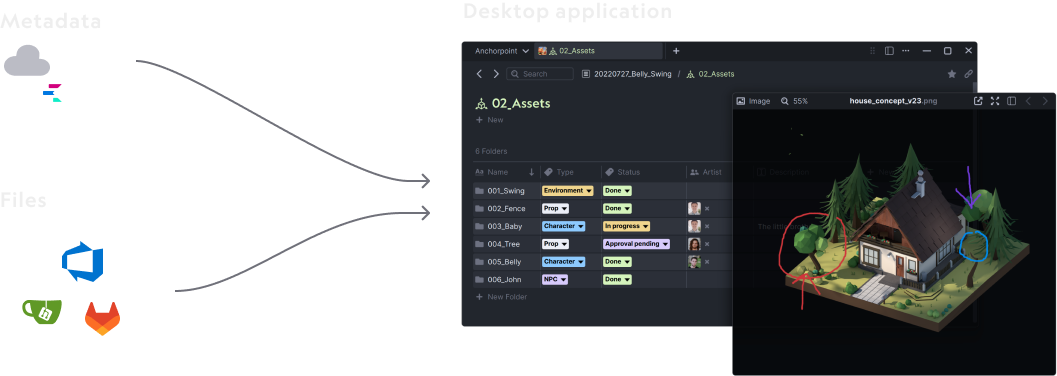
Anchorpoint uses a metadata system on top of your files. This allows you to manage file locks, tag files, comment on files, or manage team members. Metadata is stored on the Anchorpoint cloud. Production data (3D models, textures, audio, etc.) is never uploaded to our cloud. There is also an option to self-host the metadata server if your security requirements demand it.
Managing licenses, team members and projects in Anchorpoint
Similar to Slack or any other project management application, Anchorpoint uses the concept of a workspace. A workspace is a place where all your projects are attached to. The number of team members in a workspace depends on the licenses that you have. One administrator is responsible for all the licensing. Team members are invited to your workspace and assigned to a project. You can transfer licenses from one team member to another if needed. It's similar to floating licenses.
Getting support
A great way to interact with the team is to use our Discord server. Organization license customers can also receive their own private channel at a certain license count. If you encounter a bug in the application, you can send us a message via the “…” button in the top right corner. This way, we will get the log and know better how to help you. For generic requests, you can also write us an email to support@anchorpoint.app